fast_code_search
Code search that ranks like code. fast_code_search indexes your source trees once, keeps a trigram index in memory, and ranks every hit the way a reader of the code would: definitions above usages, files the rest of the codebase imports above the ones nothing depends on, the phrase you typed above lines that merely contain its words. Queries answer in milliseconds over gigabytes of code, from a command-line client, a web UI, or REST and gRPC APIs.
fcs 'fn main' returns fn main() lines first. fcs symbols Widget returns
the type’s definition, not its two hundred uses. fcs refs Widget returns
those uses. See Ranking for why.
Where to go
| You want to… | Read |
|---|---|
| install and run a first search | Install, then First index, first search |
| use it from a terminal or an editor | Command-line client, Editors |
| give a coding agent the index | Coding agents (MCP) |
| keep it running on your machine | Run at startup |
| index many repositories or a monorepo | Configuration cookbook |
| know what a request or config key does | API and configuration, Query syntax |
| know where results differ from grep or ripgrep | Matching compared with grep and ripgrep |
| understand the ranking or the index | How it works |
| check the numbers | Benchmarks |
| fix something | Troubleshooting |
The parts
flowchart LR
    subgraph clients
        W[web UI<br/>embedded]
        F[fcs<br/>command line]
        E[editors, scripts]
        G[coding agents]
    end
    subgraph server["fast_code_search_server"]
        A[REST + MCP :8080] --> X[(in-memory index<br/>trigrams · symbols · import graph)]
        R[gRPC :50051] --> X
        V[watcher] --> X
        X <--> P[/index file on disk/]
    end
    W --> A
    F --> A
    E --> A
    E --> R
    G --> A
    T[(your source trees)] --> V
    F -. offline fallback .-> P
fast_code_search_serverbuilds and holds the index, watches the tree for changes, and serves the web UI on127.0.0.1:8080and gRPC on127.0.0.1:50051.fcsis the command-line client: grep-style output and exit codes,--jsonfor tools, and an offline fallback that searches the saved index when the server is down.- The web UI is embedded in the server: search-as-you-type, hover previews, references, regex help, a dependency explorer for the import graph, a diagnostics page.
- REST and gRPC expose the same queries to editors and scripts, and
MCP at
/mcpexposes them to coding agents.
Source, issues and releases: github.com/jburrow/fast_code_search.
Install
Two binaries: fast_code_search_server (the index and its APIs) and fcs
(the command-line client). They are built together and released together.
Release archive
Download the archive for your platform from the
latest release,
verify it, unpack it, and put both binaries on your PATH:
tar -xzf fast_code_search-v*-x86_64-unknown-linux-gnu.tar.gz
sha256sum -c fast_code_search-v*-x86_64-unknown-linux-gnu.tar.gz.sha256
mkdir -p ~/.local/bin && cp fast_code_search_server fcs ~/.local/bin/
| Platform | Archive |
|---|---|
| Linux x86_64, glibc | …-x86_64-unknown-linux-gnu.tar.gz |
| Linux x86_64, static | …-x86_64-unknown-linux-musl.tar.gz (any distribution, no glibc dependency) |
| macOS, Apple silicon | …-aarch64-apple-darwin.tar.gz |
| macOS, Intel | …-x86_64-apple-darwin.tar.gz |
| Windows x86_64 | …-x86_64-pc-windows-msvc.zip |
Each archive also contains config.toml.example, the startup unit files
under deploy/, and the CLI and startup guides. On macOS, a downloaded
binary may need xattr -d com.apple.quarantine <file> before it runs.
Verifying a download
Every archive ships with a .sha256 file and, for releases after v0.13.0,
a Sigstore bundle (.sigstore.json) produced by the release workflow’s own
identity.
The checksum proves the file is intact; the signature proves it was built
by this repository’s release workflow for this tag, and not merely
uploaded by someone holding the account.
sha256sum -c fast_code_search-v0.18.1-x86_64-unknown-linux-gnu.tar.gz.sha256
cosign verify-blob \
  --bundle fast_code_search-v0.18.1-x86_64-unknown-linux-gnu.tar.gz.sigstore.json \
  --certificate-identity-regexp '^https://github.com/jburrow/fast_code_search/' \
  --certificate-oidc-issuer https://token.actions.githubusercontent.com \
  fast_code_search-v0.18.1-x86_64-unknown-linux-gnu.tar.gz
cosign is a single
binary; no key management is involved because the signing is keyless.
With cargo
cargo binstall downloads
the release archive for your platform instead of compiling, using the
metadata in Cargo.toml. Until the crate is on crates.io, point it at the
repository:
cargo binstall --git https://github.com/jburrow/fast_code_search fast_code_search
Once fast_code_search is published on crates.io, cargo binstall fast_code_search and cargo install fast_code_search work without the
--git flag.
Homebrew
A tap is wired into the release workflow and will be announced here once
its repository exists; until then use the archive, cargo binstall or the
container image.
Container image
Every release from v0.13.0 is also published as
ghcr.io/jburrow/fast_code_search (tags latest, 0.18, 0.18.1). The
image indexes whatever is mounted at /src, watches it for changes, and
serves the web UI and REST API on port 8080 and gRPC on 50051:
docker run --rm -p 8080:8080 -v "$PWD:/src:ro" ghcr.io/jburrow/fast_code_search
To keep the index between runs mount a volume at
/var/lib/fast_code_search; to change any setting mount your own file at
/etc/fast_code_search/config.toml (the baked-in one is
deploy/docker/config.toml).
The fcs client is in the image too: docker exec <container> fcs 'fn main'.
From source
Requires Rust 1.89 or newer and the Protocol Buffers compiler (protoc,
from your package manager or
the releases page).
cargo install --git https://github.com/jburrow/fast_code_search --bins
or, from a checkout, cargo build --release and take
target/release/fast_code_search_server and target/release/fcs.
Check
fast_code_search_server --version
fcs --version
Next: First index, first search.
First index, first search
1. Write a configuration
mkdir -p ~/.config/fast_code_search
fast_code_search_server --init ~/.config/fast_code_search/config.toml
Open the file and set paths to the directories you want searchable. The
defaults for everything else are sensible; the keys worth knowing early:
[indexer]
paths = ["~/work", "~/src/another-repo"]     # ~ expands; relative paths resolve against this file
index_path = "~/.local/share/fast_code_search/index.fcsidx"   # persist the index across restarts
watch = true                                   # the default: follow edits, renames and deletes
Both binaries find this file on their own ($FCS_CONFIG,
./fast_code_search.toml, then ~/.config/fast_code_search/config.toml),
so you rarely need --config. The full key list is in
API and configuration.
2. Start the server
fast_code_search_server
It logs how many files it discovered and indexes them in batches; searches work while the build is still running. A first build of a 60k-file workspace takes a couple of minutes (tree-sitter symbol extraction is most of it); later starts load the saved index in seconds and reconcile what changed while the server was down.
3. Search
From another terminal:
fcs 'fn main'                 # lines holding the phrase, like rg -F -i
fcs symbols SearchEngine      # definitions only
fcs refs SearchEngine         # call sites and type mentions
fcs -e 'fn\s+\w+\(' -g '*.rs' # a regex, Rust files only
fcs status                    # is the server up, what does it hold
Or open http://127.0.0.1:8080 for the web UI, or call the API:
curl "http://127.0.0.1:8080/api/search?q=fn%20main&max=5"
4. Keep it running
The server is meant to stay up: the index lives in memory and the watcher keeps it current. Run at startup shows the per-user service on Linux, macOS and Windows.
fcs — the command-line client
fcs searches the index kept by a running fast_code_search_server from a
terminal, with grep-style output and exit codes, so it slots into editors,
shell pipelines and scripts. When no server is running it can search the
on-disk index directly.
fcs 'fn main'                    # lines holding the phrase, like rg -F -i
fcs -- -Wall                     # a query starting with - goes after --
fcs -e 'fn\s+\w+\(' -g '*.rs'    # regex, Rust files only
fcs refs SearchEngine            # call sites and type mentions of an identifier
fcs symbols parse_query          # definitions only
fcs -l TODO | xargs $EDITOR      # files containing TODO
vim -q <(fcs --format vimgrep TODO)   # results as a quickfix list
fcs status                       # is the server up, what does it hold, how current is it
fcs mcp                          # MCP over stdio, for coding agents
fcs check                        # compare fcs with ripgrep and the import resolvers on your code
Design
Client first. The server holds the index in memory, watches the tree and
answers a query in milliseconds. fcs sends every query to it over the REST
API (/api/search) rather than re-reading files, so a search costs the same
as a request to the web UI. The intended setup on a developer machine is one
server started at login (see RUN-AT-STARTUP.md) and any
number of fcs invocations.
Same semantics as the web UI. The query syntax, modes and result shape
are the server’s. fcs adds nothing the API does not have, so what you see
in a terminal is what the UI would show for the same query.
Offline fallback. When the server does not answer and an index file is
known (index_path in the configuration, or --index-path), fcs loads that
file in-process and runs the same engine calls the server does. It is
read-only: nothing is written back. A note on stderr says the fallback was
used, because the on-disk index may be behind the working tree (changed
files are re-read, deleted ones dropped, but new files are not discovered).
--offline forces this path; --no-offline turns the fallback into an
error.
Grep conventions. Output is path:line:col:text when stdout is not a
terminal (what vim -q, VS Code’s terminal links and grep-aware tools
expect) and grouped by file with colour on a terminal. Exit status is 0 when
there were matches, 1 when there were none, 2 on error. A closed pipe
(fcs … | head) is not an error.
Finding the server
In order: --server URL, $FCS_SERVER, the web_address of the
configuration file, then http://127.0.0.1:8080. A bind address such as
0.0.0.0:8080 is turned into a loopback address. The configuration file is
--config FILE, else $FCS_CONFIG, ./fast_code_search.toml, then
~/.config/fast_code_search/config.toml (the same order as the server).
Options
| Option | Meaning |
|---|---|
QUERY | Literal text, like rg -F: several words are one phrase, quotes and a leading - are part of it (put such a query after --). file:PATTERN, -file:PATTERN, lang:rust, case:yes, word:yes as in the web UI. |
-e, --regex | Treat the query as a regular expression (matched one line at a time; mention \n for multi-line patterns). |
-s, --case-sensitive / -i, --ignore-case | Override case handling (plain text ignores case by default, a regex matches it; -e -i ignores it). |
-w, --word | Whole words only. |
-n, --max N | Hits to print (default 50, up to the server’s search.max_page_size, 1,000). When more exist, a note on stderr says so and gives the --offset for the next page. With -l, the most files to list (default: every matching file). Not grep’s line-number flag. |
--offset N | Skip the first N hits; ordering is deterministic, so --offset 50 is page two. Up to the server’s search.max_page_offset (100,000 by default). |
-C, --context N | Lines of context around each hit (up to 10). |
-g, --glob GLOB | Only files matching the glob (repeatable). src/**/*.rs, *.py, tests (a bare name matches anywhere in the path). |
--exclude GLOB | Skip files matching the glob (repeatable). |
--rank auto|fast|full | Every mode reads candidate files best first until enough matches are collected to rank; auto and fast honour a file limit, full never stops at one. |
--max-files N | Most candidate files to read (default: the server’s search.fast_rank_files, no limit; up to its search.max_fast_rank_files). |
--timeout-ms MS | Stop scanning after MS and return the best hits so far. |
-l, --files-with-matches | Print every matching file path once, best first. fcs pages through all the hits to find them, so the list is complete unless -n or the server’s search.max_page_offset stops it (then stderr says so). |
--format grouped|vimgrep|json, --json | Output layout (default: grouped on a terminal, vimgrep when piped). JSON is the server’s response object. |
--absolute | Print absolute paths (mapped through the configured roots). |
--color auto|always|never | ANSI colour; auto means a terminal without NO_COLOR. |
-q, --quiet | No summary or fallback notes on stderr. |
--server URL, --config FILE | Where the server and configuration are. |
--offline, --no-offline, --index-path FILE | Control the on-disk fallback. |
Subcommands: search (the default; fcs QUERY works), refs NAME
(references: call sites, type mentions), symbols QUERY (definitions only),
status.
Output formats
Grouped (terminal):
fast_code_search/src/search/engine/mod.rs
  664: impl SearchEngine {
  601 [def]: pub struct SearchEngine {
On a terminal, up to five files whose path matches the query are listed
first, under Files (N paths match), so fcs src/web/api.rs finds the
file even when no line mentions it. Piped and -l output leave them out.
vimgrep (piped): path:line:col:text, column 1-based; with -C, context
lines use - as the separator and -- ends each block, as grep -C does.
JSON: the object /api/search returns (results, total_results,
has_more, total_matches, truncated_by_budget, elapsed_ms, …). Each
result carries line_number, match_column, line_match_start /
line_match_end (byte offsets in the full line) and match_type
(TEXT, SYMBOL_DEFINITION, SYMBOL_REFERENCE).
Editor integration
- Vim / Neovim:
:cexpr system('fcs --format vimgrep ' . shellescape(q)), orset grepprg=fcs\ --format\ vimgrep grepformat=%f:%l:%c:%mand use:grep. - VS Code: run
fcsin the integrated terminal;path:line:coloutput is clickable. With--absolutethe links work from any working directory. - fzf:
fcs -l QUERY | fzf | xargs $EDITOR.
MCP for coding agents
fcs mcp serves the Model Context Protocol
over stdio by relaying each message to the server’s /mcp endpoint, for
agents that launch a command rather than connect to a URL:
{ "mcpServers": { "fast_code_search": { "command": "fcs", "args": ["mcp"] } } }
It finds the server like any fcs command (--server, $FCS_SERVER, the
configuration). Stdout carries only protocol messages; when the server is
down each request is answered with an error saying so. Clients that speak
HTTP can use http://127.0.0.1:8080/mcp directly. The tools are listed in
API.md.
When the index is behind
A server running with watch = false (watching is on by default) only knows the files as
they were at its last scan. fcs then ends a search with a note on stderr,
such as fcs: Index last synced with disk 2 h 0 min ago (…); file watching is off, so files written since then may be missing or out of date. -q hides
it, and fcs status always reports when the index last synced and whether
watching is on. Restart the server to rescan, or set watch = true under
[indexer]. See API.md.
Checking fcs on your code
fcs check [PATH…] indexes the folders (default: the configuration’s
paths, else the current folder) afresh in memory, compares 200 queries
made up from the files with rg -F, and compares the import graph with
grimp (Python) and TypeScript’s resolver when they are installed. It prints
a markdown report and exits 1 when a search differs from ripgrep. Options:
--queries N, --seed N (repeat a run), --rg PATH, --no-search,
--no-graph. It needs no server. See the book’s
correctness page.
Exit status
| Code | Meaning |
|---|---|
| 0 | At least one match (or, on a terminal, a matching path) was printed. |
| 1 | The search ran and found nothing. |
| 2 | Error: bad arguments, invalid regex, server error, no server and no index. |
Limitations
- The fallback needs an
index_path; a server started without one leaves nothing to search offline. - Offline searches load the index each time (a few seconds for tens of thousands of files) and do not discover files added since the last save.
- On a terminal, result paths are workspace-relative (
root-name/…) unless--absolutecan map them through the configuration’spaths. Piped (vimgrep) output and-lprint paths relative to the current folder when the configuration’s roots are known, sofcs -l foo | xargs sed …opens the right files (absolute for files outside the current folder); without the roots they stay workspace-relative.
Web UI
The server embeds a single-page UI at its web address (default http://127.0.0.1:8080). Nothing to install or build; it is served from the binary.
Searching
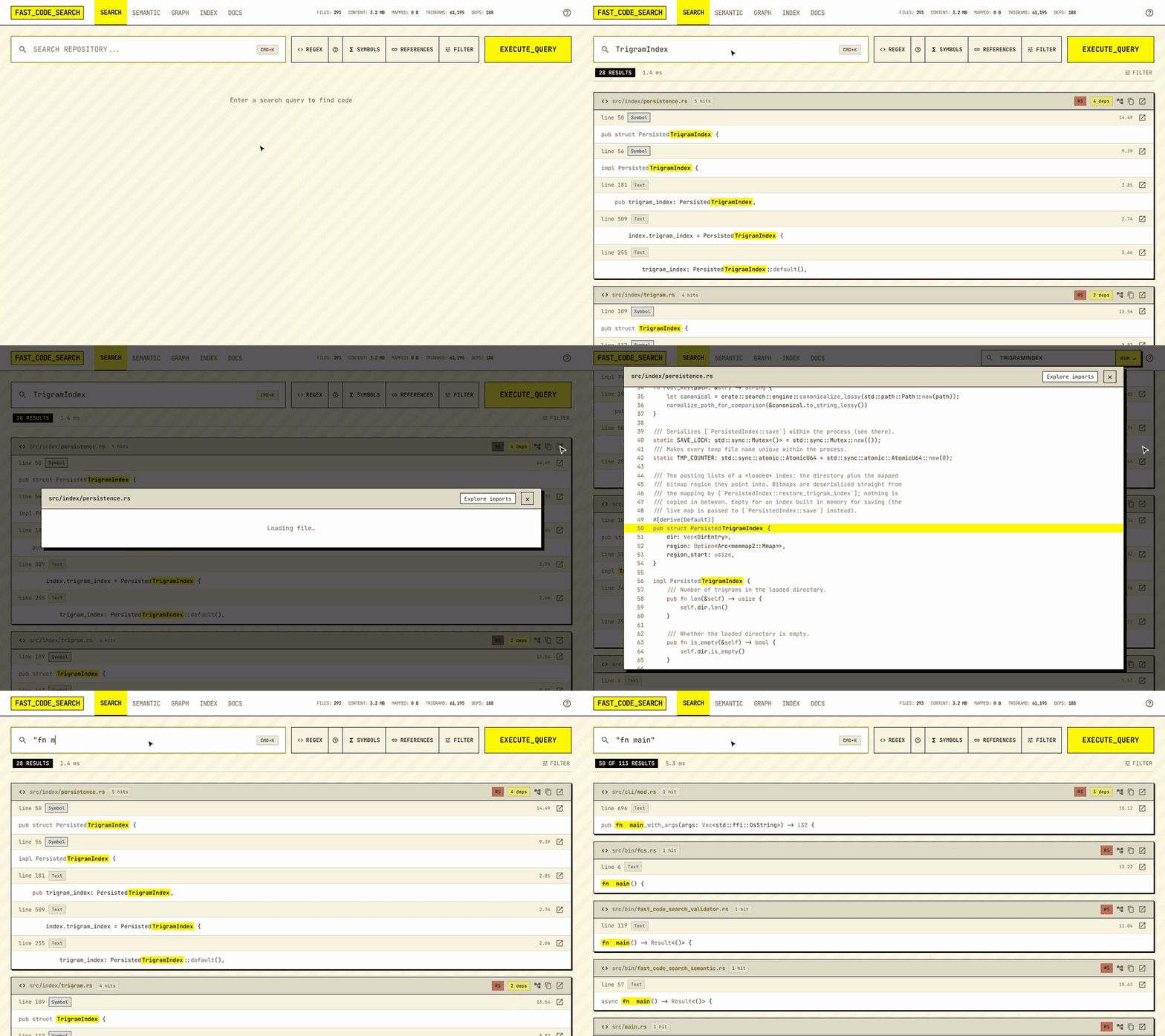
- Type and press Enter (or wait: the page searches as you type after a short
pause).
Ctrl/Cmd+Kfocuses the box from anywhere;/does too. Focusing the box lists recent searches (kept in this browser): one counts once you press Enter, pause for two seconds or move on to the results. - REGEX, SYMBOLS and REFERENCES switch modes; FILTER opens
page size, ranking mode, context lines and the path filters (SEARCH ONLY
IN and SKIP PATHS: globs separated by
,or;). While a path filter is set, FILTER shows a count and the summary line shows each filter with an × to remove it. Path filters are remembered between visits. - MATCH CASE (
Aa) matches upper and lower case exactly, in every mode; off, case is ignored in plain text and regex alike. The summary line says which applied (“ignoring case” or “matching case”). - What you type is searched for as written, like
rg -F: several words are one phrase, and quotes and a leading-are part of the text. The operatorsfile:src/,lang:rust,case:yesandword:yesnarrow it. - Results are grouped by file, best hit first, with every query term
highlighted from the server’s match offsets. Load more pages through
the rest; the summary line says how many matches exist and whether the
scan was cut short by its budget. Files are read best first; when the
server limits how many (
search.fast_rank_files), the summary says “Searched N of M files” and SEARCH ALL FILES opens the rest (or as many as the server allows). - Results are in rank order with each file’s hits together (see Ranking). A file cut at the end of a page says so: its badge reads “3 of 7 hits”, and Show 4 more hits in this file under its code fetches the rest in place. “7+” means the file reached the per-file cap and may hold more.
- Files whose path matches the query are listed in a FILES box above
the results, so typing or pasting
src/web/api.rs(or justapi.rs) finds the file even when no line mentions it. File names rank first; click a path to open the file. Five show at first, Show more lists up to fifty. Text and regex searches only. The count above the results includes them (“2 FILES · 1 RESULT”). - The URL carries the query and modes, so a link reproduces a search; Back returns to the previous one.
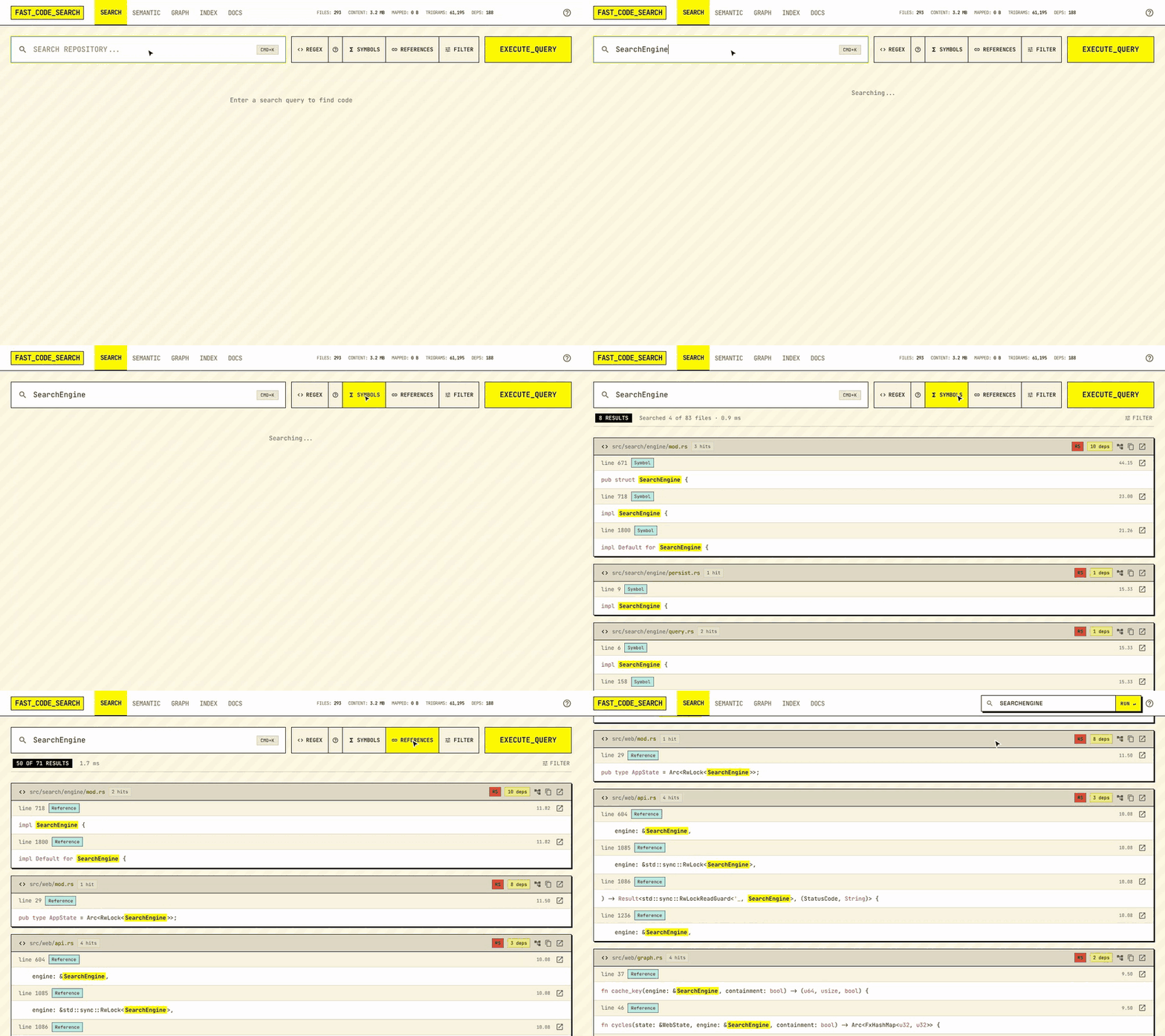
SYMBOLS keeps only the lines that define the name; REFERENCES lists every place it is used:
Regex help
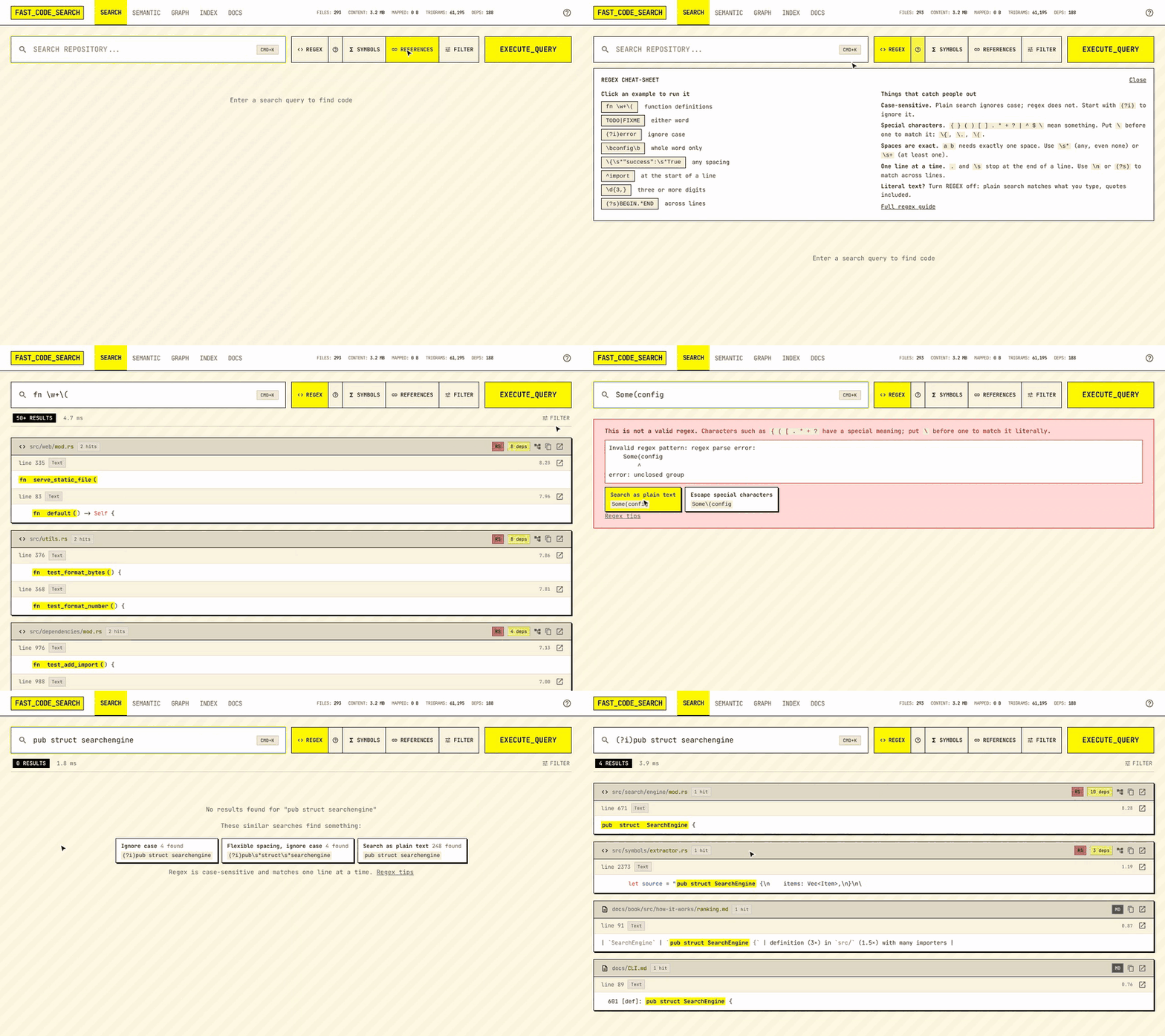
- The ? next to REGEX opens a cheat-sheet: common patterns you can
run with one click, and the rules that catch people out (regex is
case-sensitive,
{ ( . *and friends need a\to match literally, spaces are exact). - When a search finds nothing, the page tries close variants (flexible spacing, ignoring case, the same text without regex, or regex for a plain query that looks like one) and offers the ones that find something.
- An invalid regex shows where the pattern is wrong and offers to search the text literally or with its special characters escaped.
Reading results
- Each hit shows its line with the line number in a gutter and one line of context either side (change it under Filter: Match only up to ±5; the browser remembers your choice). Definitions and references are tagged. Hover the ↗ icon at the end of a hit to preview the whole file; click the icon (or anywhere in the preview) to keep it open until Escape, a click outside it or its ×. A kept preview does everything the file viewer does (go to definition, select a line, Copy link, Explore imports); Expand shows the same file in the large viewer. Click the line number to open the file there, or the file name to open it at its first hit; copy and the dependency explorer link show when you hover the file.
- The file viewer and the preview mark every line the query matches in a strip beside the scrollbar; click the strip to jump to the nearest one. Click a line number to select that line; Copy link copies a URL that reopens the search with the file at that line. Large files open in a window of lines with “Show more” at either end.
- Ctrl+click (⌘+click on a Mac) a name in the file viewer, the preview or a result to open its definition; holding the key underlines what you can click. One definition opens directly, several open a list, and a name with no definition is searched for as text. Each jump in the viewer leaves a Back step (also Alt+←). Double-click a name for a menu with Definition, References and Search.
- The deps chip on a file opens its importers and imports. The tree icon on a result (and Explore imports in the file viewer) opens the file in the dependency explorer.
j/kmove the keyboard selection, Enter opens it, Escape closes any dialog; the copy button puts the path on the clipboard.
Dependency explorer
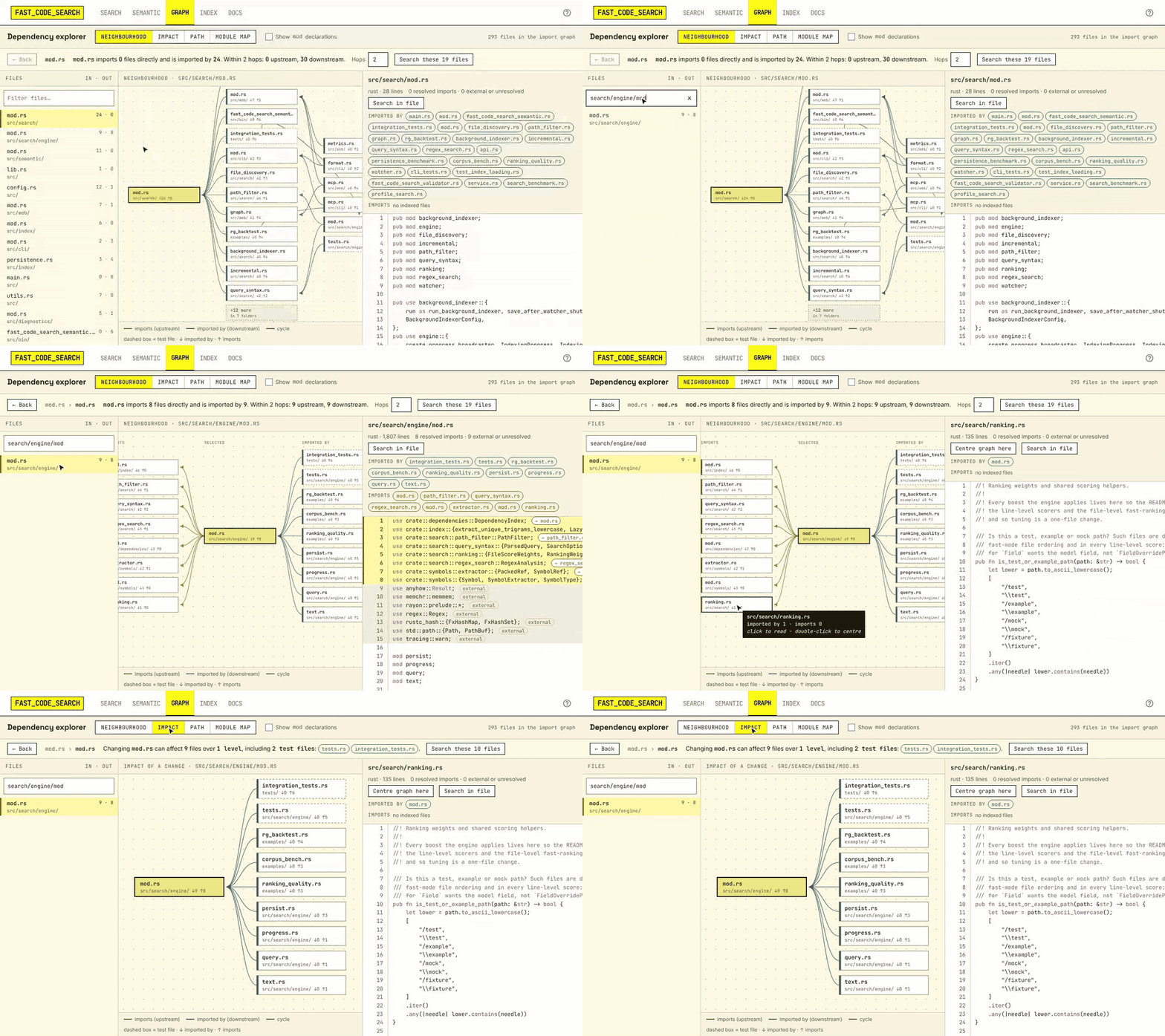
Graph (/graph.html) shows the import graph around one file, next to
its source. Pick a file on the left (most connected first) and switch view:
- Neighbourhood: what the file imports on the left, what imports it on the right, up to four hops each way. Busy levels fold into “+N more”; click to list them.
- Impact: every file a change could reach, level by level, and the test files among them.
- Path: the shortest chain of imports between two files.
- Module map: folders laid out so each only imports folders to its left; red marks import cycles.
Click a box to read the file (import lines are marked beside its scrollbar) and a line to open the import statement it stands for; double-click (or Enter) to centre the graph on it. Import lines in the source are highlighted and link to their target; imports of packages and the standard library are marked external. Search these files runs a keyword search limited to the files on screen.
Rust mod foo; declarations (and pub use foo::X re-exports of a child
module) are hidden by default since they are structure rather than
dependencies; Show mod declarations brings them back. Imports are
resolved for Rust, Python and JavaScript/TypeScript.
For JavaScript/TypeScript, tsconfig paths and baseUrl, workspace
packages imported by name and, without a tsconfig, the repository root are
followed; How the import graph is built
has the details.
Themes
The first time you open the UI it asks you to pick a theme; hover an option
to try it on the page (moving off it puts your theme back) and click it
to use it. Bold (the default) has capitalised labels and
hard edges; Corporate and Corporate dark are quieter, with sentence
case and rounded corners. Change it any time with the palette button in the
header, which previews on hover the same way. The choice is kept in your browser. On a shared server,
default_theme sets the theme for people who haven’t chosen one and
theme_picker = false skips the first-run question (see
Configuration).
Other pages
- Index (
/diagnostics.html): file counts, extension breakdown, the configuration in effect, and self-tests that search for sampled files. Its Service card says whether the web UI and gRPC started, where the index is saved (or that it is memory only or read-only), and any startup or storage problems. When there are some, the search page shows “Server started with N problems” with a link to it. - Docs (
/docs.html): a one-page cheat sheet (query operators, regex, keys,fcsand MCP, the main API calls) with links into this book.
The UI talks to the same /api/search you can call yourself, so anything
it shows is available to scripts.
Editors
fcs prints path:line:col:text when its output is not a terminal, which
is the format editors’ quickfix and “go to file:line” features read.
Vim and Neovim
" one-off: results as a quickfix list
:cexpr system('fcs --format vimgrep ' . shellescape('fn main'))

" make :grep use it
set grepprg=fcs\ --format\ vimgrep\ --absolute
set grepformat=%f:%l:%c:%m
Then :grep 'fn main', :copen. --absolute maps the workspace-relative
paths back to absolute ones through your configuration, so the list works
from any working directory.
VS Code
Run fcs in the integrated terminal: path:line:col output is clickable.
With --absolute the links resolve regardless of the folder you opened.
The repository also contains a
VS Code extension
that talks to the server directly.
Emacs
M-x grep with fcs --format vimgrep --absolute QUERY produces a
compilation buffer whose entries jump to the file and line.
Coding agents (MCP)
The server speaks the Model Context Protocol
at /mcp, so Claude Code or any other MCP client can search the index, read
files with line numbers and walk the import graph instead of grepping:
claude mcp add --transport http fast_code_search http://127.0.0.1:8080/mcp
Clients that only launch local commands can use fcs mcp, which relays MCP
over stdio to the same endpoint:
{ "mcpServers": { "fast_code_search": { "command": "fcs", "args": ["mcp"] } } }
The tools and their arguments are listed under MCP in the API reference.
Shell
fcs -l TODO | xargs $EDITOR           # open every file containing TODO
fcs -l 'fn main' | fzf | xargs $EDITOR
fcs --json 'parse_query' | jq '.results[] | [.file_path, .line_number]'
Exit status follows grep: 0 when there were matches, 1 when none, 2 on
error, so fcs -q pattern && … works in scripts.
Running the server at login
The command-line client (fcs), the web UI and editor integrations all
expect one fast_code_search_server per machine, holding the index in memory
and watching your checkouts. This guide starts it automatically for your
user account at login, on Linux (systemd), macOS (launchd) and Windows
(Task Scheduler). Ready-made unit files are in deploy/.
For a shared, always-on service under its own account see the systemd section of DEPLOYMENT.md.
1. Install the binaries
cargo build --release
mkdir -p ~/.local/bin
cp target/release/fast_code_search_server target/release/fcs ~/.local/bin/
Make sure ~/.local/bin is on your PATH (it is by default on most Linux
distributions and in recent macOS shells; otherwise add it in your shell
profile). Or download a release archive from GitHub and unpack the two
binaries there.
2. Write the configuration
mkdir -p ~/.config/fast_code_search ~/.local/share/fast_code_search
fast_code_search_server --init ~/.config/fast_code_search/config.toml
Edit the file. The settings that matter for a developer machine:
[server]
address = "127.0.0.1:50051"      # gRPC
web_address = "127.0.0.1:8080"   # REST + web UI; fcs uses this

[indexer]
paths = ["~/work", "~/src/other-repo"]          # ~ is expanded
exclude_patterns = ["**/node_modules/**", "**/target/**", "**/.git/**",
                    "**/build/**", "**/dist/**", "**/.venv/**"]

# Persist the index so restarts take seconds instead of a full rebuild,
# and fcs can search offline when the server is down.
index_path = "~/.local/share/fast_code_search/index.fcsidx"
save_after_build = true
checkpoint_interval_files = 20000

# Follow edits, renames and deletes as they happen.
watch = true
save_after_updates = 100
Relative paths in the file resolve against the file’s own directory. Both
the server and fcs find this file automatically (~/.config/fast_code_search/config.toml);
FCS_CONFIG=/path/to/file overrides that for both.
Check it once by hand before automating it:
fast_code_search_server --config ~/.config/fast_code_search/config.toml
Open http://127.0.0.1:8080 or, in another terminal, fcs status and
fcs 'fn main'. Stop it with Ctrl+C (the index is saved on the way out).
Linux: inotify watches
Watching a large tree needs one inotify watch per directory. The server logs how many it installed and warns when the limit is hit. Raise the limit if you see that warning:
echo fs.inotify.max_user_watches=524288 | sudo tee /etc/sysctl.d/60-fast-code-search.conf
sudo sysctl --system
3. Start it at login
Linux (systemd user service)
Copy deploy/systemd/fast-code-search.service
to ~/.config/systemd/user/ and enable it:
mkdir -p ~/.config/systemd/user
cp deploy/systemd/fast-code-search.service ~/.config/systemd/user/
systemctl --user daemon-reload
systemctl --user enable --now fast-code-search
systemctl --user status fast-code-search
The unit runs %h/.local/bin/fast_code_search_server --config %h/.config/fast_code_search/config.toml
(%h is your home directory), restarts it if it crashes, and stops it
cleanly at logout so the index is saved. Logs:
journalctl --user -u fast-code-search -f
To keep the server running while you are logged out (SSH sessions, a shared
workstation), enable lingering once: loginctl enable-linger $USER.
macOS (launchd user agent)
Copy deploy/launchd/com.fastcodesearch.server.plist
to ~/Library/LaunchAgents/, replace __HOME__ with your home directory,
and load it:
mkdir -p ~/Library/LaunchAgents ~/Library/Logs
sed "s|__HOME__|$HOME|g" deploy/launchd/com.fastcodesearch.server.plist \
  > ~/Library/LaunchAgents/com.fastcodesearch.server.plist
launchctl bootstrap gui/$(id -u) ~/Library/LaunchAgents/com.fastcodesearch.server.plist
launchctl print gui/$(id -u)/com.fastcodesearch.server | head
Logs go to ~/Library/Logs/fast_code_search.log. To stop or unload:
launchctl bootout gui/$(id -u)/com.fastcodesearch.server
On macOS the server watches each root with FSEvents, so no watch limit
applies. If the binaries were downloaded rather than built locally, clear
the quarantine flag first: xattr -d com.apple.quarantine ~/.local/bin/fast_code_search_server.
Windows (Task Scheduler)
Put fast_code_search_server.exe and fcs.exe in a directory on your
PATH (for example %LOCALAPPDATA%\fast_code_search\bin) and the
configuration at %APPDATA%\fast_code_search\config.toml (the default
location on Windows). Then, in PowerShell:
.\deploy\windows\Install-StartupTask.ps1
The script registers a task named FastCodeSearch that runs the server
hidden at logon of the current user, restarting it up to three times if it
exits. Inspect it with Get-ScheduledTask FastCodeSearch, start it now
with Start-ScheduledTask FastCodeSearch, and remove it with
.\deploy\windows\Install-StartupTask.ps1 -Uninstall. The server’s log is
written next to the configuration file (server.log).
4. Verify
fcs status
should report the server as reachable, its version and the number of files indexed. The first start builds the index (minutes for hundreds of thousands of files); later starts load the saved index in seconds and reconcile it with what changed while the server was down.
Troubleshooting
fcs: cannot reach the search server— the service is not running or listens elsewhere. Checksystemctl --user status fast-code-search/launchctl print/Get-ScheduledTask, then the log.fcs --server URLtargets another address;FCS_SERVERsets it for a shell.- Port already in use — another instance is running (perhaps started by
hand). Stop it, or change
web_address/addressin the configuration. - Index rebuilt on every start —
index_pathis unset, or points at a directory the service cannot write. The log says where it tried to save. - Changes are not picked up —
watch = false, or the inotify limit was hit (Linux); see the log for “Failed to watch”. - Old files keep appearing after editing
exclude_patterns— they are dropped on the next start; a running server applies the new rules only to files it re-indexes.
Configuration cookbook
Recipes for the situations that come up most. Keys are documented in API and configuration; the complete template with every default is in Configuration template.
One developer, many repositories
List each checkout as its own root. The first path component of every
result is the root’s directory name, so proj/src/main.rs is unambiguous
even when several roots have a src/.
[indexer]
paths = ["~/work/api", "~/work/web", "~/work/tools", "~/oss/tokio"]
exclude_patterns = ["**/node_modules/**", "**/target/**", "**/.git/**",
                    "**/build/**", "**/dist/**", "**/.venv/**", "**/__pycache__/**"]
index_path = "~/.local/share/fast_code_search/index.fcsidx"
watch = true
Roots that do not exist at start are skipped with a warning and picked up on the next start; a root that is unreachable when a saved index loads (an unmounted share) keeps its files rather than dropping them.
A monorepo
One root, and excludes that name the build output of every toolchain in
it. Patterns are globs matched against the full path; a bare directory
name (node_modules) matches at any depth. Excluded directories are never
read, so a generous list costs nothing.
paths = ["/srv/monorepo"]
exclude_patterns = ["**/node_modules/**", "**/target/**", "**/.git/**",
                    "**/bazel-*/**", "**/out/**", "**/*.min.js", "**/*.map",
                    "**/package-lock.json", "**/Cargo.lock"]
respect_gitignore = true
max_file_size = 2097152          # 2 MB: skips generated blobs
checkpoint_interval_files = 20000
Results without the folder name
With one root, every result starts with that folder’s name: indexing
~/work/myapp shows myapp/src/main.rs. To show src/main.rs instead:
[indexer]
paths = ["~/work/myapp"]
show_root_name = false
This only changes what is displayed (web UI, REST, fcs, MCP). It has no
effect with more than one root, where the name is what tells their files
apart, and file: filters match the same files either way: a bare word
never matches the root’s name, and file:myapp/ still selects the whole
root. No re-index is needed; restart the server.
Only some languages
include_extensions = ["rs", "py", "ts", "tsx", "toml", "md"] # a leading dot is fine too
Anything not listed is not indexed at all.
Skip generated or vendored code but keep it browsable
Use exclude_patterns for whole trees and exclude_files for individual
paths. A .gitignore in any indexed tree is honoured as well (also outside
git repositories), so what your VCS ignores, the index ignores.
Two configurations on one machine
Say a work.toml and a personal.toml, each run by its own server. Give
each its own ports and, above all, its own index_path: only one server
can write an index, and a second one pointed at the same file loads it
read-only and never saves (the log names the process that owns it).
fast_code_search_server --init work.toml already names the index after
the file (work.fcsidx).
[server]
address = "127.0.0.1:50052"
web_address = "127.0.0.1:8081"

[indexer]
index_path = "~/.local/share/fast_code_search/work.fcsidx"
Web UI and fcs only, no gRPC
fcs, the web UI and the REST API all use the web port. If nothing of
yours speaks gRPC, turn it off (or pass --no-grpc):
[server]
enable_grpc = false
Change a rule on a running index
Edit the file and restart the server. Files that are no longer eligible
under the new patterns, extensions, size cap or .gitignore are dropped
when the saved index is reconciled; the log reports how many.
Shared server for a team
Bind to an address others can reach only behind something that authenticates: the server has no login and returns file contents.
[server]
address = "0.0.0.0:50051"
web_address = "0.0.0.0:8080"
cors_origins = ["https://ide.example.com"]   # only if a page on another origin calls the API
max_concurrent_searches = 64
request_timeout_secs = 30
default_theme = "corporate" # web UI theme: "bold" (default), "corporate" or "corporate-dark"
theme_picker = false        # don't ask each person to pick a theme on their first visit

[search]
max_fast_rank_files = 50000 # most files one request may ask to read (SEARCH ALL FILES, max_files); 0 = no limit
max_page_offset = 100000    # deepest result offset a client may page to; 0 = no limit
min_match_budget = 32768    # matches collected to rank page 1; lower it on a small shared machine

[mcp]
default_limit = 50          # search_code hits per call by default
max_limit = 1000            # most one call may ask for; agents page on with `offset`
Every search limit and its default, with the measurements behind it, is on
Search limits. Up to 0.16 three of them
lived under [server] (fast_rank_files, max_fast_rank_files,
max_page_offset); those spellings still work, with a warning at startup.
See Deployment for a reverse-proxy example and the system-wide systemd unit, and the security policy.
Where the config file lives
--config FILE wins; otherwise $FCS_CONFIG, then ./fast_code_search.toml,
then ~/.config/fast_code_search/config.toml (%APPDATA%\fast_code_search\config.toml
on Windows). ~ is expanded in every path-valued key; relative paths
resolve against the config file’s own directory. Both the server and fcs
use the same lookup.
Performance and memory
What the numbers depend on, and the knobs that move them. Measured values are in Latest results.
Build time
Symbol extraction with tree-sitter is about three quarters of a full
build; trigram extraction and reading are the rest. The build uses every
core (rayon); RAYON_NUM_THREADS=4 caps it if the machine must stay
responsive. Searches are served between batches while a build runs.
A persisted index (index_path) turns a restart into a load of a few
seconds: the file is memory-mapped, checked, and reconciled against the
tree by one stat per file plus an eligibility pass. Only files that
changed are re-read.
Memory
Resident memory after a build is roughly: the trigram posting lists (Roaring bitmaps, a few dozen bytes per file per distinct trigram), the per-file symbol and reference tables, the dependency graph, and whatever file content searches have recently read. Small files (≤ 1 MiB) are read into owned buffers per access, so they do not stay resident; larger files are memory-mapped and counted in the “mapped” figure the UI shows. The CI corpus (tokio + Django, 38.9 MB of text) sits at about 120 MB resident; a 60k-file, 545 MB workspace at about 500 MB.
To reduce it: exclude generated and vendored trees, cap max_file_size,
and restrict include_extensions.
Search latency
- Candidates. A query’s trigrams intersect posting lists; the fewer and rarer the trigrams, the smaller the candidate set. Short queries (under three characters) have no trigrams and scan everything.
- Reading order. Candidates are read best first by file metadata until
the match budget is spent. A server can cap the files read
(
search.fast_rank_files; none by default); the web UI’s SEARCH ALL FILES (max_fileson the API,fcs --max-files) opens more for one search, up tosearch.max_fast_rank_files. - Budget and deadline. Every search stops at a match budget (32,768
matches for a first page by default, about 230 bytes each while the search
runs) and at a deadline derived from
request_timeout_secs(or a smallertimeout_ms), reportingtruncated_by_budgetwhen it did. On a 372k-file corpus a first page took about 80 ms (median) for words with over 100k hits; Search limits has the measurements behind each default. On a small machine serving many people,search.min_match_budgettrades page-1 quality for memory and time. - Regex. Literals extracted from the pattern pre-filter through the index; a pattern with no required literal scans every file. Line-mode patterns run in one pass per file.
- Concurrency.
max_concurrent_searches(shared by REST and gRPC) bounds the blocking threads; beyond it the server answers 503 withRetry-Afterrather than queueing.
Incremental updates
The watcher coalesces events for two seconds and applies a batch under one
write lock: deletes in one pass over the posting lists, modified files
stripped in one pass and re-read in parallel. On Linux one inotify watch is
installed per kept directory; excluded trees get none. If the limit is
hit the log says so; raise it with
sysctl fs.inotify.max_user_watches=524288.
Disk
The index file is roughly half the size of the text it covers (21.5 MB for 38.9 MB in CI). Saves are atomic (unique temp file, fsync, rename) and serialized, so a crash mid-save leaves the previous file intact.
Troubleshooting
| Symptom | Likely cause | What to do |
|---|---|---|
fcs: cannot reach the search server | Server not running, or listening elsewhere | fcs status; start the server or pass --server URL / set $FCS_SERVER; see Run at startup |
fcs says it is searching the on-disk index | Server down, index_path known | Fine for a quick answer (results may be behind the tree); start the server for live results |
| Web UI shows “Index is currently being updated” briefly | A watcher batch or checkpoint holds the write lock | Wait; the UI retries on its own. If constant, a build is running (see the Index page) |
| A file you edited is not found | Watcher off, or the inotify limit was hit | Set watch = true; on Linux check the log for “Failed to watch” and raise fs.inotify.max_user_watches |
| Files from an excluded directory still appear | Rules changed while the server ran | Restart; reconciliation drops files the current rules exclude |
| Results stop at “50+ (scan budget reached)” | Broad query, budget hit | Narrow with file:, lang: or a longer literal; use Load more / --offset for the next page |
fn main returns lines without main | Older version | Since 0.16 several words are one phrase; upgrade |
fn main misses fn main or fn\tmain | Plain text is a literal, spacing included | Use a regex: fn\s+main |
| “Searched N of M files” | The server sets search.fast_rank_files, and the search read only that many of the most likely files | Click SEARCH ALL FILES (max_files on the API and MCP, fcs --max-files); raise or unset search.fast_rank_files to change the default |
| A regex finds nothing that plain search finds | { ( . are syntax; outside the web UI a regex is also case-sensitive | Escape special characters with \, use \s* for spacing, start with (?i) (or fcs -e -i); the web UI’s suggestions under an empty result do this for you |
| A regex is slow | No required literal, so every file is scanned | Anchor it with a literal (fn\s+main rather than \w+\s+\w+) |
references finds nothing, or misses a use, for a name | The use is in a position that language does not record (C and C++ record none), or the index predates extraction changes | Reference support lists what each language finds; search the plain text for the rest. The index re-extracts symbols on the first start after an upgrade that changed extraction |
gRPC API NOT started / Web UI ... NOT started at startup | Port already in use by another instance (perhaps started by hand) | The server keeps running on the other API; ss -ltnp | grep :PORT finds the holder. Stop it, change address / web_address, or set enable_grpc = false |
Nothing indexed, paths_count=0 | No config file found: without --config only $FCS_CONFIG, ./fast_code_search.toml and ~/.config/fast_code_search/config.toml are read | Pass --config FILE; the Configuration source log line says which file was used. Add --verbose (or RUST_LOG=debug) to see each path and ignore file |
Index NOT writable: another fast_code_search server is already using this index | Two servers share one index_path (often an old one still running) | The log names the other PID and ports. Stop it, or give each config its own index_path; until then this server loads the index read-only |
| “Server started with N problems” on the search page | A port was busy, the index belongs to another server, or storage is low | Open the Index page: its Service card lists each problem (/api/diagnostics has the same list) |
No space left on device when saving, while df -h shows free space | The filesystem ran out of inodes | The log says whether bytes or inodes ran out; df -i confirms. Free inodes (often many small files) or move index_path elsewhere. The server also warns at startup when either is low |
| Index rebuilt on every start | index_path unset (startup warns) or unwritable | Set it to a writable location; the log names the path it tried |
Windows: C:\Users\NAME~1\… paths | Short-name spelling of a root | Harmless; roots are compared in canonical form |
| 504 from the API | Request timeout | The search also stopped; narrow the query or pass timeout_ms for a partial answer |
| macOS: binary “cannot be opened” | Quarantine flag on a download | xattr -d com.apple.quarantine fast_code_search_server |
Getting more information
fcs statusprints the server, version, readiness and index size.- The Index page in the UI (
/diagnostics.html) shows the service status (APIs, where the index is saved, startup and storage problems) and runs self-tests that search for sampled files. RUST_LOG=debug fast_code_search_serverlogs every batch, watch and save;RUST_LOG=infois the default./metricsexposes request counters and a latency histogram for Prometheus.
If none of that explains it, open a bug report with the version, the query and the log lines around the problem.
Upgrading
Replace the two binaries and restart the server. The saved index is versioned; what happens on the first start after an upgrade depends on the change:
| Change | Effect on the first start |
|---|---|
| Any release | The index loads, is reconciled against the tree, and files changed while the server was down are re-read |
| Symbol or reference extraction changed (the fingerprint’s extraction tag differs) | Symbols and references are re-extracted from file content once, then saved; the log says “Persisted symbols predate the current extractor”. Tens of seconds for 60k files |
| On-disk format changed (new magic number) | The old file is rejected with a message saying it must be rebuilt, and a full build runs |
Configuration rules changed (excludes, extensions, size cap, .gitignore) | Files that are no longer eligible are dropped during reconciliation |
Nothing needs to be done by hand in any of these cases. Releases note format changes in the changelog.
Version policy
Releases follow semantic versioning on a 0.x line: a minor bump may
change ranking, output formats or the index file; a patch bump fixes
things. Only the latest release receives fixes
(security policy).
Downgrading
An index written by a newer format is rejected by an older server, which
then rebuilds. Keep the old binary’s index_path separate if you need to
switch back and forth.
Deployment Guide
This guide covers running fast_code_search as a shared service: a system-wide unit, a reverse proxy, a container and Kubernetes. For a single developer’s machine (a per-user service started at login on Linux, macOS or Windows) see RUN-AT-STARTUP.md.
Table of Contents
- What runs
- Quick Start
- Production Deployment
- Container
- Kubernetes Deployment
- Configuration
- Monitoring
- Troubleshooting
What runs
One process, fast_code_search_server, holds the index in memory, watches
the indexed trees, and serves two listeners:
| Listener | Config key | Default | Serves |
|---|---|---|---|
| Web | server.web_address | 127.0.0.1:8080 | The web UI, the REST API (/api/…), /metrics, and what fcs talks to |
| gRPC | server.address | 127.0.0.1:50051 | search.CodeSearch (see proto/search.proto) and grpc.health.v1 |
Both bind to loopback by default because the server has no authentication
and returns file contents. Turn gRPC off with enable_grpc = false (or
--no-grpc) if nothing uses it. If one port cannot be bound the server
logs which one and keeps running on the other; it exits only when neither
could start.
The index is saved to indexer.index_path and reloaded on the next start,
so a restart takes seconds rather than a full build. Only one server writes
a given index: a second one pointed at the same index_path loads it
read-only and never saves.
Quick Start
Local Deployment
- Build the release binaries (or download a release archive):
cargo build --release
- Write a configuration, add your paths to
[indexer] paths, and start the server:
./target/release/fast_code_search_server --init config.toml
./target/release/fast_code_search_server --config config.toml
- Open http://127.0.0.1:8080, or search from a terminal with
./target/release/fcs 'fn main'.
Testing the Deployment
# Liveness, readiness and the index size
curl http://127.0.0.1:8080/api/health
curl http://127.0.0.1:8080/api/ready
fcs status

# A search over REST
curl "http://127.0.0.1:8080/api/search?q=fn%20main&max=5"
Over gRPC, use the example client or grpcurl with the schema (the server
does not offer gRPC reflection, so grpcurl needs the .proto):
cargo run --example client

grpcurl -plaintext -import-path proto -proto search.proto \
    -d '{"query": "fn main", "max_results": 10}' \
    localhost:50051 search.CodeSearch/Search

grpcurl -plaintext -import-path proto -proto search.proto \
    -d '{"paths": ["/srv/repos/api/new-module"]}' \
    localhost:50051 search.CodeSearch/Index    # a path under a configured root
Production Deployment
System Requirements
Memory is the constraint. The index keeps trigram posting lists and symbols in memory and maps file contents; as a rough guide, the benchmark tree of 6,200 files and 39 MB of text uses about 120 MB resident. See Performance and memory for sizing. Indexing uses every core; searching is fast on any of them. Keep the index on local storage with free space and free inodes (the server warns at startup and before each save when either runs low).
Running as a System Service
systemd (Linux)
The repository’s deploy/systemd/fast-code-search.service is the per-user
variant. A system-wide one, /etc/systemd/system/fast-code-search.service:
[Unit]
Description=fast_code_search server
After=network.target

[Service]
Type=simple
User=codeuser
Group=codeuser
ExecStart=/usr/local/bin/fast_code_search_server --config /etc/fast_code_search/config.toml
# SIGINT lets the server save the index before exiting.
KillSignal=SIGINT
TimeoutStopSec=120
Restart=on-failure
RestartSec=10
Environment=RUST_LOG=info

# Security hardening
NoNewPrivileges=true
PrivateTmp=true
ProtectSystem=strict
ProtectHome=true
ReadWritePaths=/var/lib/fast_code_search

[Install]
WantedBy=multi-user.target
With index_path = "/var/lib/fast_code_search/index.fcsidx" in the config.
ProtectHome=true hides /home; drop it if the indexed trees live there.
sudo systemctl daemon-reload
sudo systemctl enable --now fast-code-search
sudo journalctl -u fast-code-search -f
Reverse Proxy with nginx
The server has no authentication: put it behind a proxy that has. The web
listener needs WebSocket upgrades for /ws/progress; gRPC needs HTTP/2.
server {
    listen 443 ssl http2;
    server_name code-search.example.com;

    ssl_certificate /etc/ssl/certs/code-search.crt;
    ssl_certificate_key /etc/ssl/private/code-search.key;

    # auth_request / auth_basic / your SSO here

    location / {
        proxy_pass http://127.0.0.1:8080;
        proxy_http_version 1.1;
        proxy_set_header Upgrade $http_upgrade;
        proxy_set_header Connection "upgrade";
        proxy_set_header Host $host;
    }

    location /search.CodeSearch/ {
        grpc_pass grpc://127.0.0.1:50051;
    }
}
Container
Every release publishes an image built from the repository’s Dockerfile.
It indexes /src, serves the web UI and REST API on 8080 and gRPC on
50051, and saves the index under /var/lib/fast_code_search:
docker run -d --name fast-code-search \
    -p 127.0.0.1:8080:8080 \
    -v /path/to/code:/src:ro \
    -v fcs-index:/var/lib/fast_code_search \
    ghcr.io/jburrow/fast_code_search
The baked-in configuration is deploy/docker/config.toml. To use your own,
mount it over it: -v ./config.toml:/etc/fast_code_search/config.toml:ro.
The image’s health check runs fcs status. To build the image yourself:
docker build -t fast_code_search ..
Docker Compose
services:
  code-search:
    image: ghcr.io/jburrow/fast_code_search
    ports:
      - "127.0.0.1:8080:8080"
    volumes:
      - /path/to/code:/src:ro
      - search-index:/var/lib/fast_code_search
    restart: unless-stopped

volumes:
  search-index:
Kubernetes Deployment
Each replica builds and holds its own index, so give each its own storage
for index_path (an emptyDir rebuilds on every pod start; a
StatefulSet volume keeps it). Never point two replicas at one index file
on a shared volume: the second loads it read-only and never saves.
apiVersion: apps/v1
kind: Deployment
metadata:
  name: fast-code-search
spec:
  replicas: 1
  selector:
    matchLabels:
      app: fast-code-search
  template:
    metadata:
      labels:
        app: fast-code-search
    spec:
      containers:
      - name: fast-code-search
        image: ghcr.io/jburrow/fast_code_search
        ports:
        - containerPort: 8080
          name: http
        - containerPort: 50051
          name: grpc
        resources:
          requests:
            memory: "2Gi"
            cpu: "2"
          limits:
            memory: "8Gi"
        livenessProbe:
          httpGet:
            path: /api/health
            port: http
          periodSeconds: 10
        readinessProbe:
          httpGet:
            path: /api/ready
            port: http
          periodSeconds: 5
        volumeMounts:
        - name: code
          mountPath: /src
          readOnly: true
        - name: index
          mountPath: /var/lib/fast_code_search
      volumes:
      - name: code
        persistentVolumeClaim:
          claimName: code-pvc
      - name: index
        emptyDir: {}
---
apiVersion: v1
kind: Service
metadata:
  name: fast-code-search
spec:
  selector:
    app: fast-code-search
  ports:
  - name: http
    port: 8080
    targetPort: http
  - name: grpc
    port: 50051
    targetPort: grpc
/api/ready answers 503 until there is an index to search, so a pod
receives traffic only once it can answer. A gRPC-native probe
(grpc: {port: 50051}) works too: the standard health service is served.
Configuration
Environment Variables
Most settings live in the TOML config (--init writes every key with its
default and a comment). The environment variables the server reads are:
# Config file to load (checked before ./fast_code_search.toml and the user config dir)
export FCS_CONFIG="/etc/fast_code_search/config.toml"

# Log filter (takes precedence over --verbose)
export RUST_LOG="debug"

# OpenTelemetry (standard names) and the project switch
export OTEL_EXPORTER_OTLP_ENDPOINT="http://collector:4317"
export OTEL_SERVICE_NAME="fast_code_search"
export OTEL_SDK_DISABLED="true"        # final: disables export regardless of config
export FCS_TRACING_ENABLED="true"      # overrides telemetry.enabled in the TOML

# Indexing threads (default: every core)
export RAYON_NUM_THREADS=4
Listen addresses are server.address / server.web_address in the config or
--address / --web-address on the command line; server.enable_grpc (or
--no-grpc) turns gRPC off; the search concurrency cap is
server.max_concurrent_searches and the request timeout
server.request_timeout_secs. The configuration is validated at startup:
unknown keys, unparseable addresses and zero limits are errors; a missing
index directory is a warning (the first save creates it). The first log
lines say which config file was used.
Monitoring
GET /api/health: liveness, always 200 while the process runs, with aproblemscount of startup and storage problems.GET /api/ready: 200 once the index can serve results, 503 before.GET /api/diagnostics(the Index page in the UI): which APIs started, where the index is saved, the problems themselves, and self-tests that search for sampled files.GET /metrics: Prometheus text format: request and error counters, a search latency histogram, and index gauges (files, trigrams, dependency edges, content bytes, indexing, ready).- Logs:
RUST_LOG=info(the default) logs startup, each build, save and watcher batch;debuglogs every path and ignore file.
Troubleshooting
The troubleshooting guide covers the common symptoms. Deployment-specific ones:
A port is already in use
The log says gRPC API NOT started or Web UI ... NOT started with the
port, and the server keeps running on the other API. Find the holder with
ss -ltnp | grep :8080 (or lsof -i :8080), then stop it, change the
address, or set enable_grpc = false.
“another fast_code_search server is already using this index”
Two servers share an index_path. The log names the other process’s PID
and addresses (also in <index_path>.lock.owner). Stop it or give each
server its own index_path; until then this one runs read-only.
“No space left on device” with free space showing
The filesystem holding the index has run out of inodes; the log says
whether bytes or inodes ran out, and df -i confirms.
Memory Allocation Errors on RHEL7/CentOS7
Symptoms:
- “cannot allocate memory” during indexing
- “Reached mmap limit” error message
- Works fine on other systems
Root Cause: Low vm.max_map_count limit (often 65530 on RHEL7, need 262144+)
Automatic Detection: The server reads the limit at startup (Linux only) and stops mapping new files at 85% of it, with an error that names the remedy. Files already indexed remain searchable.
Solution 1: with sudo access:
sysctl vm.max_map_count                                   # current limit
sudo sysctl -w vm.max_map_count=524288                    # until reboot
echo "vm.max_map_count=524288" | sudo tee -a /etc/sysctl.conf
sudo sysctl -p
Solution 2: without sudo access, index less:
[indexer]
max_file_size = 2097152  # 2MB instead of 10MB
exclude_patterns = [
    "**/node_modules/**", "**/target/**", "**/.git/**", "**/build/**",
    "**/dist/**", "**/vendor/**", "**/*.min.js", "**/*.min.css", "**/*.lock", "**/*.svg"
]
include_extensions = ["rs", "py", "js", "ts", "java", "go", "c", "cpp", "h"]
Security Considerations
- Keep both listeners on loopback or a private network, and put an authenticating proxy in front of anything shared; see SECURITY.md.
- Run as a non-root user and mount the indexed code read-only.
cors_originsstays empty unless a page on another origin calls the API.
Backup and Recovery
The index file is a cache of the indexed trees: losing it costs one full build, nothing else. Back up the configuration file; to recover, restore it and start the server.
Scaling
- Vertically: more cores make builds faster; more memory holds larger trees.
- Horizontally: run several instances behind a load balancer, each with its own index of the same trees. They are independent; nothing is shared between them.
API and configuration reference
Everything the server exposes: the REST API served on web_address
(default 127.0.0.1:8080), the gRPC service on address (default
127.0.0.1:50051), the server’s command line, and the configuration file.
The web UI’s own /docs.html page carries the same REST reference with
live examples.
REST API
Errors are JSON ({"error": "…"}) with the right status: 400 for bad
parameters or an invalid regex, 404 for an unknown file, 503 with
Retry-After while the index is being written, 504 with the same envelope
when the request timeout is hit.
| Endpoint | Description |
|---|---|
GET /api/search | Search (text, regex, symbols, references) |
GET /api/file?file=… | Full content of an indexed file |
GET /api/context?file=…&line=N&context=K | Lines around a match (K ≤ 200) |
GET /api/dependents?file=… / GET /api/dependencies?file=… | Files that import this file / files it imports |
POST /mcp | Model Context Protocol for coding agents. See MCP |
GET /api/graph/… | The import graph: neighbourhoods, impact, import chains, the folder map. See Import graph |
GET /api/stats | Index statistics (files, trigrams, dependency edges, content bytes) |
GET /api/status | Indexing progress, and how current the index is (see Index freshness) |
GET /api/health | Liveness ({"status":"healthy","version":…,"problems":N}); problems counts startup and storage problems |
GET /api/ready | Readiness: 200 once there is an index to search, 503 otherwise |
GET /api/diagnostics | Index health, extension breakdown, self-tests, and service: web UI and gRPC status, where the index is saved, and the problems (a problem marks the status degraded) |
GET /metrics | Prometheus text format (request counters, latency histogram, index gauges) |
WS /ws/progress | Live indexing progress frames |
GET /api/search
| Parameter | Default | Description |
|---|---|---|
q | required | Query. Plain text understands the query syntax; with regex=true it is a regular expression. |
max | 50 | Page size, 1 to search.max_page_size (1,000) (0 = search.default_page_size). |
offset | 0 | Hits to skip; ordering is deterministic, so offset=max is page two. At most search.max_page_offset (100,000 by default). |
regex | false | Treat q as a regex (Rust regex syntax, matched one line at a time unless the pattern mentions \n or sets (?s)). |
symbols | false | Definitions only (functions, types, classes, …) plus filename matches. |
references | false | Uses of the identifier in q: call sites and type mentions. Cannot be combined with regex or symbols (400). |
case | — | true / false overrides case: in the query. Plain text ignores case by default; a regex is case-sensitive by default and case=false adds (?i). |
word | — | true for whole-word matching. |
include / exclude | — | Semicolon-separated path globs (src/**/*.rs;lib/**). |
rank | auto | Every mode reads candidate files best first (by a per-file score that needs no reads) until the match budget is spent. auto and fast also stop at max_files when one applies; full never does. |
max_files | search.fast_rank_files (no limit) | Most candidate files a search reads. Capped by search.max_fast_rank_files, reported in max_files_allowed when the server sets one. When candidates_searched < total_candidates, ask again with max_files=total_candidates to search the rest. |
context | 0 | Context lines before and after each hit, 0 to search.max_context_lines (10). |
timeout_ms | 0 | Stop scanning after this long and return the best hits so far (capped at search.max_timeout_secs, 30 s; every search also runs under the server’s request timeout). |
files | 0 | Also return up to this many files whose path matches q, 0 to search.max_path_matches (100), in files (first page of a text or regex search only). |
Response:
{
  "results": [{
    "file_path": "proj/src/main.rs",
    "line_number": 5,
    "content": "fn helper_target(x: i32) -> i32 {",
    "match_start": 3, "match_end": 16,
    "line_match_start": 3, "line_match_end": 16, "match_column": 3,
    "content_truncated": false,
    "score": 12.5,
    "match_type": "SYMBOL_DEFINITION",
    "dependency_count": 2,
    "file_hits": 3,
    "context_lines": ["…"], "context_start_line": 4
  }],
  "query": "helper_target",
  "total_results": 1, "offset": 0, "total_matches": 3,
  "has_more": true, "truncated_by_budget": false,
  "elapsed_ms": 0.7, "rank_mode": "full",
  "total_candidates": 12, "candidates_searched": 12,
  "index": { "watching": false, "synced_at_ms": 1791789240000 }
}
match_start/match_end are byte offsets into content (which may be a
truncated window of a long line, see content_truncated);
line_match_start/line_match_end are byte offsets into the full line and
match_column the 0-based character column, for placing an editor cursor.
line_number is 0 for a filename match. match_type is TEXT,
SYMBOL_DEFINITION or SYMBOL_REFERENCE. file_hits is how many hits
the search found in the result’s file across all pages (a file cut at a
page boundary shows only some of them on this page);
file_hits_capped: true means the file reached the per-file cap and may
hold more. To fetch one file’s hits, repeat the search with include set to
that path (glob metacharacters escaped as [*]). total_matches is present when
the search ran to completion; otherwise truncated_by_budget is true and
has_more means more may exist. index says how current the index is; see
Index freshness.
With files=N, two more fields list the files whose path matches, best
first (file name hits above directory hits, then shorter paths). They are
separate from results, which are unchanged:
{
  "files": [{ "file_path": "proj/src/web/api.rs", "score": 8.0, "match_ranges": [[5, 19]] }],
  "total_files": 1
}
match_ranges are [start, end) byte offsets into file_path, one per
word of the query (path matching splits it on spaces). Every word must
appear in the shown path (case-insensitive unless case:yes, \ read as
/); a word containing / may also match the absolute path, so a pasted
absolute path finds its file. file:, lang:, include and exclude
filter as for content. See how matching
compares with grep and ripgrep.
Index freshness
With watch = false (the default is true), the server indexes the tree when it
starts and does not see files written afterwards. Search then misses text
written after that scan, while /api/file and MCP read_file read the disk
and already show it. Every search response, /api/status and the
/ws/progress frames carry index so clients can say so:
| Field | Meaning |
|---|---|
watching | A file watcher applies edits, renames and deletes as they happen. |
synced_at_ms | When the last full scan of the indexed folders started (Unix ms). Every change made before then is in the index. Absent until the first build or reconcile finishes. |
updated_at_ms | When the watcher last changed the index (Unix ms). |
GET /api/status?paths=src/a.rs;src/new.rs also compares each path (at most
100, separated by ;, as results print them, relative to an indexed folder,
or absolute) with the disk and returns "paths": [{"path": …, "state": …}].
state is one of the following:
| State | Meaning |
|---|---|
current | The file’s modification time and size match what was indexed. |
stale | The file changed after it was indexed. |
deleted | Still in the index but gone from disk. |
not_indexed | On disk but not in the index: written after the last sync, or excluded by the configuration. |
not_found | Neither in the index nor under an indexed folder. |
unknown | Indexed, but its indexed version was not recorded. |
When watching is false, the web UI shows “Index synced 6 min ago · watching
off” beside the search time, fcs prints the same warning on stderr, and MCP
search_code ends with it. Updating the index on request (for example right
after an agent writes a file) is tracked in
#140.
Query syntax
Plain-text queries (not regex=true) are a literal, like rg -F: the
query minus its operators is searched for as written.
| Syntax | Meaning |
|---|---|
fn main | The phrase fn main, exactly one space. Several words are one phrase. |
"fn main", -Wall | Quotes and a leading - are part of the text. |
file:PATTERN / -file:PATTERN | Only / never paths matching the glob; a bare word matches anywhere in the path, src/ means everything under src. |
lang:rust / -lang:py | Only / never files of that language. |
case:yes | Case-sensitive. |
word:yes | Whole words only. |
Ranking
Each hit’s score combines the match with structural signals (weights in
src/search/ranking.rs):
| Signal | Effect |
|---|---|
| Line defines a symbol | 3× |
| Exact case | 2× |
| Match at the start of the line | 1.5× |
File under src/ or lib/ | 1.5× |
| Files that import this file | 1 + 0.5·log10(dependents) |
| Long line | inverse-length damping |
| Test or example path (fast mode) | 0.7× |
Results are in rank order with each file’s hits kept together: files in the order of their best hit, then every hit of that file by score.
Import graph
The dependency explorer (/graph.html) is built on these. Every endpoint
answers from memory under the engine read lock. file accepts a display
path (project/src/main.rs) or any path /api/file accepts. Unknown files
are 404.
Rust mod foo; declarations are edges from a parent module to its own
child. They describe structure, not dependencies, and would put every parent
and child in a cycle, so they are left out unless containment=true (also
accepted by every endpoint below). A pub use child::X re-export is the same
edge, so it is left out too.
| Endpoint | Parameters | Returns |
|---|---|---|
GET /api/graph/neighborhood | file, depth (1–4, default 2), limit (files per level, default 12, max 500), expand (comma-separated levels to list up to 500 files, e.g. -2,1) | nodes (path, signed depth: negative for files it imports, positive for files importing it; imports, imported_by, test, cycle), edges among them (from, to, cycle, containment), hidden (per level: count and the shared folder or number of folders), and upstream / downstream totals |
GET /api/graph/impact | file, limit, expand | Every file that transitively imports file, by distance: affected, levels, tests_total, tests (up to 200, nearest first), plus nodes / edges / hidden as above |
GET /api/graph/path | from, to | The shortest import chain as files (each imports the next). When there is none from from to to, the reverse chain with reversed: true; found: false when neither exists |
GET /api/graph/modules | — | The graph collapsed to folders: folders (files, imports, imported_by, cycle) and edges (from, to, count of file imports, cycle); unresolved_imports, the imports that resolve to no indexed file, and unresolved_local, those of them written as a path into the project (./x, .x, crate::, @/), which point at a broken import or a form fcs does not resolve. Cached until the index changes |
GET /api/graph/imports | file | The file’s import statements: line (1-based), spec as written, the indexed target it resolves to (null for packages, the standard library and files outside the index), containment |
GET /api/graph/files | q (case-insensitive substring), limit (default 100, max 1000) | files most connected first, with imports / imported_by, and the total that matched |
Imports are resolved for Rust (crate::, self::, super::, sibling
modules and the crate’s own name), Python and JavaScript/TypeScript.
MCP (coding agents)
The web server also speaks the Model Context Protocol
at /mcp, so a coding agent can use the index instead of grepping: search,
read files with line numbers, and walk the import graph. Point the agent at
the URL:
claude mcp add --transport http fast_code_search http://127.0.0.1:8080/mcp
For clients that only launch local commands, fcs mcp relays MCP over stdio
to the same endpoint (it finds the server like every fcs command:
--server, $FCS_SERVER, the configuration, then http://127.0.0.1:8080):
{ "mcpServers": { "fast_code_search": { "command": "fcs", "args": ["mcp"] } } }
| Tool | Arguments | What it returns |
|---|---|---|
search_code | query (the query syntax), mode (text, regex, symbols, references), include / exclude globs, limit (default 50, max 1,000: mcp.default_limit / mcp.max_limit), offset (page on from there), max_files, rank, context (0–5) | path:line:column: line per hit, with the match count and, when more exist, the offset of the next page; in text and regex mode up to 20 files whose path matches are listed first (mcp.file_matches) |
read_file | path, start_line, end_line | Numbered lines, 200 by default and at most 1,000 (mcp.read_file_lines / mcp.max_read_file_lines), with how to continue |
file_dependencies | path, direction (in, out, both), depth (1–4), limit | Files it imports and files importing it, by distance, with the line of each direct import |
change_impact | paths (one or more), limit | Every file that transitively imports any of them, nearest first, split into tests and other code |
import_path | from, to | The shortest chain of imports between two files, either way round |
dependency_overview | directory (optional), limit | The most connected folders, the heaviest folder-to-folder imports, folder cycles and hub files |
index_status | paths (optional, at most 100) | When the index last synced with disk and whether file watching is on, plus, for each path, whether it is current, stale, not indexed yet or deleted. See Index freshness |
Every tool is read-only and answers from the same handlers as the REST API, so it shares their search permits, deadlines and caps. Results use the root-relative paths search results print, and lists are capped with a note saying what was left out. The graph tools say which languages have import edges (Rust, Python, JavaScript/TypeScript), so an empty answer for another language is not mistaken for “unused”.
Transport details: each JSON-RPC message is a POST /mcp answered with
application/json (notifications get 202); there is no event stream
(GET /mcp is 405) and no session. Requests carrying a browser Origin
are refused with 403 unless it is a loopback address, the server’s own
address, or listed in cors_origins, so a web page cannot drive a local
server through the visitor’s browser. Like the REST API, /mcp has no
authentication: anyone who can reach the web port can read the index.
gRPC
The schema is proto/search.proto: Search
streams SearchResult messages with the same fields and modes as REST
(is_regex, symbols_only, references, case_sensitive,
whole_word, include_paths, exclude_paths, rank, offset,
deadline_ms), and Index adds paths under the configured roots. The
standard grpc.health.v1 service is served too. A minimal client:
examples/client.rs (cargo run --example client).
Limits match REST: offset ≤ max_page_offset, fast ranking opens
fast_rank_files, the search semaphore is shared with
the REST side, and every search runs under a deadline derived from the
request timeout.
Server command line
fast_code_search_server [OPTIONS]

  -c, --config <FILE>       Configuration file
  -a, --address <ADDR>      gRPC listen address (overrides config)
      --web-address <ADDR>  Web UI / REST listen address (overrides config)
  -i, --index <PATH>        Additional path to index (repeatable)
      --no-auto-index       Skip indexing on startup
      --no-grpc             Do not start the gRPC API (same as enable_grpc = false)
      --init <FILE>         Write a documented template configuration and exit
      --static-dir <DIR>    Serve the UI from disk (development)
  -v, --verbose             Debug logging
Configuration discovery: --config, then $FCS_CONFIG, then
./fast_code_search.toml, then ~/.config/fast_code_search/config.toml.
The first log lines say which file was used (or that none was found and
the defaults apply) and any warnings about it.
If one of the ports cannot be bound, the server logs which port and keeps
running on the other API; it exits only when neither could start. The
diagnostics page and /api/health report the failure.
Configuration file
fast_code_search_server --init config.toml writes a fully commented
template. The keys that matter most:
[server]
address = "127.0.0.1:50051"       # gRPC
enable_grpc = true                # false (or --no-grpc) for web UI / REST / fcs only
web_address = "127.0.0.1:8080"    # REST + web UI
enable_web_ui = true
max_concurrent_searches = 64      # shared by REST and gRPC; beyond it: 503 / RESOURCE_EXHAUSTED
request_timeout_secs = 30         # searches get an engine deadline just under this
fast_rank_files = 2000            # files fast ranking opens by default (0 = all)
max_fast_rank_files = 0           # most a request may ask for with max_files (0 = no limit)
max_page_offset = 100000          # deepest offset a client may page to (0 = no limit)
cors_origins = []                 # e.g. ["https://ide.example.com"]; empty = same-origin only

[indexer]
paths = ["~/work", "/srv/repos/other"]     # ~ expands; relative paths resolve against this file
exclude_patterns = ["**/node_modules/**", "**/target/**", "**/.git/**"]
include_extensions = []           # empty = every text file; ["rs", "py"] to restrict
max_file_size = 10485760          # bytes; 0 = default
respect_gitignore = true
show_root_name = true             # false: src/main.rs instead of myapp/src/main.rs (one path only)

index_path = "~/.local/share/fast_code_search/index.fcsidx"   # persist across restarts
save_after_build = true
checkpoint_interval_files = 20000
watch = true                      # follow edits, renames, deletes
save_after_updates = 100          # save after this many watched file changes
--init writes every key with its default, and sets index_path from the
template’s own name (--init work.toml gives
~/.local/share/fast_code_search/work.fcsidx). Without index_path the
index lives only in memory and is rebuilt on every start; the startup log
warns about it.
Only one server writes an index. A server holds a lock on
<index_path>.lock and records its PID and addresses in
<index_path>.lock.owner; a second server given the same index_path
logs who owns it, loads the index read-only and never saves. Give each
configuration its own index_path.
At startup and before each save the server checks free space and free inodes on the filesystem holding the index (and inodes where indexed source lives), and warns when either is low.
Changing exclude patterns, extensions, the size cap or a .gitignore takes
effect on the next start: files that are no longer eligible are dropped
when the persisted index is reconciled.
Exit codes and errors (CLI)
fcs exits 0 when it printed at least one match, 1 when the search found
nothing, and 2 on error (bad arguments, invalid regex, server error, no
server and no index). See CLI.md.
Query syntax
The same syntax everywhere: the web UI’s search box, fcs, and the q
parameter of the API. It applies to plain-text queries; with regex=true
(fcs -e) the whole query is a regular expression instead. For how the
results compare with grep, ripgrep and git grep, see Matching compared
with grep and ripgrep.
The text you type is searched for as written, like rg -F. The operators
below are the only exceptions; everything else, spaces, quotes and dashes
included, is part of the text.
| Write | To get |
|---|---|
fn main | Lines holding the phrase fn main, with exactly one space. Several words are one phrase. |
"fn main" | Lines holding "fn main" with its quotes. Quotes are text: { "success": True finds that text as written. |
-Wall | Lines holding -Wall. A leading - is text too (->, -1, --flag). On the command line put such a query after --: fcs -- -Wall. |
file:src/ | Only paths under a src directory. A bare word matches anywhere in the path (file:parser); globs are used as written (file:*.rs, file:crates/**/tests/**). |
-file:vendor | Never paths matching the pattern. |
lang:rust, -lang:py | Only / never files of that language (by extension: rs/rust, py/python, ts, js, go, java, …). |
rdeps:src/search/ranking.rs | Only that file and the files that import it. See Search by imports. |
deps:app/main.py | Only that file and the files it imports. |
case:yes | Match case exactly (the default is case-insensitive). |
word:yes | Whole words only. |
kind:call, -kind:attribute | References only: keep / drop references of that kind (call, type, value, attribute). See Reference kinds. |
Operators can be combined: Widget file:src/ -lang:ts case:yes. Filters
of different kinds narrow each other (file:src/ lang:rust is the Rust
files under src/); repeating one kind widens it (lang:rust lang:py is
either language, file:src/ file:lib/ either folder). They are
whole words with an argument: file: alone, or url=file:x, is text.
Operators between words join the words with one space, so fn file:src/ main searches for fn main under src/. The ends of the query are
trimmed; spaces inside it are kept. To search for operator-looking text
such as file:x, use a regex.
Reference kinds: kind:
Each reference is one of four kinds, shown on the result (in the web
UI’s tag, as [call] in fcs refs, as reference_kind in the API’s
JSON and as [reference: call] in MCP):
| Kind | Is | Example, for size or Item |
|---|---|---|
call | a call, or a decorator | x.size(), @cached |
type | a type or class mention: an annotation, a base class, new T, an implemented interface | def f(x: Item), class A(Item) |
value | a function or class used as a value: passed, assigned, compared, returned | isinstance(x, Item), cb = size |
attribute | an attribute that is read, without a call: a property, a method passed along | n = other.size |
refs size kind:call keeps the calls only; kind:call,type (or
kind:call kind:type) keeps either; -kind:attribute keeps everything
but attribute reads, the usual way to leave out properties of other
classes that share the name. attr is short for attribute. Which kinds a
language records is on Reference support:
value and attribute are Python only for now, and every other
language’s references are calls and types. kind: with a text or
symbol search is an error rather than being ignored; a regex is not
parsed for operators.
Search by imports: deps: and rdeps:
These limit a search to the files the import graph connects to one file, so the question “where is this used, among the code a change to this file could affect?” is one query:
| Write | To search |
|---|---|
Weight rdeps:src/search/ranking.rs | ranking.rs and the files that import it |
Weight rdeps:src/search/ranking.rs:2 | the same, up to two imports away |
Weight rdeps:src/search/ranking.rs:* | everything that reaches ranking.rs, at any distance |
config deps:app/main.py | main.py and the files it imports (:N and :* as above, 10 at most) |
Weight rdeps:src/search/ | every file under the folder, and the files that import any of them |
Weight -rdeps:src/search/ranking.rs | everything except those files |
- The path is the file’s path as results show it, or any trailing part
of it that names one file (
rdeps:ranking.rswhen only one file ends that way). A path that matches no file, or several, is an error that lists them; so is a file in a language the graph does not cover (edges exist for Rust, Python and JavaScript/TypeScript, see Dependency graph support). - Combining: repeating
rdeps:(ordeps:) searches the union; adeps:and anrdeps:together search the files in both; both narrowfile:andlang:, and they narrow each other. - Package entry files are passed through, carefully. An import of a
package usually lands on its entry file (
mod.rs,lib.rs,main.rs,__init__.py,index.ts/index.js), not on the module behind it. So an edge from an entry file to a module of its own package does not count as a hop, and a file reached across one is kept only if it names something the module on the other side defines (a function, type, constant or macro as a whole word, or the module itself in a path such asranking::or./ranking).rdeps:src/search/ranking.rstherefore finds the files thatuse crate::search::RankingWeights, but not every importer ofcrate::search. Only one entry file is crossed in a row (ranking.rstosearch/mod.rs, never on tolib.rsfor free). A child module that imports its parent (Rustuse super::*) is an ordinary hop: use:2. - Negated filters walk strictly.
-rdeps:and-deps:follow import edges only, with no pass-through, so they never leave out a file that does not depend on the anchor. - Rust paths without a
use(crate::search::fold::fold_str(…),super::util::Thing) count as imports of the module they name. - The scope is only as complete as the graph. The results header (and
the
scopeobject of the API, MCP’s text,fcs’s summary) says how many files were searched, and warns when imports in those files are written as project paths (./x,crate::x) but resolve to no file: the scope may be missing whatever they point at. - Ranking: nearer files rank a little higher; each hit’s
hops(0 for the file itself and its package entry) is in the API response and the row’s tooltip. - Everywhere: in the query on any surface; for a regex, whose query is
all pattern, as the
deps/rdepsAPI parameters (semicolon-separated, a leading-to leave out),fcs --deps PATH[:N]/--rdeps, MCPsearch_code’sdeps/rdeps, gRPC’sdeps/rdepsfields. In the web UI they are the FILTER panel’s Files that import and Files imported by boxes, and the dependency popover and the explorer’s Search importers / Search its imports buttons fill them in.
Inside the scope, matching is exactly what it is without one: a scoped search finds what ripgrep finds over the same files.
Case
Plain text ignores case unless the query says case:yes. A regex matches
case unless it starts with (?i) or the request says to ignore it. The
web UI’s MATCH CASE toggle (case on the API, fcs -s / -i, MCP
case_sensitive) sets it for every mode: off, upper and lower case are
the same in plain text and regex alike; on, they are matched exactly. The
results header always says which applied (“ignoring case” or “matching
case”).
Modes
| Mode | UI / CLI / API | Returns |
|---|---|---|
| Text (default) | — / fcs / — | Lines matching the query, ranked |
| Regex | REGEX / fcs -e / regex=true | Rust regex syntax, matched one line at a time. To span lines, mention \n or set (?s) |
| Symbols | SYMBOLS / fcs symbols / symbols=true | Definitions only (functions, types, classes, constants, …) plus filename matches |
| References | REFERENCES / fcs refs / references=true | Call sites and type mentions of the identifier |
References are exact and case-sensitive on the identifier; file: and
lang: still narrow the files, and kind: the kinds of use. Which positions count as a reference
differs by language, and C and C++ record none: see
Reference support.
Regex notes
- Literals in the pattern pre-filter through the trigram index; a pattern with no required literal of three or more characters scans every file.
^and$anchor at line boundaries (CRLF included);\sdoes not cross a line break unless the pattern is a multi-line one.- On the API and
fcs -e, a regex is case-sensitive unless it starts with(?i)or the request sayscase=false(fcs -e -i). In the web UI it follows MATCH CASE, like plain search. { } ( ) [ ] . * + ? | ^ $ \are syntax; escape one with\to match it (\{,\.). For code exactly as written, search without regex.- Spaces are exact:
\{ "a"misses{"a". Use\s*for any amount of space, including none. - In the web UI the ? next to REGEX has runnable examples, and a search that finds nothing offers close variants that do.
- Patterns are compiled with size limits; an absurd one is rejected with a 400 rather than run.
How matching compares with grep, ripgrep and git grep
fcs aims to find exactly the lines ripgrep finds for the same search. Every
difference listed below is either deliberate, or the result of fcs being an
index rather than a scan tool. ripgrep is the reference because it is the
closest well-known tool: the same regex engine (Rust regex), Unicode-aware
case folding, and .gitignore handling. The ripgrep
backtest checks this on every engine change.
It runs a fixed set of searches through both tools and fails on any line one
finds and the other does not.
Every search, as ripgrep would run it
The contract in one table: for each kind of fcs search, the ripgrep run
that finds the same lines. “Same lines” is what the backtest checks; fcs
then ranks them and may cap how many it reads (see Ranked, and capped
below, and limits_hit in every response).
| fcs search | Same lines as | Checked by |
|---|---|---|
foo bar (plain text) | rg -F -i 'foo bar' | backtest, generated queries |
foo case:yes (or MATCH CASE, fcs -s) | rg -F 'foo' | backtest, generated queries |
foo word:yes (or fcs -w) | rg -F -i -w 'foo' | backtest, generated queries |
foo case:yes word:yes | rg -F -w 'foo' | backtest, generated queries |
Regex on the API or fcs -e | rg 'PATTERN' (rg -U when it mentions \n) | backtest |
Regex with case=false, (?i) or fcs -e -i | rg -i 'PATTERN' | backtest |
lang:rust foo | rg -F -i -t rust 'foo' | backtest (with globs) |
file:*.py foo / -file:tests foo | rg -F -i -g '*.py' 'foo' / -g '!tests'; a bare word such as file:parser matches anywhere in the path, which -g has no exact form for | backtest (with globs) |
file:src/ lang:rust foo | rg -F -i -g 'src/**/*.rs' 'foo': different filters narrow each other, as -g and -t do | backtest (with globs) |
rdeps:src/a.rs foo / deps: | rg -F -i 'foo' FILE… over the files the import graph puts in scope; rg has no graph | backtest (rg’s hits kept to the scope’s files) |
| A text search’s filename hits (no line number) | none; closest is rg --files | rg -i 'foo' | not compared |
Path matches (files=N, the FILES box) | none; closest is rg --files | rg -i with every word required | unit tests |
Symbols (SYMBOLS, fcs symbols) | none: definitions come from tree-sitter, not from text | engine tests |
References (REFERENCES, fcs refs) | none: call sites come from tree-sitter, not from text | engine tests |
fcs on the command line, the web UI, the API, gRPC and MCP all run one
shared request path, and a test runs the same searches through web, gRPC
and offline fcs and requires identical hits (tests/frontend_parity.rs).
Where fcs agrees with ripgrep and differs from grep and git grep
| Behaviour | fcs | ripgrep | GNU grep | git grep |
|---|---|---|---|---|
| Regex dialect | Rust regex | Rust regex (PCRE2 with -P) | POSIX BRE/ERE (-E), PCRE with -P | POSIX BRE/ERE, PCRE with -P |
| Byte order mark at the start of a file | ignored, so ^ matches line 1 | ignored (kept with -E none) | part of line 1, so ^ misses it | part of line 1, so ^ misses it |
$ on a line ending in CRLF | matches before the \r | only with --crlf | no | no |
Pattern that mentions \n | runs over the whole file and reports the line where the match starts | needs -U | not supported | not supported |
| Case-insensitive folding | Unicode simple case folding: Σ, σ and ς are the same letter, so are s and the long ſ, k and the Kelvin sign K, the micro sign µ and μ; ß is not ss and İ is not i | the same | depends on the locale | depends on the locale |
Hidden files (.github/, .env.example) | searched | skipped unless --hidden | searched | searched if tracked |
| Files searched | the indexed tree, honouring .gitignore | the tree, honouring .gitignore | what you name | tracked files only |
These were checked with GNU grep 3.11, git 2.43 and ripgrep 14.1.
Where fcs differs from all of them
These follow from fcs being a code search server rather than a line filter.
- Case-insensitive by default. Plain text ignores case unless the query
says
case:yes; grep, git grep and ripgrep match case by default (rg -iis the fcs default,rg -siscase:yes). On the API and infcsa regex matches case unless it uses(?i)or the request sayscase=false; in the web UI the MATCH CASE toggle decides for both. The backtest passes-ito ripgrep whenever fcs ignores case. - Operators. Plain text is a literal, like
rg -F: several words are one phrase, and quotes and a leading-are part of the text. The only exceptions are whole words with an argument:file:,-file:,lang:,-lang:,deps:,rdeps:(and their-forms),case:andword:. To search for one of those literally, use a regex. The query is trimmed at both ends (rg ' x'keeps its leading space). See Query syntax. - File names match too. A text search also lists files whose name matches, as a hit without a line number. grep has no equivalent, so the backtest leaves these out of the comparison.
- Paths match, separately. When asked (
files=Non/api/search, the web UI’s FILES box,fcson a terminal, MCPsearch_code), the files whose path matches are returned apart from the content results, which do not change. Here the text is split into words, and every word must appear in the path as results show it, case-insensitively unlesscase:yes;\counts as/;word:yes,file:,lang:and include/exclude globs apply as they do to content. A term holding a/also matches the file’s absolute path, so a pasted/home/me/repo/src/main.rsworks, but only when the match reaches past the indexed folder (/home/alone lists nothing). A regex is matched against the shown path. This is closest torg --files | rg PATTERN; it is not part of the backtest, which compares content only. - One result per line. A line with several matches is one result. For a
multi-line match, the result is the line where it starts. ripgrep counts
lines the same way (
rg -c). - Ranked, and capped. Results come back best first rather than in file
order. To keep a broad search fast, a request reads a bounded number of
matches: a budget of 32,768 for every page that ends before result 1000,
and 100,000 for every page from there on. One file contributes at most
its best 1,000 hits (by score, not its first 1,000 lines) before result
1000, and up to the budget after it. Files are read best first, so the
budget keeps the hits of the most likely files. Because every page in
each range ranks the same sample, paging with
offset(MCP’ssearch_code,fcs --offset, the API) returns each hit once, with no repeats or gaps; only the switch at result 1000 can differ, and only for a search that hit its budget. When a limit is reached, the total is shown as “N+” rather than as a count, and the response names the limit (limits_hit:match_budget,per_file_cap,timeout,max_filesorindexing;fcsprints it, MCP adds a “Results capped” line, gRPC sends anfcs-limits-hitheader).indexingmeans the server was still building or reconciling its index, so files not indexed yet could not match. A server may also cap the files read (search.fast_rank_files, off by default); the header then says “Searched N of M files” and SEARCH ALL FILES opens the rest (up tosearch.max_fast_rank_files). Symbol search reads the files holding the best-matching symbols (at least 200); when there are more, it says so in the same way, and SEARCH ALL FILES, MCP’smax_filesorrank=fullread them all. LOAD MORE in the web UI fetches the whole list again at the bigger size, up to 1000 results (search.max_page_size), so every match ends up shown exactly once. Results already on screen can move when it does. Past 1000 results it fetches the next page instead. Paging stops at offset 100,000 by default (search.max_page_offset). ripgrep has none of these limits; each is reported when it applies, and Search limits gives the measurements behind the defaults. - Filters need text. A query made only of filters (
lang:rust,file:///etc) is answered with an error saying there is no text to find, not an empty result.case:andword:takeyesorno(alsoy/n,true/false,1/0,on/off); with any other argument the token is text, soword:countsearches forword:count. - Non-UTF-8 files are converted. Files in Latin-1, Windows-1252,
Shift-JIS or UTF-16 are converted to UTF-8 when they are indexed
(
transcode_non_utf8, on by default). ripgrep only does this for UTF-16 with a byte order mark, or when given-E. grep and git grep match raw bytes. A file with a NUL byte in its first 8 KB is binary and not indexed (ripgrep’s test is the same NUL byte, but it looks wherever it reads, so a NUL further in makes rg stop at it while fcs searches the whole file). Files with these extensions are not read at all: images (png,jpg,gif,ico,bmp,webp), archives, fonts, office documents, media, compiled objects and bytecode (indexer.extra_binary_extensionsadds more). SVG is text and is indexed. - Index scope. Files over
max_file_size(10 MB by default) and paths matchingexclude_patterns(node_modules,target,.git,build,dist, Python virtual environments) are not indexed, so they are never searched, even when git tracks them (ripgrep searches a trackedbuild/). Ignore files apply as in ripgrep:.gitignore,.ignore,.git/info/excludeand your global git excludes (core.excludesFile), at startup and for files the watcher sees change.
Known differences
None at the moment. A known difference would be listed here, and marked
known with its reason in benches/rg_backtest.toml, so the backtest still
reports it without failing.
Dependency graph support
What the import graph (the dependency explorer, “imported by N”, /api/graph,
MCP’s graph tools) understands, per language. An import that is not listed
here produces no edge. If fcs misses an edge listed as supported, that is a
bug; if it misses one listed as not handled, that is a known gap. Python
and TypeScript are checked against their own resolvers (see the end of the
page).
How the import graph is built
explains the method, including how an import is judged internal or
external.
Edges exist for Rust, Python and JavaScript/TypeScript only. Go, Java,
C and C++ #include, C#, Ruby and every other language are searched and
have symbols, but get no import edges.
How resolution works, for every language
- An import resolves only to a file that is in the index. Packages
outside the indexed folders (
std, site-packages,node_modules, which is excluded by default) never produce an edge. - A bare or external name resolves to nothing, unless the language’s own
configuration maps it to an indexed file (for JavaScript and TypeScript:
tsconfig
paths/baseUrl, a workspacepackage.jsonname, or the repository root when there is no tsconfigbaseUrl). There is no “a file with that name somewhere in the repo” guess, so a missing edge is never replaced by a wrong one. - Imports that do not resolve are kept. They are retried when a matching
file is indexed later, and
GET /api/graph/imports?path=…lists every import of a file with its line, andtarget: nullfor the unresolved ones. - The unresolved ones are counted. Most are packages, but one written as a
path into the project (
./x,.x,crate::,@/) is a broken import or a form listed below as not handled. The dependency explorer’s folder map gives that count,GET /api/graph/modulesreturns both (unresolved_imports,unresolved_local), MCP’sdependency_overviewreports them, andfile_dependencieslists a file’s unresolved imports.
Rust (.rs)
| Form | Supported |
|---|---|
use crate::a::b; | yes, from the nearest Cargo.toml’s src/ |
use self::a;, use super::super::a; | yes, relative to the module’s directory (foo/ for foo.rs; the file’s directory for mod.rs, lib.rs, main.rs) |
use a::b; where a is a sibling module | yes |
use my_crate::a; inside my_crate | yes ([lib] name, else [package] name with - as _) |
use a::{b, c};, use a::*;, use a as b; | yes, to the longest module path that exists (a/b.rs, then a/b/mod.rs) |
mod foo; | yes |
crate::a::f(), super::x::Y used inline, without a use | yes, once per file, like use crate::a::f |
use other_workspace_crate::x; | no: only the importing crate’s own name is recognised |
use crate::{a, b}; | no: reduces to crate::, which does not reach lib.rs |
extern crate x;, #[path = "…"] mod x; | no |
External crates and std | no edge, by design |
Inline mod foo { … } is treated like mod foo;, so it can draw an edge to
a file foo.rs that is not the module. Config read: Cargo.toml.
Python (.py, .pyi, .pyw)
| Form | Supported |
|---|---|
import a.b, import a, b as c | yes, one edge per module |
from a.b import c | yes: to a/b/c.py (or a/b/c/__init__.py) when c is a module, else to a/b.py or a/b/__init__.py, as Python does |
from .x import y, from ..x import y | yes: one dot is the file’s own package, each extra dot one level up; when x does not exist the import is unresolved, as Python fails it |
from . import y | yes: to y.py when it is a module, else to the package’s __init__.py |
| Absolute imports | yes, as Python 3 does: from the ancestor folders that are not packages themselves (no __init__.py), so import json inside a package is the standard library, not a json.py next to it; where several could hold the module, the one that holds most of the dotted name wins |
src/ layouts (tests/ importing src/pkg) | yes: each of those folders’ src/ is tried too |
| Absolute imports from a file nested any number of folders deep | yes: every ancestor folder is tried |
A repository whose root folder has an __init__.py, run with that folder on sys.path (import app.models) | yes: when nothing else resolves the import, the outermost package folder is tried as a root if it is the repository root (.git) or no folder above it holds an indexed file |
Other sys.path entries (pyproject.toml, setup.cfg, PYTHONPATH) | no: no configuration is read, so a package in a sibling folder (lib/mypkg/ imported from apps/x/main.py, with lib put on PYTHONPATH by your setup) is not found and the import counts as external |
.pyi stubs as import targets | no |
| Standard library, installed packages | no edge, by design |
JavaScript and TypeScript (.js, .jsx, .mjs, .cjs, .ts, .tsx, .mts, .cts)
| Form | Supported |
|---|---|
import … from './x', export … from './x', export * from './x' | yes |
require('./x'), require(`./x`), import('./x') | yes (not a template string with ${…}), also import(/* comment */ './x') |
import x from './x.json' with { type: 'json' }, and the older assert { … } | yes |
import x = require('./x') (TypeScript) | yes |
Relative specifiers (./, ../, ., ..) | yes |
@/x, ~/x | yes: tsconfig paths when it maps them, else from the nearest folder with a package.json or tsconfig.json (else the repository root), trying src/x then x |
| Extension probing | the exact file; .js/.jsx written for a .ts/.tsx file, .mjs for .mts, .cjs for .cts; then .ts .tsx .js .jsx .mjs .cjs .mts .cts .d.ts .json appended; then index with each of those extensions |
Imports of stylesheets, .vue/.svelte components and other assets | yes, when the file is indexed (a bundler resolves them; TypeScript does not) |
A folder’s own package.json main (import './lib' where lib/package.json names the entry) | no |
package.json imports (#name) and a package importing itself by name | no |
tsconfig / jsconfig paths and baseUrl, with relative extends | yes, as tsc resolves them; an extends naming an npm package is skipped |
Workspace packages by name (@acme/shared, @acme/shared/x) | yes: to an indexed package.json with that name: its types/source/module/main/exports["."] entry, else src/index; a subpath under src/ or the package root |
No tsconfig baseUrl/paths (import 'components/Button') | yes: tried from the repository root (the folder holding .git) |
exports subpath maps and nested conditions | no |
Packages in node_modules | no edge, by design |
How this is checked
Extraction and resolution have unit tests per form
(src/symbols/extractor.rs, src/dependencies/mod.rs). On top of those,
examples/graph_oracle.rs compares the whole graph with an independent
resolver over a pinned repository and lists every edge fcs misses or draws
wrongly:
| Language | Oracle | Repository | Result |
|---|---|---|---|
| Python | grimp 3.17 (src/check/oracle/py.py) | Django 5.2 | 3,041 of 3,041 edges, none extra |
| TypeScript, JavaScript | TypeScript 5.9 ts.resolveModuleName under each file’s tsconfig (src/check/oracle/ts.mjs) | Vite 6.3.5 | 99.6% of edges, 1 extra; 4 of the 7 misses are package.json imports (#name); 221 workspace-package edges the oracle cannot see without an install are listed apart |
CI runs both, and fails if a change misses or adds more edges than that.
python3 src/check/oracle/py.py bench-corpus/django > py.json
cargo run --release --example graph_oracle -- bench-corpus/django --oracle py.json --lang py
(cd scripts/graph-oracle && npm ci)   # pins TypeScript
(cd scripts/graph-oracle && node ../../src/check/oracle/ts.mjs ../../bench-corpus/vite) > ts.json
cargo run --release --example graph_oracle -- bench-corpus/vite --oracle ts.json --lang ts
To run the same comparison on your own code, use fcs check (see
Correctness against ripgrep).
It runs whichever oracles are installed: Python’s needs pip install grimp, TypeScript’s needs typescript in the repository’s
node_modules.
Reference support
What the References mode (REFERENCES in the web UI, fcs refs,
references=true, MCP mode: "references") finds, per language.
References are search-based, not compiler-based. While indexing, each file
is parsed with tree-sitter, and the grammar’s tags query marks some names
as references: call sites, type mentions, new expressions, base classes.
A reference search returns the lines where the identifier appears in one of
those positions. Two consequences hold for every language:
- Names, not symbols.
fcs refs parsereturns every call of anything calledparse, whichever class or module it belongs to. Nothing tells two functions with the same name apart. - Only the listed positions. A use in any other position (an import line; outside Python, a function passed as a value) is not a reference, even though a text search finds it. When references look incomplete, search the plain text as well.
A definition is never its own reference, and references are exact and
case-sensitive on the identifier. Each reference is a call, type, value or attribute,
and kind: filters on it (see
Reference kinds).
If fcs misses a form listed as found, that is a bug; if it misses one listed as not found, that is a known gap.
At a glance
| Language | Calls | Method calls | Type mentions | new / constructors | Base classes | Not found (main gaps) |
|---|---|---|---|---|---|---|
| Rust | yes | yes | yes | n/a | impl Trait for T | anything inside a macro’s arguments, the Type in Type::new(), enum variants (Item::A), use lines, functions as values |
| Python | yes | yes | yes | yes (a call) | yes | imports, string annotations, a few value positions; also returns uses of other things with the same name (see below) |
| JavaScript | yes | yes | n/a | yes | no | extends, instanceof, functions as values, property reads, imports |
| TypeScript | yes | yes | partly | yes | no | Foo[], Foo<T>, A | B, ns.Type, type arguments, type aliases, extends and implements, instanceof, imports |
| Go | yes | yes | yes | composite literals (Item{}) | n/a | functions as values (Run: helper, cb := helper), field reads, imports |
| Java | yes | yes | partly | yes | yes | field, parameter, local and generic types, annotations, Foo.class, Foo::bar, the class in Util.f(), casts, imports |
| C# | member calls only | yes | partly | yes | yes | plain calls Helper(), generic calls Make<T>(), parameter and generic types, attributes, typeof, casts, the class in Util.F(), using |
| C | no | no | no | n/a | n/a | everything: no references are recorded |
| C++ | no | no | no | no | no | everything: no references are recorded |
| Ruby | yes | yes | constants | Item.new | yes | see below: also returns local variables |
| PHP | no (plain f()) | yes | no | no | implements only | plain function calls, new Item(), extends, parameter and return types, use |
| Bash and other languages | no | no | no | no | no | not parsed for references |
“Partly” is spelled out in the language’s section below.
Rust (.rs)
| Form | Found |
|---|---|
helper(x), self.helper(), crate::a::helper(), Type::new() (the new) | yes |
helper::<T>(), a::helper::<T>() | yes |
Types in fields, parameters, returns and generics (Result<Item, Error>), impl Trait for S | yes |
The Type in Type::new() or Item::default() | no |
Enum variants and paths in patterns (Item::A) | no |
Anything inside a macro call (println!("{}", helper(x)), assert!(…)) | no: macro arguments are not parsed |
use crate::a::{Engine, helper}; | no |
Functions as values (let cb = helper;, .map(helper)) | no |
Field reads (self.prop) | no |
#[derive(Debug)] | no |
The macro gap matters most in tests: calls inside assert_eq!(…) are not
references.
Python (.py, .pyi, .pyw)
Python is checked against Jedi, which resolves each name to its definition (see the end of the page).
| Form | Found |
|---|---|
helper(x), self.helper(), pkg.util.do_thing(), Foo() | yes |
Decorators: @login_required, @app.route("/x"), @bp.before_app_request, @name.setter | yes |
Base classes: class Foo(Base, Mixin) | yes |
Type annotations: item: Item, -> Result, list[Item], Item | None, Callable[[A], B], t.Optional[Item] | yes |
Functions and classes as values: isinstance(x, Item), cb = helper, return Result, register(self.on_done), (a, b), {"k": helper}, x == helper | yes |
Any attribute that is read: self.prop, obj.CONSTANT, request.form | yes |
A class used through an attribute: Item.from_dict() (the Item, when it starts with a capital) | yes |
except Oops as e:, raise Failed | yes |
Assigning an attribute: self.prop = 1 | no, on purpose: it sets prop, it does not use it |
A parameter or local variable with the same name as a function (def view(request, app): app.run()) | no, on purpose: Python makes a name bound anywhere in a function local to it, unless it is declared global or nonlocal |
import, from … import | no |
Annotations written as strings: x: "Item" | no |
Other value positions: lambda bodies, yield x, *args unpacking, f-string {x} | no |
Each Python reference has a kind: decorators and calls are call;
annotations, base classes and exceptions type; functions and classes
used as values value; attribute reads attribute. -kind:attribute
leaves out property reads (see
Reference kinds).
Because references are names, fcs refs get also returns every .get(…)
on a dictionary, and fcs refs status_code returns reads of every
attribute called status_code, whichever class it belongs to. On the
repositories below, between one Python reference in ten and one in five
is such a use of something else with the same name.
JavaScript (.js, .jsx, .mjs, .cjs)
| Form | Found |
|---|---|
helper(x), this.helper(), z.string() | yes |
new Foo() | yes |
require("x") | no, on purpose |
class Foo extends Base | no |
x instanceof Item | no |
Functions as values (const cb = helper, arr.map(helper)) | no |
Property reads (this.prop) and object keys | no |
import { helper } from "./x" | no |
TypeScript (.ts, .mts, .cts, .tsx)
Everything JavaScript finds, plus some type mentions:
| Form | Found |
|---|---|
A plain type in an annotation: item: Item, ): Result | yes |
Arrays, generics and unions: Item[], Map<string, Item>, Item | null | no |
Qualified types: z.ZodType, ns.Item | no |
Type arguments: generic<Item>(x), Promise<Item> | no |
type T = Item & Other, interface A extends B | no |
class Foo extends Base implements Iface | no |
| Decorators | no |
Go (.go)
| Form | Found |
|---|---|
helper(x), s.helper(), pkg.DoThing() | yes |
Types anywhere (e *Engine, []Item, map[string]Item, Item{}) | yes, built-in types such as string and error too |
Functions as values: cb := helper, Command{Run: helper}, sort.Slice(x, less) | no |
Field reads (s.prop) | no |
The package in pkg.DoThing(), import lines | no |
Java (.java)
| Form | Found |
|---|---|
helper(x), this.helper(), Util.doThing() (the doThing) | yes |
new Item() | yes |
extends Base, implements Iface | yes |
Field, parameter, return, local and generic types: private Engine e;, run(Engine e, List<Item> xs), Item x | no |
The class in Util.doThing() | no |
Item.class, S::helper, casts (Result) x | no |
Annotations (@Annot) | no |
import lines | no |
C# (.cs)
| Form | Found |
|---|---|
this.Helper(), Util.DoThing() (the DoThing) | yes |
new Item(), Item x = …, field types | yes |
class S : Base, IFace | yes |
Plain calls: Helper(e) | no |
Generic calls and generic types: Make<Item>(), List<Item> | no |
| Parameter and return types | no |
The class in Util.DoThing() | no |
Attributes ([Serializable]), typeof(Item), casts | no |
using lines | no |
C and C++
No references are recorded. The C and C++ grammars’ tags queries define
symbols only, so fcs refs finds nothing in .c, .h, .cpp, .cc,
.hpp and the other C and C++ extensions. Use a plain or whole-word text
search instead.
Ruby (.rb, .rake, .gemspec)
Calls, method calls, constants (Item.new, Util.do_thing), base classes
and include Mixin are found. Ruby’s tags query is meant to skip local
variables, but fcs does not apply that filter, so local variables and
parameters are returned as references too (x in x = Item.new).
PHP (.php, .phtml)
| Form | Found |
|---|---|
$this->helper(), Util::doThing() (the doThing) | yes |
implements IFace | yes |
Plain calls: helper($e) | no |
new Item() | no |
extends Base, parameter and return types, use lines | no |
How complete this is
Python, against Jedi
examples/ref_oracle.rs compares the references fcs records in a
repository with the ones Jedi 0.20
finds (src/check/oracle/py_refs.py): every name Jedi resolves to a
function, class or property defined in the repository, other than the
definition itself and import lines. A reference Jedi lists and fcs does not
is missing. A reference fcs records, under the name of one of those
functions or classes, where Jedi resolves the name to something else, is
extra: almost always a use of something else with the same name.
Where Jedi cannot resolve a name at all (an untyped receiver), neither side
is counted.
| Repository | Found | Precision | With -kind:attribute | Before October 2026 |
|---|---|---|---|---|
| pallets/flask | 98.1% | 87.3% | 88.4% found, 93.8% precision | 57.4% found, 90.9% precision |
| psf/requests | 100% | 90.2% | 93.6%, 90.9% | 74.4%, 88.9% |
| pallets/click | 97.1% | 91.3% | 92.7%, 95.6% | 65.5%, 93.6% |
| encode/httpx | 99.5% | 80.5% | 77.9%, 90.1% | 59.0%, 86.6% |
CI runs it on Flask and Click (.github/workflows/ref-oracle.yml) and
fails if a change misses or adds more references than that.
pip install jedi==0.20.1
python3 src/check/oracle/py_refs.py bench-corpus/flask > flask.json
cargo run --release --example ref_oracle -- --oracle flask.json
cargo run --release --example ref_oracle -- --oracle flask.json --drop-kind attribute
The report groups misses and extras by the syntax around the name, which says which row of the Python table each one is.
Other languages
There is no oracle for the other languages yet. Each form above is checked with a small file per language. To give a sense of scale, a one-off count in October 2026 took every function, method and type defined in a public repository and counted how many of its uses in code fall on a reference. The count is rough: some of those uses are not references at all (a local variable that shares a type’s name, an import line).
| Language | Repository | Uses found as references |
|---|---|---|
| Go | spf13/cobra | 90% |
| Rust | fast_code_search src/ | 53% |
| Java | google/gson | 52% |
| C# | JamesNK/Newtonsoft.Json | 50% |
| TypeScript | colinhacks/zod | 40% |
| TypeScript | sindresorhus/ky | 38% |
| C | DaveGamble/cJSON | 0% |
| C++ | fmtlib/fmt | 0% |
Closing these gaps is on the roadmap.
fcs command line
Full help for the client and each subcommand, as printed by the binary. The narrative guide is Command-line client.
fcs --help
Search the code index kept by a running fast_code_search server.

`fcs QUERY` is `fcs search QUERY`. The query is the web UI's: literal text, like rg -F (several words are one phrase; quotes and a leading - are text), plus file:PATTERN, -file:PATTERN, lang:rust, case:yes, word:yes. Put a query starting with - after --.

Exit status: 0 = matches found, 1 = no matches, 2 = error.

Usage: fcs [OPTIONS] <COMMAND>

Commands:
  search   Search file contents (the default; `fcs QUERY` works too)
  refs     Find references (call sites, type mentions) of an identifier; `kind:call`, `kind:type`, `kind:value`, `kind:attribute` keep one kind
  symbols  Search symbol definitions (functions, types, classes, ...) only
  status   Show whether the server is reachable and what it has indexed
  mcp      Serve MCP over stdio by relaying to the server's /mcp endpoint (for agents that launch a command rather than connect to a URL)
  check    Check fcs against independent tools on your own code: generated queries against ripgrep, and the import graph against Python's and TypeScript's own resolvers when they are installed
  help     Print this message or the help of the given subcommand(s)

Options:
      --server <URL>
          Server base URL (default: $FCS_SERVER, then the config's web_address, then http://127.0.0.1:8080)

      --config <FILE>
          Configuration file (default: $FCS_CONFIG, ./fast_code_search.toml, ~/.config/fast_code_search/config.toml)

      --offline
          Search the on-disk index directly instead of asking the server

      --no-offline
          Never fall back to the on-disk index when the server is unreachable

      --index-path <FILE>
          Index file for offline searches (default: the config's index_path)

      --format <FORMAT>
          Output layout (default: grouped on a terminal, vimgrep when piped)

          Possible values:
          - grouped: File headings with `line:col: text` underneath (default on a terminal)
          - vimgrep: One `path:line:col:text` line per hit (default when piped)
          - json:    The server's JSON response, one object

      --json
          Shorthand for --format json

  -l, --files-with-matches
          Print every file that matches, once, best first (pages through all hits)

      --absolute
          Print absolute paths (needs the roots from the configuration)

      --color <COLOR>
          Colour output: auto (terminal only, honours NO_COLOR), always, never

          [default: auto]
          [possible values: auto, always, never]

  -q, --quiet
          No summary or fallback notes on stderr

  -h, --help
          Print help (see a summary with '-h')

  -V, --version
          Print version

Examples:
  fcs 'fn main'                 lines holding the phrase
  fcs -- -Wall                  a query starting with -
  fcs -e 'fn\s+\w+\(' -g '*.rs'  regex, Rust files only
  fcs refs SearchEngine         call sites and type mentions
  fcs symbols parse_query       definitions only
  fcs -l TODO | xargs $EDITOR   files containing TODO
  vim -q <(fcs --format vimgrep TODO)
  fcs status                    is the server up, what does it hold
  fcs mcp                       MCP over stdio, for coding agents
  fcs check                     compare fcs with ripgrep and the import resolvers
fcs search --help
Search file contents (the default; `fcs QUERY` works too)

Usage: fcs search [OPTIONS] <QUERY>...

Arguments:
  <QUERY>...
          The query (web UI syntax; several words are one phrase)

Options:
  -e, --regex
          Treat the query as a regular expression

  -s, --case-sensitive
          Match case exactly

  -i, --ignore-case
          Ignore case (the default for plain text; with -e, makes a regex ignore it too)

  -w, --word
          Match whole words only

  -n, --max <N>
          Maximum hits to print (1 to the server's search.max_page_size, 1000; default 50). With -l, the most files to list (default: every file)

      --offset <N>
          Skip the first N hits (paging; ordering is deterministic)

          [default: 0]

  -C, --context <N>
          Lines of context before and after each hit (0 to search.max_context_lines, 10)

          [default: 0]

      --server <URL>
          Server base URL (default: $FCS_SERVER, then the config's web_address, then http://127.0.0.1:8080)

      --config <FILE>
          Configuration file (default: $FCS_CONFIG, ./fast_code_search.toml, ~/.config/fast_code_search/config.toml)

  -g, --glob <GLOB>
          Only files matching this glob (repeatable; `src/**/*.rs`, `*.py`, `tests`)

      --exclude <GLOB>
          Skip files matching this glob (repeatable)

      --offline
          Search the on-disk index directly instead of asking the server

      --no-offline
          Never fall back to the on-disk index when the server is unreachable

      --rank <RANK>
          Ranking: auto and fast read files best first and honour a file limit; full never stops at one

          [default: auto]
          [possible values: auto, fast, full]

      --index-path <FILE>
          Index file for offline searches (default: the config's index_path)

      --timeout-ms <MS>
          Stop scanning after this many milliseconds and return the best so far

          [default: 0]

      --format <FORMAT>
          Output layout (default: grouped on a terminal, vimgrep when piped)

          Possible values:
          - grouped: File headings with `line:col: text` underneath (default on a terminal)
          - vimgrep: One `path:line:col:text` line per hit (default when piped)
          - json:    The server's JSON response, one object

      --max-files <N>
          Most candidate files to read, best first (default: the server's search.fast_rank_files, no limit)

      --deps <PATH[:N]>
          Only search this file and what it imports, N hops deep (1 by default; `*` for any distance). Repeatable; `-PATH` leaves them out

      --json
          Shorthand for --format json

  -l, --files-with-matches
          Print every file that matches, once, best first (pages through all hits)

      --rdeps <PATH[:N]>
          Only search this file and the files that import it (as `--deps`)

      --absolute
          Print absolute paths (needs the roots from the configuration)

      --color <COLOR>
          Colour output: auto (terminal only, honours NO_COLOR), always, never

          [default: auto]
          [possible values: auto, always, never]

  -q, --quiet
          No summary or fallback notes on stderr

  -h, --help
          Print help (see a summary with '-h')
fcs refs --help
Find references (call sites, type mentions) of an identifier; `kind:call`, `kind:type`, `kind:value`, `kind:attribute` keep one kind

Usage: fcs refs [OPTIONS] <QUERY>...

Arguments:
  <QUERY>...
          The query (web UI syntax; several words are one phrase)

Options:
  -e, --regex
          Treat the query as a regular expression

  -s, --case-sensitive
          Match case exactly

  -i, --ignore-case
          Ignore case (the default for plain text; with -e, makes a regex ignore it too)

  -w, --word
          Match whole words only

  -n, --max <N>
          Maximum hits to print (1 to the server's search.max_page_size, 1000; default 50). With -l, the most files to list (default: every file)

      --offset <N>
          Skip the first N hits (paging; ordering is deterministic)

          [default: 0]

  -C, --context <N>
          Lines of context before and after each hit (0 to search.max_context_lines, 10)

          [default: 0]

      --server <URL>
          Server base URL (default: $FCS_SERVER, then the config's web_address, then http://127.0.0.1:8080)

      --config <FILE>
          Configuration file (default: $FCS_CONFIG, ./fast_code_search.toml, ~/.config/fast_code_search/config.toml)

  -g, --glob <GLOB>
          Only files matching this glob (repeatable; `src/**/*.rs`, `*.py`, `tests`)

      --exclude <GLOB>
          Skip files matching this glob (repeatable)

      --offline
          Search the on-disk index directly instead of asking the server

      --no-offline
          Never fall back to the on-disk index when the server is unreachable

      --rank <RANK>
          Ranking: auto and fast read files best first and honour a file limit; full never stops at one

          [default: auto]
          [possible values: auto, fast, full]

      --index-path <FILE>
          Index file for offline searches (default: the config's index_path)

      --timeout-ms <MS>
          Stop scanning after this many milliseconds and return the best so far

          [default: 0]

      --format <FORMAT>
          Output layout (default: grouped on a terminal, vimgrep when piped)

          Possible values:
          - grouped: File headings with `line:col: text` underneath (default on a terminal)
          - vimgrep: One `path:line:col:text` line per hit (default when piped)
          - json:    The server's JSON response, one object

      --max-files <N>
          Most candidate files to read, best first (default: the server's search.fast_rank_files, no limit)

      --deps <PATH[:N]>
          Only search this file and what it imports, N hops deep (1 by default; `*` for any distance). Repeatable; `-PATH` leaves them out

      --json
          Shorthand for --format json

  -l, --files-with-matches
          Print every file that matches, once, best first (pages through all hits)

      --rdeps <PATH[:N]>
          Only search this file and the files that import it (as `--deps`)

      --absolute
          Print absolute paths (needs the roots from the configuration)

      --color <COLOR>
          Colour output: auto (terminal only, honours NO_COLOR), always, never

          [default: auto]
          [possible values: auto, always, never]

  -q, --quiet
          No summary or fallback notes on stderr

  -h, --help
          Print help (see a summary with '-h')
fcs symbols --help
Search symbol definitions (functions, types, classes, ...) only

Usage: fcs symbols [OPTIONS] <QUERY>...

Arguments:
  <QUERY>...
          The query (web UI syntax; several words are one phrase)

Options:
  -e, --regex
          Treat the query as a regular expression

  -s, --case-sensitive
          Match case exactly

  -i, --ignore-case
          Ignore case (the default for plain text; with -e, makes a regex ignore it too)

  -w, --word
          Match whole words only

  -n, --max <N>
          Maximum hits to print (1 to the server's search.max_page_size, 1000; default 50). With -l, the most files to list (default: every file)

      --offset <N>
          Skip the first N hits (paging; ordering is deterministic)

          [default: 0]

  -C, --context <N>
          Lines of context before and after each hit (0 to search.max_context_lines, 10)

          [default: 0]

      --server <URL>
          Server base URL (default: $FCS_SERVER, then the config's web_address, then http://127.0.0.1:8080)

      --config <FILE>
          Configuration file (default: $FCS_CONFIG, ./fast_code_search.toml, ~/.config/fast_code_search/config.toml)

  -g, --glob <GLOB>
          Only files matching this glob (repeatable; `src/**/*.rs`, `*.py`, `tests`)

      --exclude <GLOB>
          Skip files matching this glob (repeatable)

      --offline
          Search the on-disk index directly instead of asking the server

      --no-offline
          Never fall back to the on-disk index when the server is unreachable

      --rank <RANK>
          Ranking: auto and fast read files best first and honour a file limit; full never stops at one

          [default: auto]
          [possible values: auto, fast, full]

      --index-path <FILE>
          Index file for offline searches (default: the config's index_path)

      --timeout-ms <MS>
          Stop scanning after this many milliseconds and return the best so far

          [default: 0]

      --format <FORMAT>
          Output layout (default: grouped on a terminal, vimgrep when piped)

          Possible values:
          - grouped: File headings with `line:col: text` underneath (default on a terminal)
          - vimgrep: One `path:line:col:text` line per hit (default when piped)
          - json:    The server's JSON response, one object

      --max-files <N>
          Most candidate files to read, best first (default: the server's search.fast_rank_files, no limit)

      --deps <PATH[:N]>
          Only search this file and what it imports, N hops deep (1 by default; `*` for any distance). Repeatable; `-PATH` leaves them out

      --json
          Shorthand for --format json

  -l, --files-with-matches
          Print every file that matches, once, best first (pages through all hits)

      --rdeps <PATH[:N]>
          Only search this file and the files that import it (as `--deps`)

      --absolute
          Print absolute paths (needs the roots from the configuration)

      --color <COLOR>
          Colour output: auto (terminal only, honours NO_COLOR), always, never

          [default: auto]
          [possible values: auto, always, never]

  -q, --quiet
          No summary or fallback notes on stderr

  -h, --help
          Print help (see a summary with '-h')
fcs status --help
Show whether the server is reachable and what it has indexed

Usage: fcs status [OPTIONS]

Options:
      --server <URL>
          Server base URL (default: $FCS_SERVER, then the config's web_address, then http://127.0.0.1:8080)

      --config <FILE>
          Configuration file (default: $FCS_CONFIG, ./fast_code_search.toml, ~/.config/fast_code_search/config.toml)

      --offline
          Search the on-disk index directly instead of asking the server

      --no-offline
          Never fall back to the on-disk index when the server is unreachable

      --index-path <FILE>
          Index file for offline searches (default: the config's index_path)

      --format <FORMAT>
          Output layout (default: grouped on a terminal, vimgrep when piped)

          Possible values:
          - grouped: File headings with `line:col: text` underneath (default on a terminal)
          - vimgrep: One `path:line:col:text` line per hit (default when piped)
          - json:    The server's JSON response, one object

      --json
          Shorthand for --format json

  -l, --files-with-matches
          Print every file that matches, once, best first (pages through all hits)

      --absolute
          Print absolute paths (needs the roots from the configuration)

      --color <COLOR>
          Colour output: auto (terminal only, honours NO_COLOR), always, never

          [default: auto]
          [possible values: auto, always, never]

  -q, --quiet
          No summary or fallback notes on stderr

  -h, --help
          Print help (see a summary with '-h')
fcs mcp --help
Serve MCP over stdio by relaying to the server's /mcp endpoint (for agents that launch a command rather than connect to a URL)

Usage: fcs mcp [OPTIONS]

Options:
      --server <URL>
          Server base URL (default: $FCS_SERVER, then the config's web_address, then http://127.0.0.1:8080)

      --config <FILE>
          Configuration file (default: $FCS_CONFIG, ./fast_code_search.toml, ~/.config/fast_code_search/config.toml)

      --offline
          Search the on-disk index directly instead of asking the server

      --no-offline
          Never fall back to the on-disk index when the server is unreachable

      --index-path <FILE>
          Index file for offline searches (default: the config's index_path)

      --format <FORMAT>
          Output layout (default: grouped on a terminal, vimgrep when piped)

          Possible values:
          - grouped: File headings with `line:col: text` underneath (default on a terminal)
          - vimgrep: One `path:line:col:text` line per hit (default when piped)
          - json:    The server's JSON response, one object

      --json
          Shorthand for --format json

  -l, --files-with-matches
          Print every file that matches, once, best first (pages through all hits)

      --absolute
          Print absolute paths (needs the roots from the configuration)

      --color <COLOR>
          Colour output: auto (terminal only, honours NO_COLOR), always, never

          [default: auto]
          [possible values: auto, always, never]

  -q, --quiet
          No summary or fallback notes on stderr

  -h, --help
          Print help (see a summary with '-h')
fcs check --help
Check fcs against independent tools on your own code: generated queries against ripgrep, and the import graph against Python's and TypeScript's own resolvers when they are installed

Usage: fcs check [OPTIONS] [PATH]...

Arguments:
  [PATH]...
          Folders to check (default: the configuration's indexed paths, else the current folder). They are indexed afresh, in memory

Options:
      --queries <N>
          Queries made up from the files and compared with `rg -F`

          [default: 200]

      --seed <N>
          Seed for the queries, to repeat a run (default: a fresh one)

      --rg <PATH>
          The ripgrep binary

          [default: rg]

      --no-search
          Skip the search check

      --no-graph
          Skip the dependency graph check

      --server <URL>
          Server base URL (default: $FCS_SERVER, then the config's web_address, then http://127.0.0.1:8080)

      --config <FILE>
          Configuration file (default: $FCS_CONFIG, ./fast_code_search.toml, ~/.config/fast_code_search/config.toml)

      --offline
          Search the on-disk index directly instead of asking the server

      --no-offline
          Never fall back to the on-disk index when the server is unreachable

      --index-path <FILE>
          Index file for offline searches (default: the config's index_path)

      --format <FORMAT>
          Output layout (default: grouped on a terminal, vimgrep when piped)

          Possible values:
          - grouped: File headings with `line:col: text` underneath (default on a terminal)
          - vimgrep: One `path:line:col:text` line per hit (default when piped)
          - json:    The server's JSON response, one object

      --json
          Shorthand for --format json

  -l, --files-with-matches
          Print every file that matches, once, best first (pages through all hits)

      --absolute
          Print absolute paths (needs the roots from the configuration)

      --color <COLOR>
          Colour output: auto (terminal only, honours NO_COLOR), always, never

          [default: auto]
          [possible values: auto, always, never]

  -q, --quiet
          No summary or fallback notes on stderr

  -h, --help
          Print help (see a summary with '-h')
Server command line
High-performance, in-memory code search service with trigram indexing and symbol awareness

Usage: fast_code_search_server [OPTIONS]

Options:
  -c, --config <FILE>       Path to configuration file
  -a, --address <ADDR>      gRPC listen address (overrides config file)
      --web-address <ADDR>  Web UI / REST listen address (overrides config file)
  -i, --index <PATH>        Additional paths to index (can be repeated, adds to config file paths)
      --no-auto-index       Skip automatic indexing on startup
      --no-grpc             Do not start the gRPC API (same as `enable_grpc = false` in the config)
  -v, --verbose             Enable verbose logging
      --init <FILE>         Generate a template configuration file and exit
      --static-dir <DIR>    Serve static UI files from this directory instead of the embedded assets. Useful during development: UI changes are visible without recompiling. Example: --static-dir static
  -h, --help                Print help
  -V, --version             Print version
Configuration template
What fast_code_search_server --init config.toml writes: every key with its default
and the comment that explains it. The narrative reference is API and configuration.
# Fast Code Search Configuration
# Generated template - customize as needed

[server]
# Address to bind the gRPC server to.
# Loopback by default: the server has no authentication and serves full file
# contents. Use "0.0.0.0:50051" only on a trusted network.
address = "127.0.0.1:50051"

# Start the gRPC API (default: true). Set false if you only use the web UI,
# REST API and fcs CLI. If the gRPC port is busy at startup the server logs
# an error and keeps running without gRPC rather than exiting.
enable_grpc = true

# Address to bind the HTTP/Web UI server to (same caveat as above)
web_address = "127.0.0.1:8080"

# Enable the web UI and REST API (default: true)
enable_web_ui = true

# Origins allowed to call the REST API from another site (CORS).
# Empty (default) = same-origin only, which is all the embedded UI needs.
# Example: ["http://localhost:3000"], or ["*"] to allow any origin
cors_origins = []

# Searches executing at once on the REST API; extra requests get 503 + Retry-After
max_concurrent_searches = 64

# Per-request timeout (seconds) for both servers
request_timeout_secs = 30

# Serve static UI files from a directory on disk instead of embedded assets.
# When set, the web server reads HTML/CSS/JS files from this path on every
# request so that UI edits are visible without recompiling the server.
# Useful during development. Unset (the default) = the assets embedded in the
# binary; TOML has no "unset" value, so this one key stays commented out.
# static_dir = "static"

# Web UI theme for people who haven't picked one: "bold", "corporate" or
# "corporate-dark". Each browser remembers its own choice.
default_theme = "bold"

# Ask people to pick a theme on their first visit. Set false on a shared
# server to use default_theme without asking (they can still change it from
# the palette button in the header).
theme_picker = true

[search]
# Search limits for every front end (web UI, REST, gRPC, fcs, MCP). The
# defaults were measured on a 372k-file corpus; see the "Limits" page of the
# book. Every limit that cuts a search is reported with the result.

# A search reads candidate files best first (by a per-file score that needs
# no reads) until it has collected enough matches to rank. This caps how
# many files it reads unless the request asks for more. 0 = no cap.
fast_rank_files = 0

# Most files a request may ask for (`max_files` on /api/search, the web UI's
# SEARCH MORE FILES). 0 = no limit; set one on a shared server.
max_fast_rank_files = 0

# Matches collected to rank a page. Every page ending before result 1000
# collects multiplier x 1000, between min and max; every page from there on
# collects max. One budget per range keeps offset pages consistent. A page
# is the best of what was collected, so a small budget gives a poor page 1
# for common words. Each match costs about 230 bytes while the search runs.
min_match_budget = 32768
match_budget_multiplier = 8
max_match_budget = 100000

# Most hits one file contributes to pages before result 1000 (its best, by
# score). 1000 leaves out nothing those pages could show.
per_file_matches = 1000

# Page size when a request gives none, and the largest it may ask for (the
# web UI's LOAD MORE and MCP follow max_page_size).
default_page_size = 50
max_page_size = 1000

# Deepest result offset a client may page to. Deep pages cost a scan of that
# many matches. 0 = no limit.
max_page_offset = 100000

# Most path matches (the FILES box) one request may ask for.
max_path_matches = 100

# Longest deadline a request may ask for, in seconds (request_timeout_secs
# still bounds every search).
max_timeout_secs = 30

# Most context lines around each hit.
max_context_lines = 10

[mcp]
# Hits search_code returns by default, and the most one call may ask for
# (at most search.max_page_size; agents page further with `offset`).
default_limit = 50
max_limit = 1000

# Files whose path matches the query, listed above search_code's hits.
file_matches = 20

# Most context lines search_code may ask for.
max_context_lines = 5

# read_file: lines returned by default, and the most one call returns.
read_file_lines = 200
max_read_file_lines = 1000

# Graph tools: files listed per level or group by default, and at most.
graph_default_limit = 50
graph_max_limit = 500

[indexer]
# Paths to index on startup
# Add your project directories here
paths = [
    # "C:/code/my-project",
    # "C:/code/another-project",
    # "/home/user/projects/my-app",
]

# Honour .gitignore / .ignore files under the indexed paths (default: true)
respect_gitignore = true

# File extensions to include (empty = all text files)
# Example: ["rs", "py", "js", "ts", "go", "c", "cpp", "h", "java"]
include_extensions = []

# Patterns to exclude from indexing
exclude_patterns = [
    "**/node_modules/**",
    "**/target/**",
    "**/.git/**",
    "**/build/**",
    "**/dist/**",
    "**/__pycache__/**",
    "**/venv/**",
    "**/.venv/**",
]

# Exact file paths to permanently exclude from indexing.
# Useful for files that cause crashes or are too large/noisy to be useful.
# After a crash, check fcs_last_processed.txt to identify the offending file.
# Example: ["/repo/src/generated/huge_file.rs"]
exclude_files = []

# Maximum file size to index in bytes (default: 10MB)
max_file_size = 10485760

# Enable encoding detection for non-UTF-8 text files (default: true)
# When enabled, files in Latin-1, Shift-JIS, UTF-16 etc. are transcoded to UTF-8.
# Disable for UTF-8-only codebases for slightly faster indexing.
transcode_non_utf8 = true

# Path to persistent index storage.
# The index is saved here and loaded on restart, so a restart takes seconds
# and only changed files are re-read. Remove the line to keep the index in
# memory only: it is then rebuilt from scratch on every start, and the server
# logs a warning saying so. Use one file per config. The directory is created
# on first save; `~` is expanded and relative paths resolve against this file.
index_path = "~/.local/share/fast_code_search/config.fcsidx"

# Save index after initial build completes (default: true)
# Only effective when index_path is set
save_after_build = true

# Save index after N file updates via watcher (default: 0 = disabled)
# When enabled, the index is periodically saved after this many watcher-triggered updates.
# Useful for long-running servers to persist incremental changes.
save_after_updates = 0

# Checkpoint every N files during the initial index build (default: 0 = disabled)
# If the process is killed mid-build, the next run resumes from the checkpoint.
# Recommended for very large repos: 20000. Has no effect if index_path is not set.
checkpoint_interval_files = 0

# Enable file watcher for incremental indexing (default: true)
# Changes to indexed files are detected and re-indexed automatically.
# Set to false to index once at startup (search then misses later edits
# until a restart; responses say how old the index is).
watch = true

# Enable tree-sitter symbol extraction (default: true)
# When enabled, function/class/struct definitions are parsed from source files
# and used to boost search relevance for symbol matches.
# Disable to reduce memory usage and indexing time at the cost of reduced relevance.
enable_symbols = true

# Start result paths with the indexed folder's name (default: true).
# Indexing /code/myapp shows myapp/src/main.rs; false shows src/main.rs.
# Only applies when a single path is indexed. Display only: file: filters
# and the saved index are unaffected.
show_root_name = true

# Files read and indexed per batch during the initial build (default: 500).
# Peak RAM scales with batch_size x average file size x ~4: lower it on small
# machines, raise it on large ones to reduce lock contention.
batch_size = 500

[telemetry]
# Enable OpenTelemetry trace export (default: false)
# Set to true to enable OTLP export (console logging is always active)
# Env overrides: OTEL_SDK_DISABLED=true, FCS_TRACING_ENABLED=true
enabled = false

# OTLP gRPC exporter endpoint (default: http://localhost:4317)
# Env override: OTEL_EXPORTER_OTLP_ENDPOINT
otlp_endpoint = "http://localhost:4317"

# Service name reported to the collector
# Env override: OTEL_SERVICE_NAME
service_name = "fast_code_search"
Index file format
The persisted index (index_path) is a single file, format v7, magic
FCSIDX05. Everything is little-endian.
magic[8]  version:u32  crc:u32  meta_len:u64  dir_count:u32  bitmaps_len:u64   (36-byte header)
META     bincode-encoded metadata (see below)
DIR      dir_count × { trigram[3], pad[1], offset:u64, len:u32 }, sorted by trigram
BITMAPS  the Roaring bitmaps, back to back; DIR offsets index this region
crc is a CRC-32 over META, DIR and BITMAPS. On load the file is
memory-mapped, the magic and both version fields are checked, the section
lengths are validated against the file size, the checksum is verified, and
the directory is checked to be sorted and in bounds before any bincode
decoding happens, so a truncated, corrupt or foreign file is rejected
early and cheaply. Bitmaps are deserialized straight out of the mapping in
parallel; nothing is copied in between.
Metadata section
- the configuration fingerprint (with the extraction schema tag, see Upgrading) and the indexed root paths;
- the file table: path (raw bytes, so non-UTF-8 names survive), mtime in nanoseconds, size, and which configured root the file belongs to;
- per-file symbols and references (reference names interned in one table);
- resolved dependency edges and imports still waiting for their target.
File positions in the table are compacted (removed files are absent), and every other section is remapped to those positions on save and back to live ids on load, so ids stay stable across restarts.
Guarantees
- Atomic. A save writes a unique temporary file next to the target, fsyncs it, and renames it into place; saves are serialized within the process. A crash leaves the previous index intact.
- Detects drift. Each file’s mtime and size at read time are stored; on load a file whose stat differs is re-read.
- Pinned.
tests/fixtures/index-v8.fcsidxis compared byte for byte in the test suite; a deliberate format change bumps the magic and regenerates the fixture (FCS_WRITE_GOLDEN=1 cargo test golden). - Older formats are rejected with a message asking for a rebuild; they are never partially decoded.
The implementation is src/index/persistence.rs.
Indexing pipeline
A build turns a set of directories into three structures held in memory: a trigram index, per-file symbol and reference tables, and an import graph. Searches are served throughout.
flowchart TB
    R[(roots)] --> D[Discovery<br/>excludes, extensions,<br/>size, .gitignore]
    D --> B{{batch of files}}
    B --> T[Read + trigrams<br/>parallel]
    B --> S[Symbols, references,<br/>imports<br/>tree-sitter, parallel]
    T --> M[Merge<br/>under the write lock]
    S --> M
    M --> I[(trigram index)]
    M --> Y[(symbol + reference tables)]
    M --> G[(import graph)]
    M -. every N files .-> P[/checkpoint to index_path/]
    I --> Q[searches served<br/>between batches]
    Y --> Q
    G --> Q
- Discovery. Each root is walked with the exclude patterns, the
include-extension list, the binary and size rules and
.gitignoreapplied. Excluded directories are never entered. The same rule set (oneEligibilityProbe) decides for watcher events and for reconciliation on load, so the three can never disagree. - Read and trigrams, in parallel. Every file is read into an owned buffer (never through a live memory map, so a file being rewritten cannot crash the process), transcoded if it is not UTF-8, and reduced to its set of lowercase trigrams. The mtime and size at read time are recorded for later staleness checks.
- Symbols, in parallel. tree-sitter parses the file with the
grammar’s
tags.scmquery (plus supplements: Rust scoped and generic calls and type mentions, TypeScript call sites) under a timeout and a panic guard. Definitions become symbols; call sites and type mentions become references; import statements are collected. - Merge, under the write lock. Files are registered, postings inserted, symbols and references stored, imports resolved against the files known so far; unresolved imports are parked and retried when a file with a matching name appears. Batches are small so a search only ever waits for one merge.
- Checkpoint and save. Every
checkpoint_interval_filesfiles and at the end, the index is written atomically toindex_path(Persistence).
Per-file metadata for fast ranking (symbol density, dependents, location, test-path penalty) is computed after the build and refreshed as files change.
Languages
Symbol-aware indexing covers Rust, Python, JavaScript, TypeScript, Go, C, C++, Java, C#, Ruby, PHP and Bash; JSON, TOML, YAML, HTML, CSS and Markdown get structural symbols (keys, headings). Every other text file is indexed for full-text and regex search without symbols.
Candidates and regex analysis
A search never scans the whole corpus. It first computes a candidate set from the trigram index, then reads only those files.
Plain text
The query is case-folded (Unicode simple case folding, the fold ripgrep’s
-i uses, which is lowercase except for a few letters such as ſ and
µ; the index stores folded text) and split into overlapping three-byte
windows;
parse_query yields par, ars, rse, se_, e_q, _qu, que,
uer, ery. Each trigram has a posting list (a Roaring bitmap of file
ids); intersecting them gives every file that could contain the query,
independent of corpus size. Several words are one phrase, so their
trigrams (spaces included) are intersected the same way.
Queries shorter than three characters have no trigrams and fall back to all files, bounded by the match budget and ranking mode.
Regex
The pattern is parsed into a syntax tree and walked for required
literals: text that every match must contain. Alternations contribute
the union of their branches’ literals (each branch must have one),
optional groups contribute nothing, and a repetition ends a literal run
(so fo+bar requires fo and obar, never fobar). Case-insensitive
patterns lower every literal, with (?i) handled through simple case
folding so k and s do not break a run. The literals’ trigrams filter
the candidates exactly as a text query would; a pattern with no required
literal of three or more bytes scans everything.
A property test in the suite asserts that for every pattern the candidate set is a superset of the files the compiled regex actually matches.
Verification and modes
Candidates are then read and verified: the text query is searched with a
whole-buffer scan (memchr-based, or a Unicode case fold when needed) that
resolves line boundaries only at hits; a regex is compiled once per query
with (?mR) and run in one pass per file with one hit per line. Symbol
queries match definition names; reference queries look up the interned
identifier in each candidate’s reference table and verify the position
against the current content.
Budgets
Every search runs under a QueryRun: a match budget derived from the page
size and offset ([search] min_match_budget, match_budget_multiplier,
max_match_budget), and a deadline just under the request timeout.
When either stops the scan the response says so
(truncated_by_budget). A deep page gets a budget that reaches it, so
paging past search.max_page_offset (100,000 by default) is refused rather than
allowed to grow the budget without bound.
How the import graph is built
This page explains how fcs turns Python and JavaScript/TypeScript imports into edges between files, and how it decides that an import is internal (an edge to a file in your project) or external (a package, which gets no edge). Dependency graph support is the short reference: a table of which import forms are handled. This page is the method behind that table.
The rule that decides internal vs external
fcs has no list of package names, and it does not read requirements.txt,
pyproject.toml, package.json dependencies or a lockfile. (For
JavaScript and TypeScript it reads tsconfig.json and each indexed
package.json’s own name and entry points, described below.) The decision
is made by one rule, the same for every language:
An import is internal when the language’s own lookup rules, applied to the files fcs has indexed, find a file. Otherwise it is unresolved, and it gets no edge.
So “internal” means “resolves to an indexed file”, and everything else falls into one of two kinds of unresolved import:
| Kind | How fcs tells | Examples | What it means |
|---|---|---|---|
| External | Written as a package name (not as a path into the project), and no indexed file matches | import os, import numpy, from django.db import models when Django is not indexed, import React from 'react', lodash/merge, @scope/pkg | The standard library or an installed package. This is expected and is not a problem. |
| Local but unresolved | Written as a path into the project (.x, ./x, ../x, @/x, ~/x) and no indexed file matches | from .missing import x, import './old-name' | A broken import, a file that is excluded from the index, or a form fcs does not handle yet (see the support table) |
The test for “written as a path into the project” is purely about the text:
it starts with ., @/, ~/, or Rust’s crate::, self::, super::.
import pkg.missing written as an absolute Python name cannot be told
apart from a package, so it counts as external.
Two consequences follow from the rule.
- What is indexed decides what is internal. Third-party code is not
indexed by default:
node_modules,venv,.venv,buildanddistare excluded. So installed packages are external. If you index a dependency’s source tree on purpose (for example, Django next to your project), imports of it become internal edges, as long as the lookup rules below reach it. - fcs never guesses by name. If
import utilscannot be found by the lookup rules, fcs does not settle for “some file calledutils.pysomewhere in the repository”. A missing edge is better than a wrong one, because a wrong edge silently corrupts “imported by N”, ranking and the dependency explorer.
The pipeline
Both languages go through the same three steps.
- Extract. Each file is parsed with its tree-sitter grammar, in the same pass that extracts symbols. Every import statement becomes an import string (the module text as written) and the line it is on. Nothing is executed and no interpreter or compiler is run.
- Resolve. The import string is turned into candidate file paths using the language’s rules (below). A candidate counts only if it is an indexed file. The check is a lookup in the index’s path table; the disk is not consulted. The first candidate that is indexed becomes the edge.
- Keep the rest. An import that resolves to nothing is kept, together with its file and line. When a file is indexed later (a new file, a rename, a watcher event), the imports that mention its name are tried again. So an edge appears as soon as its target exists, and order of indexing does not matter.
Python
What is extracted
| Source | Import string(s) |
|---|---|
import a.b | a.b |
import a, b as c | a, b (one per module; the alias is ignored) |
from a.b import c, d | a.b.c, a.b.d (one per name) |
from a import * | a |
from . import x | .x |
from ..pkg import x | ..pkg.x |
from a.b import c gives a.b.c because c may be a submodule
(a/b/c.py) or just a name defined in a/b.py. Resolution tries the
submodule first and falls back to the module, which is what Python does.
Imports inside functions, if TYPE_CHECKING: blocks and try: blocks are
extracted like any other. importlib.import_module("x") and __import__
are not, because their argument is a runtime value.
Relative imports (from .x import y)
These are always internal or local-but-unresolved, never external.
- The dots choose the base folder. One dot is the importing file’s own folder (its package), and each extra dot goes one folder up.
- Under that base, fcs looks for the dotted name as a module or package,
longest first. For
.a.bit triesa/b.py, thena/b/__init__.py, thena.py, thena/__init__.py. - A match must cover the whole name, or all of it but the last part (the last part may be a name defined in the module). Anything shorter is not accepted, because Python would fail that import too.
from . import name, wherenameis not a module, resolves to the package’s own__init__.py.
pkg/__init__.py
pkg/api.py           from .models import User   -> pkg/models.py
pkg/models.py        from . import api          -> pkg/api.py
pkg/sub/views.py     from ..models import User  -> pkg/models.py
                     from .missing import x     -> unresolved (local)
Absolute imports (import a.b, from a import b)
Python 3 looks for an absolute import only on sys.path, never next to the
importing file. fcs does not know your sys.path, so it works out the
likely entries from the folder layout.
- Find the roots. Walk up from the importing file’s folder, all the
way up, however deep the file sits. A folder that contains
__init__.pyis part of a package, so it is not a root. Every other folder is a candidate root, and so is itssrc/subfolder (the “src layout”). - Look under each root for the dotted name, longest first, exactly as
for relative imports:
a/b.py,a/b/__init__.py,a.py,a/__init__.py. The same “whole name, or all but the last part” rule applies. - Pick the best root. A root where the whole name exists wins immediately. Otherwise the root that matches the most of the name wins, and the nearest root wins a tie.
- A repository root that is itself a package. When no root found
anything and the outermost package folder (the top of a chain of
__init__.pyfolders) is the repository root, or no folder above it holds an indexed file, that folder is tried as a root too. This is the repository with an__init__.pyin its root folder that is run with that folder onsys.path:import app.modelsfromrepo/app/views.pyfindsrepo/app/models.py. Only the outermost package qualifies, soimport jsoninsiderepo/app/fields/is still the standard library. - Nothing found means external.
import os,import requestsandfrom django.db import modelsfind nothing in the index (the standard library and site-packages are not under any of these roots), so they resolve to nothing.
myproject/                  (no __init__.py: a root)
  src/shop/__init__.py
  src/shop/cart.py          from shop.models import Item  -> src/shop/models.py
  src/shop/models.py        import json                   -> external (stdlib)
  src/shop/json.py
  tests/test_cart.py        from shop.cart import Cart    -> src/shop/cart.py
import json in src/shop/models.py does not resolve to the
src/shop/json.py next to it. src/shop/ is a package, so it is not on
sys.path, and Python would load the standard library’s json. A
tests/test_cart.py that imports shop finds it through the
myproject/src/ root.
Python limits
- Only the folder layout is used.
sys.pathentries frompyproject.toml,setup.cfg,PYTHONPATH,.pthfiles or editable installs are not read, so a package that lives somewhere these rules do not reach is external to fcs. - Namespace packages (folders without
__init__.py) work when they sit under a root, because each segment is a folder name. .pyistub files are indexed and their imports are extracted, but they are never the target of an import.- A name that exists both in your project and in the standard library
(say a top-level
logging.pyin a root) resolves to your file, as it would for Python with that root first onsys.path.
JavaScript and TypeScript
What is extracted
| Source | Import string |
|---|---|
import x from './a', import './a', import type { T } from './a' | ./a |
export { x } from './a', export * from './a' | ./a |
require('./a'), require(`./a`) | ./a |
import('./a'), import(/* chunk */ './a') | ./a |
import data from './a.json' with { type: 'json' } (or assert) | ./a.json |
A template string with ${…}, or any argument that is not a string
literal, is a runtime value and is skipped. TypeScript’s older
import x = require('./a') is extracted as ./a.
How a specifier is classified
The specifier’s first characters decide which lookups apply, in this order:
| Specifier | Lookup | If nothing is found |
|---|---|---|
./x, ../x, ., .. | Relative to the importing file’s folder | Local but unresolved |
| anything else | 1. The nearest tsconfig.json (or jsconfig.json): its paths (an exact pattern, else the wildcard pattern with the longest prefix, each target in order), then its baseUrl, with relative extends applied, as tsc does | (next step) |
2. A workspace package: an indexed package.json whose name is the package part (@acme/shared of @acme/shared/money). The bare name goes to its entry point (types, typings, source, module, main, then exports["."]), then src/index, then index; a subpath goes to src/money, then money | (next step) | |
3. @/x, ~/x: from the nearest parent folder with a package.json or tsconfig.json (else the repository root): src/x first, then x | Local but unresolved | |
4. When no tsconfig sets baseUrl or paths: the repository root (the folder holding .git) as baseUrl, so components/Button finds <repo>/components/Button.tsx | External |
Each step only counts when it finds an indexed file, so react and
lodash/merge stay external: no tsconfig alias, no indexed package.json
and no file under the repository root carries that name. package.json
imports (#name) are not read yet and show up as missing edges.
tsconfig, package.json and .git are read from disk (once per folder,
and again when a tsconfig*.json or package.json is re-indexed), so a
tsconfig excluded from the index still applies. The graph is built when
files are indexed: after changing paths or a package’s name, re-index.
Finding the file
Given the folder path a specifier points at, fcs tries, in order:
- The exact file, when the specifier has an extension.
- The TypeScript extension swap. In TypeScript ESM code you write the
extension of the compiled output, so
./a.jscan meana.tsora.tsx,./a.jsxcan meana.tsxora.ts,./a.mjsmeansa.mtsand./a.cjsmeansa.cts. - Appended extensions:
.ts .tsx .js .jsx .mjs .cjs .mts .cts .d.ts .json, in that order. - A folder’s index file:
indexwith each of the extensions in 3.
web/
  package.json
  src/app.tsx         import { api } from './api'      -> src/api.ts
                      import Button from '@/ui/Button'  -> src/ui/Button/index.tsx
                      import { money } from '@acme/shared' -> packages/shared/src/index.ts
                      import './styles.css'             -> src/styles.css (if indexed)
                      import React from 'react'         -> external
  src/api.ts          export * from './types.js'        -> src/types.ts
Imports of stylesheets, .vue or .svelte components and other assets
resolve when that file is indexed, because a bundler resolves them and
they are real dependencies. TypeScript itself does not resolve them.
JavaScript and TypeScript limits
package.jsonimports(#name),exportssubpath maps and nestedexportsconditions are not read;rootDirsis not applied.- A tsconfig
extendsthat names an npm package (@tsconfig/node20) is skipped; relativeextends(a string or an array) are followed. - Aliases defined only in a bundler config (webpack, Vite, Jest) are not
read.
@/and~/follow the common convention; other bundler-only aliases show up as missing edges.
Seeing what did not resolve
- The dependency explorer’s folder map says how many imports written as project paths resolve to no file.
GET /api/graph/modulesreturnsunresolved_imports(all of them, packages included) andunresolved_local(the ones written as project paths).GET /api/graph/imports?path=…lists every import of a file with its line; unresolved ones havetarget: null.- MCP’s
dependency_overviewgives both counts, andfile_dependencieslists a file’s unresolved imports.
A large unresolved_local count usually means a form from the limits
above (a bundler-only alias, for example) or files excluded from the index.
How the method is checked
Rules like these are easy to get subtly wrong, so fcs compares its graph with each language’s own resolver, an oracle that knows nothing about fcs.
| Language | Oracle | How it runs |
|---|---|---|
| Python | grimp, the import-graph library behind import-linter | Every package directly under the folder (or its src/) is given to grimp with that folder on sys.path. grimp parses imports statically and resolves them as Python would. External packages are left out. |
| JavaScript, TypeScript | TypeScript’s own ts.resolveModuleName | Every JS/TS file outside node_modules, dist and similar folders is pre-processed with ts.preProcessFile, and each import is resolved under the nearest tsconfig.json or jsconfig.json, with extends, paths and baseUrl applied (Bundler resolution when there is no config). A target in node_modules or outside the folder counts as external. |
The comparison (src/check/graph.rs) works on edges between files:
- Only files the oracle analysed are compared.
- An edge the oracle draws and fcs does not is missing. An edge fcs draws and the oracle does not is extra, which means a wrong edge.
- Missing edges are grouped by the shape of the import (relative,
from pkg import name,@/alias, bare name…), so each group points at one row of the support table. - Edges from TypeScript files to stylesheets, components and assets are counted separately and not judged, since TypeScript cannot resolve them.
- Package-style imports that fcs links and the oracle leaves unresolved
are listed separately and not counted as extra. The oracle runs without
an install, so it cannot follow a workspace package’s
node_moduleslink; fcs links it to the package’s source. The repository-root fallback lands here too.
CI runs both oracles on pinned public repositories and fails if a change adds a missing or extra edge:
| Language | Repository | Result |
|---|---|---|
| Python | Django 5.2 (grimp 3.17) | 3,041 of 3,041 edges, none extra |
| TypeScript | Vite 6.3.5 (TypeScript 5.9) | 7 missing (4 package.json imports, 3 relative imports TypeScript resolves through a folder’s package.json or, where a.js and a.ts both exist, to a.ts), 1 extra; 221 workspace-package edges listed apart |
To run the same comparison on your own code, run fcs check (see
Correctness against ripgrep).
It uses grimp if pip install grimp has been done, and TypeScript if it is
in the repository’s node_modules. It reports missing and extra edges
with examples, but does not fail on them: they are either a known gap from
the limits above or a bug worth reporting.
Ranking
This is the part that makes results feel right. A hit’s score combines a
content match with what the index knows about the line, the file and the
codebase. All weights live in one file, src/search/ranking.rs.
flowchart LR
    subgraph line["the line"]
        direction TB
        A[defines a symbol ×3]
        B[exact case ×2]
        C[starts the line ×1.5]
    end
    subgraph file["the file"]
        direction TB
        E[under src/ or lib/ ×1.5]
        F[test / example path ×0.6]
        H[public definition ×1.6]
    end
    subgraph codebase["the codebase"]
        G["imported by N files<br/>× (1 + 0.5·log10 N)"]
    end
    line --> S((score))
    file --> S
    codebase --> S
Line-level signals
score = base
      × 3.0   if the line defines a symbol
      × 2.0   if the match has the exact case typed
      × 1.5   if the match starts the (trimmed) line
      × 1.5   if the file is under src/ or lib/
      × (1 + 0.5 · log10(files that import this file))
      × max(1 / (1 + ln(1 + length/100)), 0.3)      # long lines damped
The dependency factor is the import graph at work: a module that twenty files import scores 1.65× a module nothing imports, for the same line. Files that are imported are the ones people are looking for. The graph has import edges for Rust, Python and JavaScript/TypeScript only (see Dependency graph support). In a repository that mixes those with Go, Java, C#, C/C++ or Ruby, files in the other languages never get this factor, so a Go module twenty files import scores like a Rust module nothing imports.
Path signals read the path under its indexed root: src/ and lib/
are folders inside the repository, and the folders the repository sits in
(~/src/…, /mnt/tests/…) never change a score. A test or example path is
a folder whose name starts with test, example, mock or fixture, a
__tests__ or spec folder, or a test file name: test_x.py,
x_test.go, x_tests.rs, x.test.ts, x.spec.js, tests.rs. The
factor applies to text, regex and symbol searches alike.
Definitions come from the symbols captured when the file was indexed. If the file has changed on disk since (file watching off, or not caught up), a line counts as a definition only while the recorded symbol’s name is still on it, so an edit above a definition drops its boost rather than moving it onto an unrelated line.
Result order
Results are in rank order with each file’s hits kept together: files in the order of their best hit, and every hit of a file, by score, before the next file. No hit waits behind other files’ hits; a file with a hundred matches takes as much of the page as it needs, as in ripgrep. Ties break on score, then file, then line, so paging is deterministic.
(From v0.12.0 to v0.15.2 results were interleaved by file instead: every file’s best hit, then every file’s second, so a file’s later hits could be pages away. That was never asked for and was removed.)
Every result carries file_hits, how many hits the search found in its
file across all pages (file_hits_capped when the file reached the
per-file cap and may hold more), so a file cut at a page boundary says
“3 of 7 hits” in the web UI rather than “3 hits”.
Reading order
Every search reads its candidate files best first, by a per-file score
that needs no I/O: base, src//lib/, code extension,
log2(symbol count) (capped), log2(dependents) (capped), ×0.7 for test
and example paths, ×5 when the query matches the file’s name. It stops
when it has collected enough matches to rank the page (the match budget,
see Search limits), so for a word with a
million hits page 1 is the best of the best-looking files, not of the
first folders on disk. rank=auto and rank=fast also stop after
search.fast_rank_files files when the server sets one (no limit by
default; a request may ask for more with max_files, up to
search.max_fast_rank_files); rank=full never stops at a file limit.
(Until 0.17, rank=auto read files in discovery order up to 5,000
candidates and only the best 2,000 above that, and the budget was 512
matches. On a 372k-file corpus that put 10% of the exhaustive top 50 on
page 1 for common words; the current defaults put 81% there.)
Symbols and references
Symbol search scores exact name matches above prefix matches above substrings, with variables and constants slightly below types and functions of the same name. Reference search returns call sites and type mentions of an identifier, verified against the current file content, and ranks them with the same file-level signals. What counts as a reference differs by language; see Reference support.
Worked examples
| Query | First result | Why |
|---|---|---|
fn main | fn main() { | a definition; start of line |
SearchEngine | pub struct SearchEngine { | definition (3×) in src/ (1.5×) with many importers |
impl SearchEngine | impl SearchEngine { | the phrase at the start of the line, in src/ |
fcs refs prune_vanished_in | the call in incremental.rs | the reference table, not text matching |
Widget in a tree with a widget_test.rs | the definition, then the importers, then the test | test paths are demoted |
Measured ranking quality (precision@1 over a labelled query set) is part
of the benchmark plan; until it lands, the examples above are covered by
unit tests in src/search/engine/tests.rs.
Incremental updates
With watch = true the server follows the tree and keeps the index
current without a rebuild.
Watching
On Linux one inotify watch is installed per directory that survives the
exclude patterns, so node_modules, target and .git/objects cost no
watches at all; new directories get watches when they appear. macOS
(FSEvents) and Windows watch each root recursively.
Events are treated as hints, not facts. An event only says which paths may have changed; when the batch is applied, each path is checked against the disk: a file is indexed or dropped, and a directory is reconciled (new or changed files indexed, files that are gone removed). Backends merge, reorder and lose events, so nothing depends on the kind of an event or on matching the two halves of a rename. Events are gathered until there has been a quiet gap of 200 ms (at most two seconds), then applied as one batch.
When events are known to be lost (the OS reports an overflow, or the bounded queue fills up), the watched roots are reconciled with the disk instead. Reconciling skips files whose size and modification time match what was indexed, so it costs a walk and a stat per file, not a rebuild.
Changes during the initial build
Files are read outside the write lock, so a file can be edited, renamed or deleted between being read by the initial build and being merged into the index. Before a batch is merged each file is checked again: content that is no longer on disk is never installed, a deleted file is skipped, and a rewritten one is read again.
Applying a batch
A batch is applied in three steps, and only the last one takes the write lock, so searches keep being answered while a batch is read from disk:
- Plan (under a read lock, which searches share). Events are coalesced per path. Deleted paths and directories are looked up; modified paths are checked against the disk (directories reconciled as above; vanished or newly ineligible paths dropped). As a safety net for backends that lose the delete half of a rename, the parent directory of every changed path is listed and entries whose file is gone are dropped. The index keeps its files by directory, so all of this costs the size of the batch and the directories it touches, not the size of the index.
- Read and parse (no lock). The files to (re)index are read and parsed in parallel on the watcher’s own threads (half the cores), so the searches running on the shared thread pool are not queued behind a burst.
- Install (write lock, in steps). The removals go first, with a single pass over every posting list; then the parsed files, at most 512 per step, each step under its own write lock with a short pause between steps for the searches that arrived meanwhile. A modified file keeps its id; edges into it are kept, and a file that was deleted and comes back regains its dependents. A path is looked up again at install time, since the index may have changed since it was planned (the initial build can run alongside), and a file that changed again since it was read has an event of its own on the way.
Imports. Every file’s imports are kept as written. After each step
the files whose imports could resolve differently now are resolved again:
those that imported a removed file, and those with an import naming a
file that appeared. That covers an import that fell back to a package
(from . import m reaching __init__.py while m.py is missing) moving
to the new file, and back. The dependency graph is therefore a function
of the files on disk, the same as a fresh build would draw.
A search that arrives during an install step waits for it (up to five
seconds) instead of being turned away. Only if the lock is still held
after that does it get a 503 with Retry-After: 1 (gRPC: UNAVAILABLE),
which fcs and the web UI retry on their own. On a generated tree of one
million Python files with 2,000 files rewritten a second, no search was
turned away and the slowest took 0.2 s (see examples/watch_load.rs).
Saving
After save_after_updates file changes the index is saved; it is also
saved on shutdown when anything changed since the last save, so an edit
made a second before Ctrl+C is on disk when the server starts again.
How this is tested
tests/watch_harness.rs runs the server’s own watch loop over a
generated Python and TypeScript tree, changes it the way people and tools
do (edits, editor-style atomic saves, renames across directories,
directory renames and deletes, moves into excluded directories, bursts of
dozens of changes, changes during the initial build), then compares the
live index with a fresh index of the same disk: the file set, every hit
for every vocabulary word, symbol definitions and dependency edges. The
random sequences print their seed; replay one with
FCS_WATCH_SEED=<seed> cargo test --test watch_harness. Another test
searches continuously while a burst of changes is applied and fails if a
search is turned away or waits too long.
For larger trees, examples/watch_load.rs generates a tree of small
scripts (a million, if you like), streams rewrites, creates and deletes
into it through the real watch loop while threads search, and reports how
many searches were answered or turned away and the latency percentiles:
cargo run --release --example watch_load -- --dir /tmp/fcs-load --files 1000000
Persistence
A saved index turns a restart into a load of a few seconds. The file format page describes the bytes; this page describes the behaviour.
Save
Saves are atomic and serialized: the engine’s read lock is held while the metadata, trigram directory and bitmaps are streamed into a uniquely named temporary file next to the target, fsynced, and renamed into place. Two saves cannot interleave, and a crash at any point leaves the previous file intact. Checkpoints during a long build use the same path.
One server per index
A server takes an exclusive lock on <index_path>.lock before it loads
and records its PID and listen addresses in <index_path>.lock.owner.
A second server started with the same index_path logs which process
holds it, loads the index read-only and never saves, so two servers can no
longer overwrite each other’s file. The lock is released when the process
exits, however it exits.
Load
- Map the file, validate header, lengths, checksum and directory order.
- Stat pass: one
statper persisted file, in parallel. A file whose mtime or size differs is stale; a file that is definitely gone (ENOENT) is removed; any other error keeps the entry, so a permission problem or an unmounted share cannot wipe a root from the checkpoint. - Eligibility pass: every surviving file is checked against the
current configuration and
.gitignorerules (gitignore matchers cached per directory), so a rule change takes effect without a rebuild. - Register files lazily (no reads), restore the posting lists from the mapping in parallel, restore symbols, references and edges — or re-extract them from content if the file was written by an older extractor — and rebuild the fast-ranking metadata.
- Re-index the stale files, then discover anything new under the roots.
Roots are compared in canonical form, so a symlinked temp directory on macOS or an 8.3 short name on Windows is the same root as its long spelling.
When a rebuild happens anyway
Only when the file’s format version is older than the server’s. The message names the file; deleting it (or letting the server overwrite it) is all that is needed.
Memory and limits
What is resident
| Structure | Grows with | Notes |
|---|---|---|
| Trigram posting lists | distinct trigrams × files | Roaring bitmaps; run-optimised after a build |
| Symbol tables | definitions | per file, restored from the saved index |
| Reference tables | call sites and type mentions | names interned once; positions packed |
| Dependency graph | resolved imports | bidirectional, with cached dependent counts |
| File store | files | one small entry per file; content is not kept |
| Mapped content | files > 1 MiB read by searches | the “mapped” figure in the UI; released when a file is removed |
Small files are read into owned buffers per access and dropped afterwards, so search traffic does not accumulate memory. The CI corpus (6,237 files, 38.9 MB) sits at about 120 MB resident after a build.
Limits that protect the server
| Limit | Value | Where |
|---|---|---|
| Page size | 1 to search.max_page_size (1,000); default search.default_page_size (50) | max |
| Offset | ≤ search.max_page_offset (100,000) | offset; deeper pages are refused |
| Files read | best first; search.fast_rank_files (no limit by default), up to search.max_fast_rank_files on request | max_files |
| Match budget | search.min_match_budget (32,768) to search.max_match_budget (100,000), search.match_budget_multiplier (8) × page end; about 230 bytes per match while a search runs | stops the scan; reported as truncated_by_budget and limits_hit |
| Deadline | timeout_ms or just under request_timeout_secs | the scan stops on its own even if the HTTP response was abandoned |
| Context lines | ≤ search.max_context_lines (10) per hit (/api/context: ≤ 200) | context |
| Concurrent searches | max_concurrent_searches, shared by REST and gRPC | beyond it: 503 / RESOURCE_EXHAUSTED immediately |
| Regex | compiled size and DFA size limits | absurd patterns are a 400 |
| Per-file hits | search.per_file_matches (1,000) per document per search, its best by score; the budget from result 1000 on | keeps a broad regex bounded |
| File size | max_file_size (default 10 MB) | larger files are not indexed |
| WebSocket frames | 4 KiB inbound | /ws/progress ignores inbound data |
When a limit cuts a search short, the response names it in limits_hit
(max_files, match_budget, per_file_cap, timeout or indexing, each with a
sentence for people). gRPC sends the names in the fcs-limits-hit
response header, fcs prints them on stderr, and MCP adds a “Results
capped” line, so a capped result never passes for a complete one.
None of these need tuning for normal use; they exist so a bad query or an
abandoned client cannot pin the machine. The defaults are measured; see
Search limits. MCP’s own limits are in
[mcp] (search_code 50 hits by default, at most 1,000, paged with
offset).
Benchmark methodology
Every number this project publishes comes from a run you can open, on a machine whose specification is recorded with the result. Three tiers:
| Tier | Corpus | What it measures | Where it runs |
|---|---|---|---|
| Synthetic (Criterion) | generated Rust-like source, 50 lines per file, 50–1,000 files | the query path in isolation: text, regex, filters, paging; index build; save and load | every push to main |
| Real corpus | tokio 1.45.0 + Django 5.2: 6,237 files, 38.9 MB | full build, resident memory, save and load, p50/p95 per query kind, incremental update | every push to main |
| Large corpus | rust-lang/rust 1.89.0 | file count, throughput, memory at scale | nightly |
Runs live in the Benchmarks workflow; the synthetic tier is charted per commit at dev/bench by github-action-benchmark, which fails the run on a regression beyond 2×.
How queries are timed
- The index is built once; queries run against it warm, 50 results per page, after a warm-up iteration. p50 and p95 are over repeated invocations of the same query.
- “Common” is a word present in most files (
return); “identifier” a name present in a few; “no match” a string in none (which measures candidate rejection alone). - Regex cases: a pattern with a required literal, a case-insensitive one, and one with no literal (a full scan).
- The incremental case rewrites one file and applies the change through the same path the watcher uses.
What the machine is
GitHub-hosted ubuntu-latest runners: 4 vCPU, 16 GB RAM, SSD, shared
tenancy. Absolute numbers on your hardware will differ; the value of the
CI numbers is that they are comparable commit to commit. Local runs are
labelled as such wherever they appear.
Reproduce
cargo run --release --example corpus_bench -- path/to/repo [more paths] --label mine
cargo bench                                 # synthetic tier
cargo bench --bench search_benchmark        # search only
corpus_bench prints the same table CI does (--markdown) and can emit
bencher lines for tracking (--bencher).
Reading the trend charts
The trend page charts every measurement per commit to
main. Each chart is a cost, so lower is better; the vertical axis is time
per operation in the unit that fits the chart (or bytes for memory). The
shaded band is that run’s spread: median to 95th percentile for the
real-corpus rows, Criterion’s reported deviation for the synthetic rows. A
step on every chart at the same commit is a change of runner, not of code.
Each chart carries a sentence saying what it measures and what would move
it.
Ranking quality
Latency says how fast the engine is; this says whether what it puts first
is what a reader wanted. benches/ranking_quality.toml holds labelled
queries over the pinned corpora — text, symbols, regex and references —
each naming the file and line that should come first (struct Runtime →
the definition in runtime.rs, not a doc comment; Field in symbols mode
→ the model field, not FieldOverridePost in a test). The suite reports
precision@1 (the expected result is the first hit) and precision@5,
runs on every push, and fails the run below 0.90 / 0.95, so a change that
makes searches faster but worse cannot land. Its first run scored 0.30 and
surfaced six ranking defects; see the changelog.
cargo run --release --example ranking_quality -- bench-corpus/tokio bench-corpus/django
cargo run --release --example ranking_quality -- … --explain 'struct Runtime'   # why a query ranks as it does
Correctness against ripgrep
Fast and well ranked is worthless if a match is missing. A backtest runs 124 searches through fcs and through ripgrep on the same trees and fails on any line one finds and the other does not; see Correctness against ripgrep for how it works and how to extend it.
Comparison with scan tools
scripts/bench/compare.sh <dir> times the same queries through ripgrep,
ugrep (if installed) and fcs against a server on the same tree, warm
cache, median of seven runs, and records the machine. It reports both the
fcs client’s wall time (process start plus HTTP) and the engine’s own
time. The point is not that a scan tool is slow — it is the right tool for
a one-off search — but that an index answers in the same time however
large the tree is, and ranks. Results are on the
latest results page when the comparison job has run.
Latest results
Last hand-checked run
From run 34254363545
on commit f46e7bf (2026-09-08), GitHub-hosted ubuntu-latest. The
README carries the
same table; the per-commit trend is at
dev/bench.
Real corpus: tokio 1.45.0 + Django 5.2
6,237 files, 38.9 MB of text, 134k distinct trigrams, 242k symbol references, 5.9k dependency edges.
| Build | Value |
|---|---|
| Discovery | 130 ms |
| Build (read, trigrams, symbols, imports, merge) | 4.26 s — 1,464 files/s, 9.1 MB/s |
| Resident memory after build | 118 MB (process before build: 8 MB) |
| Index save | 201 ms (21.5 MB on disk) |
| Index load, reconciling | 255 ms |
| Query | p50 | p95 |
|---|---|---|
| text, common word | 0.95 ms | 1.03 ms |
| text, identifier | 1.52 ms | 1.64 ms |
| text, no match | 1 µs | 1 µs |
| text, short (two characters) | 1.40 ms | 1.46 ms |
| text, full ranking | 0.94 ms | 1.04 ms |
| text, path-filtered | 1.02 ms | 1.08 ms |
| regex with literal | 1.37 ms | 1.50 ms |
| regex, case-insensitive | 0.72 ms | 0.80 ms |
| regex, no literal (full scan) | 1.72 ms | 1.91 ms |
| symbol, exact | 3.66 ms | 4.32 ms |
| symbol, prefix | 4.01 ms | 4.35 ms |
| references | 0.67 ms | 1.00 ms |
| incremental: modify one file | 10.1 ms | 14.0 ms |
Synthetic (Criterion), same run
| Benchmark | Corpus | Mean |
|---|---|---|
| text search, common query | 100 files | 0.39 ms |
| text search, rare query | 100 files | 27 µs |
| text search, no match | 100 files | 0.45 µs |
| regex, literal | 100 files | 0.49 ms |
| regex, alternation | 100 files | 0.52 ms |
| regex, no literal | 100 files | 0.71 ms |
| index build | 100 files | 53 ms |
| index save / load | 1,000 files | 7.9 ms / 9.2 ms |
Values are Criterion means; the corpus is generated by
benches/search_benchmark.rs.
Against ripgrep and ugrep
A scan tool reads every file on every query. An index reads the tree once
and answers from memory. This page puts the two side by side on the same
machine, the same tree and the same queries, and says plainly what the
numbers do and do not mean. The script is
scripts/bench/compare.sh;
the benchmark workflow runs it on every push and the result appears on the
latest results page.
How it is measured
- The same query string goes to every tool. Literal rows use ripgrep’s
fixed-string, case-insensitive mode, which is what a plain
fcssearch does; regex rows are given to both as regular expressions. - Warm cache, median of seven runs, wall time from process start to exit,
every tool’s output written to the same scratch file.
fcsasks for the best 50 hits; the scan tools are given no match limit, because a scan tool cannot know the best 50 without reading everything anyway. - Output goes to a file, not
/dev/null, because ugrep (like GNU grep) detects a/dev/nullstdout and quietly switches to “stop at the first match”. The first CI run timed that as a 6 ms “scan” of forty megabytes. fcs (client)is the command-line client talking to a server over HTTP. It includes starting the process and the round trip.fcs (engine)is the time the server reports for the search itself, which is what an editor holding a connection sees.- The server is started fresh on the tree and timing begins only after its build has finished. Build time is not in the table; it is on the latest results page.
- The script refuses to run on a FUSE, NFS or SMB mount. On an external NTFS drive the same ripgrep query took about one second instead of forty milliseconds, and publishing that would have been dishonest.
Results on a laptop
11th Gen Intel Core i5-1135G7, 8 logical CPUs, ext4 on NVMe, ripgrep 15.0.0. ugrep was not installed on this machine; the CI run has it.
tokio 1.45.0 + Django 5.2 — 6,240 files.
| Query | ripgrep | fcs (client) | fcs (engine) |
|---|---|---|---|
common word return | 40.1 ms | 10.4 ms | 0.90 ms |
identifier Config | 33.0 ms | 11.7 ms | 1.03 ms |
| rare identifier (no match) | 30.4 ms | 7.5 ms | 0.01 ms |
two words fn main | 31.7 ms | 10.5 ms | 1.51 ms |
regex with literal fn\s+\w+\( | 37.5 ms | 10.1 ms | 1.17 ms |
regex, no literal [a-z]+_[a-z]+_[a-z]+\( | 45.5 ms | 9.6 ms | 1.11 ms |
case-insensitive (?i)unwrap\( | 31.2 ms | 9.3 ms | 0.76 ms |
54 crates from the cargo registry — 11,451 files, 268 MB on disk.
| Query | ripgrep | fcs (client) | fcs (engine) |
|---|---|---|---|
common word return | 58.6 ms | 16.5 ms | 1.08 ms |
identifier Config | 49.0 ms | 9.3 ms | 1.14 ms |
| rare identifier (no match) | 39.1 ms | 7.3 ms | 0.01 ms |
two words fn main | 42.0 ms | 13.3 ms | 3.66 ms |
regex with literal fn\s+\w+\( | 138.9 ms | 13.3 ms | 1.40 ms |
regex, no literal [a-z]+_[a-z]+_[a-z]+\( | 92.7 ms | 14.5 ms | 2.63 ms |
case-insensitive (?i)unwrap\( | 47.2 ms | 9.9 ms | 0.96 ms |
Reading the numbers
- ripgrep is fast. Thirty-odd milliseconds for a full scan of six thousand files is remarkable, and for a one-off search from a shell it is the right tool. Nothing here argues otherwise.
- ugrep is in the CI run. On the GitHub runner (4 vCPUs) the first
two runs put ugrep at 6 ms against ripgrep’s 60 ms on every query that
had a match, and at 84 ms on the one that had none. That was ugrep’s
/dev/nullshortcut above, not a scan; the latest results page shows the corrected run. It is a good reminder of why the script and the raw JSON are published with the numbers. - The engine’s time does not grow with the tree. Between the two trees ripgrep’s cost doubles to quadruples on the regex rows because it reads more bytes and prints more lines; the engine stays near a millisecond because the trigram index narrows every query to the few files that can match before any text is read, and it prints fifty. On a tree ten times larger the scan takes ten times longer and the index does not.
- A query per keystroke changes the arithmetic. An editor or web UI that searches as you type issues ten queries for a ten-letter identifier. Forty milliseconds each is a visible stutter; one millisecond each is not. This, and not the single-query gap, is why the project is a server.
- The
fcsclient column is mostly process start. Seven of its eight milliseconds are the OS starting a process and one HTTP request. A client that keeps a connection, such as the web UI or an editor extension, sees the engine column. - Scan tools do not rank. Both tools return matching lines; only one
of them puts the definition of
Runtimefirst. That is measured separately on the ranking quality page. - Zoekt is the closest comparable design — a trigram index behind a server — and a comparison against it is planned once the corpus and query set are shared between the two; see the roadmap.
Reproduce it
cargo build --release --bins
scripts/bench/compare.sh path/to/tree [more trees] --runs 7 --json compare.json --markdown compare.md
rg must be on the path; ugrep is used if present. The tree must be on
a local filesystem.
Ranking quality
Speed is easy to measure and easy to game: an engine that returns the first fifty lines containing the query is fast and useless. This page tracks the thing that matters — does the first result answer the query? — with a suite of labelled queries that runs on every push and fails the build when it regresses.
What is measured
Each query in benches/ranking_quality.toml
names the file (and, for text queries, the line) a reader would want first,
with a one-line reason. The corpora are the pinned
tokio 1.45.0 and
Django 5.2 trees used by the
latency benchmark, so both measurements describe the same index.
- precision@1 — the share of queries whose first result is the expected one.
- precision@5 — the share whose expected result is in the top five.
The CI gate is precision@1 ≥ 0.90 and precision@5 ≥ 0.95. The suite
deliberately favours the cases a scan tool gets wrong: a definition that
has many mentions in docs and tests, a bare identifier whose definition
should beat its uses, a short name (Field) with several unrelated
definitions where the widely imported one should win, and a reference
query where the definition itself must not appear.
Current score
tokio 1.45.0 + Django 5.2: precision@1 1.00, precision@5 1.00 over 20 queries.
| Query | Mode | Expected first | Why | Rank found |
|---|---|---|---|---|
struct Runtime | text | tokio/src/runtime/runtime.rs | the definition, not the many mentions in docs and tests | 1 |
pub struct Mutex | text | tokio/src/sync/mutex.rs | tokio’s Mutex definition | 1 |
fn sleep | text | tokio/src/time/sleep.rs | the free function, above test helpers named sleep | 1 |
fn block_on | text | tokio/src/runtime/runtime.rs or tokio/src/runtime/handle.rs | the public Runtime::block_on / Handle::block_on, not the scheduler’s internal fn | 1 |
struct Notify | text | tokio/src/sync/notify.rs | the definition | 1 |
struct Semaphore | text | tokio/src/sync/semaphore.rs | the definition | 1 |
class HttpResponse | text | django/http/response.py | the class itself, above HttpResponseRedirect and friends | 1 |
def get_object_or_404 | text | django/shortcuts.py | the definition | 1 |
class QuerySet | text | django/db/models/query.py | the definition | 1 |
class ModelForm | text | django/forms/models.py | the definition | 1 |
class Client | text | django/test/client.py | the test client definition | 1 |
HttpResponseBase | text | django/http/response.py | a bare identifier: its definition should beat its uses | 1 |
Runtime | symbols | tokio/src/runtime/runtime.rs | exact name match, the struct | 1 |
get_object_or_404 | symbols | django/shortcuts.py | exact name match | 1 |
JoinHandle | symbols | tokio/src/runtime/task/join.rs | the struct, above the many impl blocks | 1 |
HttpResponse | symbols | django/http/response.py | exact name match over HttpResponseRedirect etc. | 1 |
Field | symbols | django/db/models/fields/__init__.py | the widely imported model Field, not the GDAL one | 1 |
pub fn sleep\( | regex | tokio/src/time/sleep.rs | literal-accelerated regex | 1 |
^class Form\( | regex | django/forms/forms.py | anchored regex | 1 |
get_object_or_404 | references | django/contrib/flatpages/views.py | the one call site in shipped (non-test) code; the definition itself must not be listed as a reference | 1 |
What it caught
The first run of the suite scored 0.30 at precision@1. Every miss was a ranking defect, not a missing feature, and each fix is in the changelog:
- Items declared inside
cfg_if!and similar macro bodies were invisible to the symbol extractor, sostruct Runtimeranked a doc comment above the definition. The extractor now re-parses macro bodies. - Lines that matched only some of a multi-term query could outrank the line with the whole phrase. Phrase matches are now a strict tier above all-terms and single-term lines.
- Test, example, mock and fixture paths carried the same weight as shipped code. They are now scaled by 0.6, and public definitions by 1.6.
- Symbol search compared the query against names with visibility and
attribute prefixes still attached, so
pub struct Mutexlost topub(crate) struct MutexGuard. Modifiers are stripped before scoring. - Symbol search over a large candidate set spent its per-file budget on the first files scanned in parallel, which made results depend on thread scheduling. Candidates are now scored from the symbol cache first and only the best files are scanned for matches.
- Match budgets were consumed by whichever files finished first, so the same query could return different results on different runs. Files that contain the whole phrase are now scanned in a separate pass before the rest.
- Reference hits all carried the same score, so ties were broken by file
id, which follows discovery order: the suite scored 1.00 on a laptop
and 0.95 on the CI runner, where a test’s call to
get_object_or_404came first. References now take the file’s score (dependency boost, test-path penalty) and all ties break on the path.
Running it
git clone --depth 1 --branch tokio-1.45.0 https://github.com/tokio-rs/tokio bench-corpus/tokio
git clone --depth 1 --branch 5.2 https://github.com/django/django bench-corpus/django
cargo run --release --example ranking_quality -- bench-corpus/tokio bench-corpus/django
Add --explain 'struct Runtime' (with --explain-mode symbols|regex|references
for other modes) to print the top results with their scores, tiers and the
factors that produced them. --min-p1 and --min-p5 turn the run into a
gate, as CI does. Adding a query is a five-line TOML entry; the point of
the suite is that every ranking change comes with the example that
motivated it.
Correctness against ripgrep
A search tool that misses a line is worse than a slow one: nobody notices the line that was not shown. Unit tests check the cases someone thought of. The backtest checks fcs against an independent, widely used tool on real code, and runs on every change to the engine.
The idea
ripgrep is the oracle. For each search in a fixed query set, the backtest:
- runs the search through the fcs engine with every result limit switched off,
- runs the same search through
rgwith the flags that mean the same thing, - compares the two answers line by line.
A line ripgrep reports and fcs does not is a miss. A line fcs reports and
ripgrep does not is an extra. Either one fails the run, unless the query
is marked known with a written reason.
The translation to rg flags comes from the query alone, never from fcs’s
own matching code, so a bug in fcs cannot hide by also being in the oracle.
Where fcs syntax has no rg equivalent (file:, lang:), the query states
what it means in rg terms, as -g globs written by hand.
ripgrep was chosen over grep and git grep because it shares fcs’s regex engine and Unicode case folding, so any difference is a real difference. See Matching compared with grep and ripgrep for where fcs, ripgrep, grep and git grep behave differently, and why.
Generated queries
The fixed set holds the cases someone thought of. --generate N adds N
queries made up from the corpus itself: identifiers, substrings, whole
lines, punctuation runs and non-ASCII text, each in random case, some with
MATCH CASE and whole word set. Each runs through fcs and through rg -F
(with -i and -w as set) and the lines must match. A query that differs
is shrunk, dropping characters from either end while it still differs, and
the report ends with the smallest forms as [[query]] blocks to add to
benches/rg_backtest.toml with the fix.
CI generates 500 per run: with a fixed seed on pull requests, and a new
seed on every push to main and once a week, so the set keeps exploring.
Rerun a failure locally with the seed from the report:
cargo run --release --example rg_backtest -- bench-corpus/tokio bench-corpus/django \
    tests/fixtures/backtest --generate 500 --seed SEED
Its first runs found two whole-word bugs, both now fixed and in the query
set: a combining mark (an Indic vowel sign, a decomposed accent) was not
counted as a word character, and with MATCH CASE a match rejected by the
whole-word test skipped the overlapping one after it (}} in field}}}).
On your own code: fcs check
The backtest and the graph oracles run on pinned open-source trees. fcs check runs the same
checks on the folders you index, so a gap that only your code exposes
shows up too:
fcs check                      # the configuration's paths, else the current folder
fcs check ~/src/app --seed 42  # one folder; repeat a run with its seed
It indexes the folders afresh, in memory, with your configuration’s settings, then:
- makes up 200 queries from your files (
--queries N) and compares each withrg -F, as above; any query that differs is shrunk and reported with the lines only one side found; - compares the import graph with grimp for Python and with TypeScript’s
own resolver for JavaScript and TypeScript, when those are installed
(
pip install grimp;typescriptin the repository’snode_modules), grouping the missed edges by the kind of import. See Dependency graph support for which misses are known gaps.
The report is markdown on stdout, progress on stderr. The exit status is 1
when a search differs from ripgrep: that is a bug, please report it with the
shrunk query. Graph differences are reported but do not fail the run.
--no-search and --no-graph skip either half.
Its first run, on Django, found a real bug: case-insensitive search did not
fold the long ſ to s (or the micro sign µ to μ) as ripgrep does.
Search now uses Unicode simple case folding throughout (src/search/fold.rs,
checked against regex-syntax’s tables for every character).
How a query is translated
| fcs query | ripgrep run | Compared how |
|---|---|---|
Text (Runtime, fn main, "x":, -Wall) | rg -F -i -e TEXT, the text as typed minus operators | the same lines exactly |
case:yes | drops -i | the same lines exactly |
word:yes | adds -w | the same lines exactly |
file: / lang: | the query’s own globs (-g) | the same lines exactly |
| Regex | rg -e PATTERN, plus -U when the pattern spans lines | the line where each match starts |
rg always runs with --no-config -uu --crlf, one tree at a time. Only files
fcs indexed are compared, so differences in which files get searched (size
limits, excluded folders, binary files) never show up as search
differences. File-name hits have no rg counterpart and are left out.
What it runs on
- Real code: tokio 1.45.0 and Django 5.2, the same pinned trees as the speed benchmarks. About 6,000 files of Rust and Python.
- Edge cases:
tests/fixtures/backtest, small files that real repositories rarely contain. They include CRLF line endings, a file with no final newline, a file with 250 matches, a very long line, Unicode (Greek, German, Japanese, emoji), quotes, operator-like text, a byte order mark and a vertical tab. - Cases borrowed from other tools:
tests/fixtures/backtest/minedholds 37 cases adapted from ripgrep’s regression tests (tests/regression.rs, named after the issue they fixed) and Zoekt’s index tests (index/index_test.go). These are the kinds of patterns a trigram index or regex literal extractor tends to get wrong: one- and two-byte terms, trigrams present but in the wrong order or split across files, optional groups and{0}repeats, character classes, flags changed mid-pattern, word boundaries next to punctuation, and matches that start on a newline.
The query set, benches/rg_backtest.toml, has 126 queries. Each one says
what it exercises (why). They cover literals, short terms, quotes, case
and whole-word options, Unicode, path and language filters, phrases,
leading dashes and regex.
Beyond matching
Three more checks run on every query:
- Repeatable. The first page (50 results) is fetched three times and must be identical. A search that stops at its match budget must still give the same answer every time.
- LOAD MORE (
--check-paging, on in CI). Each query with up to 1000 matches is loaded the way the web UI’s LOAD MORE does it: the whole list again, 50 longer each time, while the server says more exist. Every match must end up shown exactly once. - Default limits (
--check-defaults, on in CI). Everything above runs without result limits, so it cannot see a problem the limits themselves cause. This check walks each query with up to 20,000 matches (--defaults-max-hits) the way a web UI user would with the server’s default settings, once with Auto ranking and once with Fast: the first page, SEARCH ALL FILES if ranking skipped files, then LOAD MORE until the server says there is no more (the whole list again up to 1000, then 50 at a time byoffset). Every match must end up shown exactly once, and a total given as an exact count must be the real one whenever every candidate file was searched.
Running it
# what CI runs (the corpora are shallow clones; see .github/workflows/backtest.yml)
cargo run --release --example rg_backtest -- bench-corpus/tokio bench-corpus/django \
    tests/fixtures/backtest --check-paging --check-defaults --markdown report.md --json report.json

# just the edge cases: no clones needed, a few seconds
cargo run --release --example rg_backtest -- tests/fixtures/backtest

# only queries whose text contains "needle"
cargo run --release --example rg_backtest -- tests/fixtures/backtest --only needle
The report lists every query with ripgrep’s and fcs’s line counts, and shows
sample lines for each miss or extra. The run exits non-zero on any
difference that is not marked known. CI runs it on every pull request that
touches src/, the query set or the fixtures, and on every push to main.
The report appears in the job summary.
Keeping it honest
- Every search bug fixed gets a query. When a search bug is fixed, add
the query that showed it to
benches/rg_backtest.toml, with a fixture file if the corpora do not already contain the case. Then it stays fixed. - A difference is fixed or explained, never hidden. If fcs differs from
ripgrep on purpose, mark the query
known = "…"with the reason, and list it under “Known differences” in Matching compared with grep and ripgrep. The backtest still reports it and says when it stops differing, so a staleknownis noticed. - The oracle stays independent. Never derive rg flags or globs from fcs code. Write them out in the query.
What it has caught
When it was first run, the backtest found that a broad search returned a
different first page on almost every run, and that LOAD MORE repeated some
results and skipped others. It also found that Greek words with a final
sigma were missed, that a regex able to match nothing reported a line past
the end of a file, and that a byte order mark stopped ^ from matching
line 1. All five are fixed (see the changelog).
The default-limits check was added after fast ranking’s 2,000-file cap and
the old offset ceiling were found by hand, not by the backtest. On its first
run it found that LOAD MORE past 1000 results repeated some matches and
skipped others on broad queries (self.assertEqual over Django lost 1,213
of 17,717), because each deeper page ranked a different sample. That is
fixed too.
What it does not cover
- Symbol and reference searches. They have no grep equivalent.
- Ranking order. That is the ranking-quality suite.
- API
offsetpaging below 1000 results across a search that hit its budget. It is not stable (see Matching compared with grep and ripgrep). The web UI never pages that way; its LOAD MORE is checked. - Queries with more than 20,000 matches under the default limits. Each
deep page re-runs the search, so walking them all is slow; raise
--defaults-max-hitsto include them. - The search deadline. The walk runs with no time limit. A search the deadline stops is a sample of whatever was read in time.
- GNU grep’s test suite. It has not been mined yet.
Search limits
A ranked search cannot rank what it never read, and reading every hit of
a word like return in a large repository costs seconds and gigabytes.
So each search collects a bounded number of matches, ranks them and shows
the best. This page lists those limits, what they cost and what they
hide, measured rather than guessed. Every limit that cuts a search is
reported with the result (limits_hit), and every one is set in the
configuration file.
How it was measured
- Corpus: Linux, LLVM, Rust and Kubernetes together (shallow clones of
their default branches, October 2026): 372,517 files, 607 MB. Common
tokens have millions of hits:
return3.08M,struct3.43M,static1.26M. - Machine: a 4 vCPU cloud VM (Xeon @ 2.1 GHz, 15 GB RAM), warm page cache. Times are engine time, without HTTP. Each figure is the median of 3 runs.
- Queries: 25, grouped by true hit count: huge (over 100k hits, 10 queries), mid (5k to 100k, 11) and small (under 5k, 4).
- Reference: each query is first run with no limits at all, giving fcs’s own ranking of every match. A setting is judged by how much of that exhaustive top 50 its page 1 holds (top-50), and in how many queries page 1 starts with the exhaustive #1 (best first). This measures what the limits change, not whether the ranking itself is good. Ties barely affect it: at rank 50 most queries tie with 1 to 20 other hits.
To repeat it on your own code:
cargo run --release --example limits_bench -- <dir>... \
    --index /tmp/fcs-bench.idx --queries queries.txt --json out.jsonl
The first run builds and saves the index, and later runs load it.
--only modes,files,budget,page picks the experiments.
Match budget
The budget is how many matches a search collects before it ranks.
Before 0.17 a first page collected 562 (a 512 floor). Page 1 was then the
best of the first 562 matches found, out of 3.4M for struct:
| Group | top-50 | best first | median / worst |
|---|---|---|---|
| huge | 10% | 0 of 10 | 16 / 55 ms |
| mid | 11% | 1 of 11 | 8 / 26 ms |
| small | 53% | 2 of 4 | 20 / 57 ms |
The budget sweep below is for a page of 50. In it, files are read best first by the metadata score, which is how every search reads them now:
| Budget | huge: top-50 / best / median / worst | mid: top-50 / best / median / worst |
|---|---|---|
| 512 | 10% / 0 of 10 / 13 / 33 ms | 18% / 3 of 11 / 7 / 18 ms |
| 2,048 | 10% / 0 / 16 / 36 ms | 50% / 7 / 21 / 31 ms |
| 8,192 | 36% / 5 / 27 / 47 ms | 75% / 8 / 49 / 85 ms |
| 16,384 | 43% / 5 / 48 / 74 ms | 89% / 10 / 77 / 97 ms |
| 32,768 | 81% / 9 of 10 / 78 / 118 ms | 98% / 11 of 11 / 85 / 162 ms |
| 100,000 | 82% / 9 / 194 / 304 ms | 98% / 11 / 86 / 145 ms |
| 1,000,000 | 82% / 9 / 2,035 / 2,416 ms | 98% / 11 / 82 / 154 ms |
Small queries reach 100% from 2,048 on. 32,768 is where quality stops improving. Going to a million adds one point and costs 26 times the time. Each collected match takes 182 to 277 bytes while the search runs, so 32,768 is about 7.5 MB per search. If all 64 permitted searches hit it at once, that is about 480 MB.
Defaults: min_match_budget = 32768, match_budget_multiplier = 8
(which only matters for pages ending past 4,096), max_match_budget = 100000. The rest of the huge-query gap is the per-file cap (below) and
files with thousands of hits each.
Reading order
Before 0.17, rank=full, which was auto’s choice below 5,000 candidates,
read files in the order they were discovered on disk. At the same budget
that order does much worse:
| Order, budget 32,768 | huge: top-50 / best | mid: top-50 / best |
|---|---|---|
| best first (now) | 81% / 9 of 10 | 98% / 11 of 11 |
| discovery order (before) | 31% / 4 of 10 | 91% / 10 of 11 |
Discovery order needed about 8 times the budget (262,144, 520 ms median)
to come close. Every mode now reads best first. Sorting the candidates
costs at most about 14 ms for struct’s 142k candidate files.
Files read (fast_rank_files)
Before 0.17, auto ranking switched to “fast” above 5,000 candidate files
and read only the best 2,000. For common words that cost nothing, because
the budget fills within the first files read. The cap mattered only for
queries with many candidate files (trigram matches) but few real hits:
handle_error has 8,046 candidate files and only 173 with a hit.
| Files read | hits on page 1 (page of 50) | top-50 | time |
|---|---|---|---|
| 500 | 21 | 32% | 11 ms |
| 2,000 (the old default) | 50 | 54% | 29 ms |
| 10,000, or no cap | 50 | 100% | 104 ms |
Neither mode was slow at any candidate count (the worst was 102 ms), so
the 5,000 switch protected nothing. Default: no cap
(fast_rank_files = 0). A search reads until the budget is spent or the
deadline passes. A server may still set a cap, and it is reported as
max_files when it bites.
Page size and MCP
| Page size | median / worst, huge queries |
|---|---|
| 20 | 14 / 38 ms |
| 100 | 13 / 46 ms |
| 500 | 16 / 35 ms |
| 1,000 | 195 / 291 ms |
A page of 1,000 gets the 100,000 budget, so it costs more. It was still
under 0.3 s for 3M-hit words. MCP’s search_code used to stop at 100 hits
with no way to page. Defaults: mcp.default_limit = 50,
mcp.max_limit = 1000, plus offset, max_files and rank arguments.
Per-file cap (per_file_matches)
Files with more than 100 hits: return 5,685, struct 7,359, static
1,671, printf 76. The largest single file has 11,242 return hits.
Until 0.17 the cap was 100, applied to a file’s first 100 hits in file
order and raised to the page end. Two things were wrong with that. Page 1
showed a busy file’s earliest hits, not its best (a file with 150 long
comment lines mentioning a word before 150 short assignments to it showed
the comments, score 1.2, and never the assignments, score 7.8). And
because the cap grew with the page end, each offset page ranked a
different sample: walking such a search by offset, as MCP tells agents
to, returned 305 hits of which 155 were distinct.
Now a file keeps its best hits by score, and the cap is the same for every page in a range. Default: 1,000, the end of the range (results before 1000): a file’s 1,001st-best hit can never rank in the first 1,000 results, so the cap leaves out nothing those pages could show. From result 1000 on the cap is the page’s budget, as before. The cost is that every hit of a capped file is scored (the old cap stopped reading the file at hit 100), and a busy file uses up to 1,000 of the budget instead of 100.
Deadline
The slowest default above (a page of 1,000) took 291 ms, and a
million-match budget took 2.4 s. The engine deadline, just under
request_timeout_secs (30 s), only matters for regex full scans and
loaded machines. Default: unchanged.
Caveats
- One corpus, on four slow cores. Cost follows the matches collected (the budget) more than the repository size. The candidate sort grows with the number of candidate files.
- Quality is measured against fcs’s own exhaustive ranking, not human judgement.
Changelog
All notable changes to this project will be documented in this file.
The format is based on Keep a Changelog, and this project adheres to Semantic Versioning.
Unreleased
0.18.1 - 2026-10-16
Small fixes to piped fcs paths and MCP totals. No re-index or config
change is needed.
Fixed
- Piped
fcsoutput andfcs -lprint short paths relative to the current folder even when the configuration lists a root as a relative path or with..in it (they were long but still valid paths). - MCP
search_codesays “total not known” instead of “the scan stopped early” when it has no exact total; the note under it gives the reason (for example, the index is still being built).
0.18.0 - 2026-10-15
Fixes from the 2026-10-15 review of what fcs promises against what it does. Paging is now consistent, busy files show their best hits, several silent cut-offs now say so, and the server keeps its index current by default.
Upgrading: file watching is now on by default. A config without a
watch key now watches its folders; add watch = false under [indexer]
to keep the old behaviour. No re-index is needed. A file with many matches now shows
its best-scoring hits rather than its first ones, so result order changes
for broad searches. search.per_file_matches now defaults to 1,000 (was
100). Files that were skipped as binary only because of control
characters, and SVG files, are now indexed, as ripgrep searches them.
Changed
watchdefaults totrue. The server follows edits, renames and deletes unless the config sayswatch = false, matching what the README and guides describe.--initwriteswatch = true. Thebuild/anddist/default excludes stay, and remain listed as a difference from ripgrep in the matching reference.
Fixed
- Offset paging no longer repeats or skips hits. The per-file cap and match budget grew with the page’s end, so page two could be ranked from a different set than page one (an MCP walk of 305 hits returned 155 distinct ones). Both are now constant below result 1,000 and constant per page beyond it, so consecutive pages join up.
- A busy file shows its best hits. The per-file cap kept a file’s first N matches in line order; it now keeps its N best by score.
- Searches during index build say so. Results carry a new
indexinglimit (web UI: “index still building”; MCP andfcsnotes) and no exact-looking total. fcspiped andfcs -lno longer stop silently at 50.-lpages through every hit and lists every matching file; other output prints a stderr note when more hits exist, with the--offsetfor the next page. Piped and-lpaths are relative to the current folder when the configuration’s roots are known, sofcs -l foo | xargs $EDITORopens the right files.- Two indexed folders with the same name no longer collide. Each root gets a distinct label (extended with parent folders when names clash), so the viewer opens the right file.
- Go to definition with watch off no longer jumps to a line that no longer holds the symbol; a cached definition is used only if its name is still on that line.
- Symbol search totals are honest. When a file limit leaves files
unread, the total is shown as unknown and the
max_fileslimit is reported;fullranking reads every file. - Ranking no longer depends on where the repository sits on disk.
The
src/,lib/and test signals use the root-relative path. - Test files are demoted by their names too (
_test.go,.spec.ts,.test.js,__tests__/,test_*.pyand similar), not only by folder. - Ignore rules match ripgrep:
.git/info/excludeand the global gitignore (core.excludesFile) are honoured by indexing and watch. - Binary detection matches ripgrep: a file is binary only if its first 8 KB contains a NUL byte. SVG is no longer on the binary extension list.
case:andword:accept only yes/no style values; anything else is searched as text. A query that holds only filters now explains how to add text to find.- The index size statistic counts indexed bytes, not files on disk.
- The web UI no longer merges
Foo.tsandfoo.tsinto one group.
Documentation
- The book’s matching, search limits, memory and ranking pages and the CLI guide describe the new behaviour and every remaining difference from ripgrep.
0.17.0 - 2026-10-15
Search limits are measured, raised and configurable. Page 1 of a search for a common word now holds most of what an unlimited search would rank first, and MCP agents can page through every hit.
Upgrading: no re-index is needed. Page 1 of a broad search now ranks
different (better) hits than 0.16.x. If your config sets
server.fast_rank_files, server.max_fast_rank_files or
server.max_page_offset, move them to the new [search] section; the
old keys still work but log a deprecation warning.
Changed
- Page 1 ranks far more of a broad query’s matches. A first page collected 512 matches before ranking (the “match budget”); it now collects 32,768. On a 372k-file corpus (Linux, LLVM, Rust, Kubernetes) page 1 held 10% of the exhaustive top 50 for words with over 100k hits, and now holds 81%, at about 80 ms median. Each collected match costs about 230 bytes while the search runs, about 7.5 MB per search at the new floor. The measurements are on the book’s new “Search limits” page.
- Every search reads files best first. Files are read in order of the per-file score fast ranking used, for every mode, instead of in discovery order below 5,000 candidate files. The budget therefore keeps the hits of the most likely files. Ordering side effect: with the bigger budget and the new order, page 1 of a broad search shows different (better ranked) hits than before; the result list is still plain rank order, and no hit is hidden.
- No more 2,000-file stop. Above 5,000 candidate files, auto ranking
read only the best 2,000 and stopped, even when those files held too few
hits to fill the page, so a rare string in a big repository could come
back nearly empty. Searches now read until the budget is spent or the
deadline passes. A server can still set a cap (
search.fast_rank_files), reported asmax_filesas before.rank=fullnever stops at a file cap;autoandfasthonour one. - MCP
search_codereturns 50 hits by default (was 20), allows up to 1,000 (was 100), takesoffset,max_filesandrank, and lists 20 files whose path matches (was 5). When more hits exist it says the offset of the next page.
Added
[search]configuration section for every search limit, read by the web UI, REST, gRPC,fcsand MCP:fast_rank_files,max_fast_rank_files,max_page_offset,min_match_budget,match_budget_multiplier,max_match_budget,per_file_matches,default_page_size,max_page_size,max_path_matches,max_timeout_secs,max_context_lines. Contradictory values (a page size abovemax_page_size, a budget floor above its ceiling) stop the server at startup, naming the key. The web UI’s LOAD MORE follows the server’smax_page_size.[mcp]configuration section:default_limit,max_limit,file_matches,max_context_lines,read_file_lines,max_read_file_lines,graph_default_limit,graph_max_limit.examples/limits_bench.rs: measures what each limit costs and how far it moves page 1 from the exhaustive ranking, on any corpus.
Deprecated
server.fast_rank_files,server.max_fast_rank_filesandserver.max_page_offsetmoved to[search]. The old keys still work and log a warning; a[search]value wins.
Fixed
- Symbol search read only the best max(200, 8 x page end) files holding a
matching symbol, and reported its total as exact. It now reports
max_fileswith the files it read when there were more.
0.16.2 - 2026-10-14
Watch mode keeps answering searches on very large trees, and Python projects whose imports were listed as external now resolve. Re-index a Python project to pick up the import fixes.
Changed
- Web UI: Semantic is no longer in the header nav, since semantic search
is not being developed for now. The page still works at
/semantic.html(and shows its tab while open).
Fixed
- Watch mode on large trees no longer answers searches with “index is being updated” while changes stream in. Applying a batch held the write lock for its whole duration, including reading and parsing the files, and a per-directory scan of every indexed path made that seconds long on big trees (15 s for one batch on 200,000 files). Now only installing the parsed files takes the write lock, in steps of at most 512 files with a pause between them; directory lookups cost the size of the directory; the watcher parses on its own threads instead of the pool searches use; and a search waits up to five seconds for a step to finish instead of failing at once. On one million files with 2,000 files rewritten a second, no search was turned away and the slowest took 0.2 s.
- Python: an absolute import (
import pkg.mod,from pkg import x) in a file nested more than 8 folders below its package root resolved to nothing, so the dependency explorer listed the project’s own modules as external packages. Every ancestor folder is now tried. A package in a sibling folder put onPYTHONPATH(lib/mypkgimported fromapps/) is still not found; the graph support page lists it as a known gap. - Python: in a repository whose root folder has an
__init__.py(run with that folder onsys.path), every absolute import of the project’s own packages was listed as external, because a package folder is never a root. The outermost package folder is now tried as a root when it is the repository root or no folder above it holds an indexed file. - Web UI: search history now records searches made by typing, not only ones submitted with Enter. A query counts once the box sits unchanged for two seconds or you move on (into the results, a preview or a filter); carrying on typing replaces that entry rather than leaving prefixes.
0.16.1 - 2026-10-14
Existing indexes are rebuilt once on the first start. The on-disk
index format is now version 8 (case-insensitive search folds case like
rg -i), and symbols are re-extracted for the new reference kinds and
Python references; the rebuild also picks up the dependency-graph fixes
for TypeScript, Python and Rust. Results are
now in rank order with each file’s hits together. The v0.16.1 binaries
report their version as 0.16.0.
Added
- Reference kinds: each reference is a
call,type,valueorattribute, shown on the result (web UI tag,fcs refs[call], APIreference_kind, MCP[reference: call]), and thekind:operator filters on it:refs size kind:call,-kind:attributeto leave out property reads. The index file format is unchanged (the kind shares the column’s word); symbols re-extract once on the first start. - Search by imports:
rdeps:PATHlimits a search to that file and the files that import it,deps:PATHto the file and what it imports (:Nhops,:*for any distance,-rdeps:/-deps:to leave them out, a trailing/for a folder). An import that lands on a package’s entry file (mod.rs,__init__.py,index.ts) reaches the modules behind it without costing a hop, one entry file at a time, and only when the file names something the module defines; negated filters walk strictly. Unknown, ambiguous or graph-less anchors are errors, never an empty result. Responses say how many files were searched and warn when unresolved project imports may leave files out; hits carry theirhopsand nearer files rank higher. In the query everywhere, plusdeps/rdepson the API, gRPC, MCPsearch_codeandfcs --deps/--rdeps(the only way to scope a regex), the web UI’s FILTER panel, the dependency popover and the explorer’s Search importers / Search its imports buttons. - Python references find far more uses: decorators, base classes, type annotations, functions and classes used as values, attribute reads and exceptions, where they used to find calls only (Flask: 57% of the uses Jedi finds, now 98%). Parameters and local variables that share a function’s name are no longer listed as its references. Existing indexes re-extract symbols once on the first start.
examples/ref_oracle.rsandsrc/check/oracle/py_refs.pycompare Python references with Jedi’s; CI runs them on Flask and Click.- Book page “Reference support”: what the References mode finds in each language, and what it misses. C and C++ record no references; Python records calls only; TypeScript, Java and C# miss many type positions.
- Imports that resolve to no indexed file are counted, and the ones written
as a path into the project (
./x,.x,crate::,@/), which point at a broken import or an unsupported form, are called out: in the dependency explorer’s folder map, inGET /api/graph/modules(unresolved_imports,unresolved_local), in MCP’sdependency_overview, and per file infile_dependencies. - Docs: “How the import graph is built” explains how Python and JavaScript/TypeScript imports are extracted and resolved, how an import is judged internal (resolves to an indexed file) or external, and how the method is checked against grimp and TypeScript.
fcs check [PATH…]: checks fcs on your own code. It indexes the folders in memory, compares queries made up from the files withrg -F(exit 1 on any difference, with each differing query shrunk), and compares the import graph with grimp (Python) and TypeScript’s own resolver when they are installed. The graph oracles’ scripts moved tosrc/check/oracle/.- Web UI: the file viewer, the hover preview and the dependency explorer’s source pane mark every hit in the whole file in a strip beside the scrollbar (query matches; import lines in the explorer). Click the strip to jump to the nearest one, including lines not laid out yet (#141). The preview’s ↑/↓ now step through every match in the file, not only the lines on screen.
- Web UI themes: Bold (the existing look, still the default), Corporate and
Corporate dark. On a first visit the UI asks which to use, previewing each
live on hover and putting the chosen theme back on mouse-out (one click
picks a theme and closes the picker); the palette button in the header (replacing the
?link, which went to the Docs page also in the navigation) changes it later. The choice is kept per browser. New[server]settings:default_theme("bold","corporate"or"corporate-dark") for people who haven’t chosen, andtheme_picker = falseto skip the first-run question on a shared server. - The ripgrep backtest’s
--check-defaults(on in CI) walks every query the way a web UI user pages through it under the server’s default limits, with Auto and Fast ranking: SEARCH ALL FILES when files were skipped, then LOAD MORE to the end. Every match must be shown exactly once. - The ripgrep backtest makes up queries from the corpus (
--generate N --seed S), checks them againstrg -Fand shrinks any that differ to the smallest form. CI runs 500 per run. - Dependency-graph oracles:
examples/graph_oracle.rscompares the import graph with grimp on Django and with TypeScript’s own resolver on Vite, listing every edge fcs misses or draws wrongly. CI fails on any regression. Django now matches grimp exactly; Vite’s remaining misses are tsconfigpaths. - Capped results say which limit cut them. Search responses carry
limits_hit(max_files,match_budget,per_file_cap,timeout, each with a sentence for people); gRPC sends the names in thefcs-limits-hitresponse header,fcsprints a “results capped” note on stderr, MCP’ssearch_codeadds a “Results capped” line (also when nothing was found), and the web UI names the limit in the count’s tooltip and shows “stopped at time limit” beside the time.
Changed
- Import graph: a Rust path into the crate used without a
use(crate::a::b::f(),super::x::Y) is an import of the module it names, so the dependency explorer, rankings andrdeps:see it. Rebuild the index to pick it up (upgrading from 0.15.x rebuilds it anyway). file:andlang:narrow each other:file:src/ lang:rustis the Rust files undersrc/, where it used to be every file undersrc/plus every Rust file. Repeating one operator still widens it.- Web UI: the preview icon is back at the end of each match line (#153 had moved the preview to the line number, with nothing to show it). Hovering the icon previews the file; clicking it pins the preview, which then stays open until Escape, a click outside it or its ×, as does clicking or scrolling inside it. The line number opens the file and no longer previews it on hover. A kept preview now does what the file viewer does: Ctrl/⌘-click or double-click a name for its definition (Back in the viewer returns to the preview’s line), click a line number to select it, Copy link, Explore imports. Its Open button is now Expand, which shows the same file in the large viewer at the preview’s line (after ↑/↓ or a selected line, not always the original hit).
- Web UI: results show one line of context either side of each hit by
default (was the match line only). Filter → Context lines still sets it
and is remembered once you pick a value;
context=0in a link shows the match line only. - Web UI: the Docs page is a one-page cheat sheet (query operators, regex,
keyboard shortcuts,
fcsand MCP, the main API calls) with links into the documentation book. It used to be a hand-kept copy of the API reference that had drifted from the book. It shows the server’s version and uses the server’s own address in the MCP example. - Web UI: denser results, about twice as many hits per screen. A hit is its code with the line number in a gutter instead of a header row above it; the kind shows as a small tag on definitions and references; the line number opens the file there (and previews it on hover), the file name opens the file, and copy and the explorer link show on hover. Language and dependency badges are quiet outlines, and on a phone they hide so the file name isn’t cut off.
- Web UI: one code viewer for the file viewer, the hover preview and the dependency explorer, so line numbers, highlighting and “Show more” look and work the same in each.
- Web UI: one rule for labels and buttons. Labels are written in sentence case and the theme decides whether they show in capitals (Bold does), so buttons, toggles and headings on every page now look alike. The search button reads SEARCH instead of EXECUTE_QUERY. The Index pages lost their emoji (SVG icons instead) and use the same cards and buttons as the rest, and the dependency explorer’s buttons and chips match the search page.
- Web UI: file names are never re-cased. The dependency explorer’s pane title, extension badges and the compact search box in the header showed them in capitals; they now show as written.
- Web UI: one FILTER button (the duplicate in the results bar is gone). It
shows how many path filters are set, the results bar lists them with an
× to remove each, and the panel has Clear path filters. The boxes are
now called SEARCH ONLY IN and SKIP PATHS and take
,as well as;(a comma inside{…}is still glob alternation). The API, CLI and MCP still separate patterns with;only. - Web UI: the results count includes path matches (“2 FILES · 1 RESULT”), the per-hit ranking score moved to the line number’s tooltip, and the dependency badge reads “imported by N” instead of “N deps”.
- Web UI: the indexing bar no longer flashes on every page load (it moved the search box), the focus hint says Ctrl+K or ⌘K to match the platform, and MAPPED is gone from the header stats (it read 0 B until searches ran).
- Web UI: the SEMANTIC page served by the keyword server says semantic search runs as a separate server, instead of claiming the keyword server is down (it probed a hard-coded port 8080).
- The INDEX page’s sample files are shown relative to the indexed folder.
- Web UI internals: all six pages share one header (
static/shell.js) and one stylesheet of design tokens (static/app.css); every colour, shadow and font is a token, Tailwind’s colours point at the same tokens, and a test fails on hard-coded colours. This is groundwork for themes and should look the same, apart from the navigation links on the non-search pages now matching the search page. The semantic pages use the same SVG icons as the rest, so the 3.9 MB icon font is gone. - A burst of file changes is applied once the tree has been quiet for 200 ms (at most two seconds), instead of after a fixed two-second debounce, so edits show up in search sooner.
- The web API, the gRPC service and offline
fcsnow run every search through one shared request path (search::request): the same default page size, caps, deadline and offset limit, and the same dispatch to the engine. Offlinefcsnow enforcesserver.max_page_offsetlike the server does. A new test checks that all three return the same hits in the same order.
Fixed
- Results are in rank order again, with each file’s hits together: files in the order of their best hit, then every hit of that file by score. Since v0.12.0 hits were interleaved by file (every file’s best hit before any file’s second), and since #147 regardless of score, so a file’s other hits could be pages away. This was never asked for. On the ranking suite, precision@5 goes from 0.90 to 1.00; precision@1 is unchanged.
- Web UI: a file’s hit badge counted only the hits on the page (“1 hit” for
a file with seven). Each result now carries
file_hits(andfile_hits_capped) in the web API, gRPC andfcs --json. A file cut at a page boundary reads “3 of 7 hits”, and Show 4 more hits in this file fetches the rest in place, kept across Load more. The ripgrep backtest checks every first-page count against the full result and that each file’s hits are together. - Dependency graph: TypeScript and JavaScript imports that go through a
tsconfig.json/jsconfig.jsonpathsalias orbaseUrl(@app/orders,components/Button) now link to the file they name, including settings inherited throughextends. They were treated as npm packages, so repos that rely on aliases had few edges. Imports of a workspace package by its package.jsonname(@acme/shared) now link to that package’s entry point. With no tsconfigbaseUrlorpaths, imports are also tried from the repository root.import x = require('./x')is picked up. - Python:
from .missing import x(orimport pkg.missing.sub) where the module does not exist no longer draws an edge to the package above it; the import is unresolved, as Python fails it. - Case-insensitive search now folds case exactly as ripgrep’s
-idoes (Unicode simple case folding):sfinds the longſ,kthe Kelvin sign,μthe micro signµ, and the Greek symbol forms (ϐ,ϑ, …) their letters. The index stores folded text, so the on-disk index format is now version 8 and an existing index is rebuilt once on upgrade. Found byfcs checkon Django. - LOAD MORE past 1000 results repeated some results and skipped others on broad searches, because each deeper page ranked a different sample of the matches. Every page that ends at result 1000 or later now ranks the same sample, so the pages fit together.
- Web UI: the hover preview shows the whole file and scrolls. It used to fetch 12 lines either side of the hit, so a FILES-box row (previewed from line 1) showed 13 lines in a window-tall panel, and the mouse wheel scrolled the page behind it, which closed it. It now opens at the hit (or the top of the file, with no line marked, for a file row), scrolls inside itself, has ↑/↓ buttons to step through the query’s matches in the file, and an Open button for the file viewer. Recently viewed files are cached, so hovering again or opening the file doesn’t re-fetch it.
- File watching no longer leaves deleted files in the index. Moving a file into a directory and deleting that directory soon after left the file’s old name indexed forever, because the two events were merged into one that named only the directory. Watch events are now hints: every path an event names is checked against the disk, directories are reconciled, and when events are lost (an OS queue overflow) the watched folders are reconciled instead.
- Files changed while the initial index was being built could be indexed with old content, or stay indexed after being deleted or moved. Content that is no longer on disk is now never merged into the index.
- Python imports resolve the way Python 3 does.
from pkg import submoduleandfrom . import submodulenow point at the submodule, not at the package’s__init__.py. An absolute import no longer resolves to a same-named file next to the importer (import jsoninside a package reaches a siblingjson.pyno more, andfrom django import …insidebackends/no longer meansbackends/django.py).src/layouts resolve. On Django the graph went from 87% to 100% of grimp’s edges, with 287 wrong edges removed. - The dependency graph of a watched index now ends up the same as a fresh build’s. Every file’s imports are kept, and a change resolves again the imports it can affect: a file that appears takes over imports that had fallen back to its package, a file that goes hands them back, and an edit that removes an import no longer leaves its edge behind when the imported file is saved in the same burst. The initial build also resolves every import once more at the end, so the graph no longer depends on the order files were indexed in.
- JavaScript/TypeScript:
import(/* comment */ './x'), imports with the olderassert { type: 'json' }and.cjswritten for a.ctsfile now give edges. - Whole-word search now uses the same word characters as ripgrep’s
-w(Unicode\w): combining marks such as Indic vowel signs and decomposed accents count as part of a word, soword:yesno longer matches inside Hindi, Malayalam or Telugu words. - Whole-word search with MATCH CASE no longer misses a match that overlaps
a rejected one (
}}at the end offield}}}), and the same on the Unicode case-folding path.
0.15.2 - 2026-10-13
Search works differently in this release. Plain-text search is now a
literal, like rg -F: several words are one phrase, quotes and a leading
- are part of the text, and the -term exclusion and quoted phrases are
gone. In the web UI, a regex ignores case unless MATCH CASE is on. See
Changed below before upgrading scripts or saved queries.
Added
- Search finds files by path. Typing or pasting a path (
src/web/api.rs,api.rs, an absolute path, Windows\separators) lists the matching files in a FILES box above the results in the web UI, first in MCPsearch_code, and above the hits infcson a terminal. File names rank above directories. Content results are unchanged. API:files=Non/api/searchaddsfilesandtotal_filesto the response. - Web UI: MATCH CASE toggle. It means the same in every mode: off,
upper and lower case are the same in plain text and regex alike; on,
they are matched exactly. The results header says which applied
(“ignoring case” or “matching case”). MCP
search_codetakescase_sensitive. - Web UI: SEARCH ALL FILES. When a query could be in more than 5,000
files, fast ranking opens only the 2,000 most likely (“Searched 2,000 of
N files”); the button opens the rest. API:
max_fileson/api/search,fcs --max-files. - Configuration:
fast_rank_files(default 2000) sets how many files fast ranking opens,max_fast_rank_files(default 0, no limit) caps what a request may ask for, andmax_page_offset(default 100000, 0 = no limit) sets how deep a client may page. Responses report the cap asmax_files_allowedwhen one is set.
Changed
- Plain-text search is a literal, like
rg -F. Several words are one phrase:fn mainfinds lines holdingfn main, not every line holdingfnormainin files that contain both. Quotes and a leading-are part of the text:"fn main"finds the words with their quotes and-Wallfinds-Wall. The-termexclusion and quoted phrases are gone;file:,-file:,lang:,-lang:,case:andword:still work. On the command line, put a query starting with-after--. - Paging is no longer refused past offset 10,000: the limit is
max_page_offset(100,000 by default), and a deep page gets a match budget that reaches it. - Web UI: with MATCH CASE off a regex ignores case, like plain search. The
API and
fcs -ekeep matching a regex’s case by default, as ripgrep does. - The search row stacks below 1024 px wide so the input keeps its room.
0.15.1 - 2026-10-13
Same changes as 0.15.0, with the version number set correctly. The v0.15.0 tag was pushed before the version bump, so its binaries report 0.14.0 and its release has no changelog notes. Use 0.15.1.
Added
- Web UI: go to definition. Ctrl+click (⌘+click on a Mac) a name in the file viewer or a result snippet to open where it is defined (a list when there are several, a text search when there are none), with Back (Alt+←) in the viewer. Double-click a name for Definition, References and Search. Uses the existing symbol and reference search.
- Web UI: the file viewer has a shareable link. Click a line number to
select a line; Copy link copies a URL whose fragment
(
#file=…&line=…) reopens the search with that file at that line. - Web UI: syntax colouring for Dart, Dockerfile, Elixir, Erlang, Haskell,
Protobuf and Scala (
static/highlight-languages.min.js, rebuilt byscripts/update-hljs-languages.sh), and for more extensions of languages already bundled (.pyi,.mts,.kts,.vue,.ini,.diff,.graphql, …). show_root_nameindexer option (defaulttrue). Set it tofalseto show result paths without the indexed folder’s name (src/main.rsinstead ofmyapp/src/main.rs) in the web UI, REST API,fcsand MCP. Only applies when a single path is indexed;file:filters are unaffected.- Index freshness. With file watching off, the server only sees files as
they were at its last scan. Search responses,
/api/statusand the progress socket now carryindex(watching,synced_at_ms,updated_at_ms), and/api/status?paths=…says whether each path is current, stale, not indexed yet or deleted. When watching is off, the web UI shows “Index synced 6 min ago · watching off” beside the search time,fcsprints the same warning on stderr (-qhides it),fcs statusreports it, MCPsearch_coderesults end with it, and a new MCP tool,index_status, lets an agent check the files it just wrote.
Fixed
- Web UI: search result context and hover previews are syntax-highlighted in one pass, so doc comments and other multi-line comments are shown as comments instead of having their words coloured as code (also when the snippet starts partway into a comment).
- Web UI: the exact hit is outlined on the matched line, where it used to blend into the line’s yellow background.
- Web UI: Dockerfiles and Makefiles in subfolders (
deploy/Dockerfile) are recognised by name and highlighted, instead of shown as plain text. - Web UI: code is shown without font ligatures, so
!=,=>and===appear as typed rather than as≠and arrows.
0.14.0 - 2026-10-08
Added
- A ripgrep backtest:
examples/rg_backtest.rsruns every query inbenches/rg_backtest.toml(124 queries, including cases adapted from ripgrep’s and Zoekt’s own regression tests) through fcs and throughrgover tokio 1.45.0, Django 5.2 and the edge-case files intests/fixtures/backtest, and fails on any line one finds and the other does not. It also checks that a page of results is repeatable and that LOAD MORE ends with every hit exactly once. Runs in CI on changes to the engine. Two new documentation pages: how the backtest works and how to extend it (“Correctness against ripgrep”), and where fcs’s matching agrees with or differs from grep, ripgrep and git grep (“Matching compared with grep and ripgrep”). - MCP server for coding agents at
/mcpon the web server (streamable HTTP), with six read-only tools:search_code,read_file,file_dependencies,change_impact,import_pathanddependency_overview.fcs mcprelays it over stdio for clients that launch a command. Browser requests from foreign origins are refused. - Dependency explorer (GRAPH in the web UI,
/graph.html): a file’s import neighbourhood, the impact of changing it (with the affected tests), the shortest import chain between two files, and a folder-level module map with import cycles marked, beside the file’s source with its import lines linked. Search results, the deps popover and the file viewer link into it, and it links back to keyword search limited to the files on screen. /api/graph/neighborhood,/impact,/path,/modules,/importsand/filesover the import graph (seedocs/API.md).- Distribution:
cargo binstallmetadata pointing at the release archives; a container image (ghcr.io/jburrow/fast_code_search) built per release with a documenteddocker runline; release archives signed keylessly through Sigstore with the verification command in the release notes; a crates.io publish job and a Homebrew-tap update job (formula generated from the archives’ checksums) that run when their tokens are configured. - Diagrams in the documentation: the indexing pipeline, how a score is composed, and the parts of a deployment.
server.enable_grpc(defaulttrue) and--no-grpcto run without the gRPC API.- Storage health checks. At startup and before each save the server warns when the filesystem holding the index is out of inodes or short of space, and when a filesystem holding indexed source is out of inodes. A failed save with “No space left on device” says whether bytes or inodes ran out, since an inode-exhausted disk still shows free space.
- One server per index: the server holds a lock on
<index_path>.lockand writes its PID and addresses to<index_path>.lock.owner. A second server given the sameindex_pathlogs which process owns it, loads the index read-only and never saves, so the two can no longer overwrite each other’s index. - The diagnostics page has a Service card: web UI and gRPC status, where
the index is saved (or that it is memory only / read-only), and startup
and storage problems, which also mark the status as degraded.
/api/healthreports the problem count, and the search page shows “Server started with N problems” linking to it. - Regex search help in the web UI: a
?cheat-sheet next to the REGEX toggle with runnable examples and the rules that catch people out; when a search finds nothing, close variants that do find something (flexible spacing, ignore case, the same text without regex, or regex for a plain query that looks like one) are offered as one-click suggestions; an invalid regex shows where it is wrong and offers to search the text literally or escaped. The regex docs gained examples and pitfalls.
Security
- rustls 0.23.36 -> 0.23.45 for RUSTSEC-2026-0285 (TLS 1.3 handshake messages accepted across encryption-level boundaries).
Changed
-
The keyword search results header is shorter: “1,234 RESULTS · 42 ms” instead of “1234 RESULTS FOUND · LATENCY: 42.3ms · FULL (5,678 files)”. The ranking mode and file count moved to tooltips; the header still says when fast ranking searched only some of the files.
-
An invalid regex’s error now carries the parser’s explanation and points at the problem in the pattern as typed (it used to repeat only the pattern).
-
Rust imports through the crate’s own name (
use my_crate::search::Xinmain.rs,src/bin/andtests/) now resolve to the library’s files, so those files have import edges and the library modules they use get the dependency ranking boost. Existing indexes pick this up on rebuild. -
A busy or forbidden port no longer stops the server. If the gRPC or web port cannot be bound, the server logs an error naming the port and how to find what holds it, and keeps indexing and serving on the other API. It exits only when no API could start. Previously a busy gRPC port shut the server down at once, interrupting indexing at 0 files while the web UI stayed up, and the cause appeared only after Ctrl+C.
-
Startup logs where the config came from (or that none was found and defaults are used) and the config warnings; both were previously discarded because they were emitted before logging was set up.
-
An unset
indexer.index_pathis now a warning when indexing starts (“Index persistence OFF … lost when the server stops”), and the ready line showsindex=memory only, not saved. A missingindex_pathdirectory is a warning rather than an error, since the first save creates it. -
--initwrites every config key with its default.index_pathis now set in the generated file, named after it (--init work.tomlgives~/.local/share/fast_code_search/work.fcsidx);cors_origins,max_concurrent_searches,request_timeout_secs,respect_gitignore,include_extensions,exclude_filesandbatch_sizeare no longer missing or commented out. A test keeps the template complete. -
fast_code_search_semanticlogs where its config came from, and a busy gRPC or web port is a clear error that disables only that API, instead of a panic inside a background task that left the process running with nothing listening. -
Documentation brought up to date with the above: the dependency explorer and
/api/graph/*in the in-app docs, regex help in the web UI and query-syntax pages,enable_grpc/--no-grpc, the index lock, storage warnings and the diagnostics Service card in the API reference, configuration cookbook and troubleshooting guide. The deployment guide is rewritten around the published container image, HTTP health and readiness probes, and one index per server (its gRPC examples relied on reflection, which the server does not offer).
Fixed
- Search correctness review: a file with more than 100 hits now reports
the total as unknown and LOAD MORE reaches its later lines (it claimed an
exact count of 100); a regex mentioning
\nkeeps^and$per line (they matched only at the file’s ends), and an escaped backslash such as\\nno longer switches to whole-file matching; symbol search returns files whose only match is their name again and honours-term;file:and-file:words no longer match the indexed root folder’s own name (-file:searchdropped every file of a root namedfast_code_search); a filename-only hit obeyscase:yesandword:yes;fcs search -e -iagainst an index file now ignores case, as it does against a server. - A search that stopped at its match limit returned a different first page on almost every run (threads raced for the budget), and LOAD MORE repeated some results and skipped others. Documents are now taken in a fixed order, and LOAD MORE fetches the whole list again at the bigger size and redraws it (up to 1000 results; past that it pages as before), so nothing repeats or goes missing. Results already shown can move.
- Greek: a query or line with a word-final sigma (
ς, or a capitalΣthat lowercases to it) missed matches written with the other sigma. - A file starting with a UTF-8 byte order mark (an invisible marker some
editors write) kept it as part of line 1, so
^textmissed that line and the result showed a stray character. The mark is now skipped when a file is read, as ripgrep does. Files on disk are untouched. - A regex that can match the empty string (
x*,^\s*$) reported a hit on a line past the end of a file that ends with a newline. - Plain-text search for code containing quotes (
{ "success": True,"key":"value") found nothing: the query parser stripped every", so the term becamesuccess:. A quote now opens a phrase only when it wraps a whole token; any other quote is searched for as written.
0.13.0 - 2026-09-08
Added
- A ranking-quality suite:
examples/ranking_quality.rsruns the labelled queries inbenches/ranking_quality.toml(tokio 1.45.0 + Django 5.2) and reports precision@1 / @5; CI fails a ranking regression. Machine specifications and every figure of the real-corpus benchmark are written as JSON (corpus_bench --json) and published to the site per run. - Rust items wrapped in brace-delimited macro invocations (
cfg_rt! { … }) are extracted as definitions and references. Existing indexes re-extract symbols once on the first start. - The benchmark trend page (
dev/bench/) is now the project’s own: it groups the charts by suite, says what each one measures and what would move it, labels every axis with its unit and “lower is better”, shades each run’s spread, links each point to its commit, and charts the scan-tool comparison: the latest run as one bar chart and each query’s ripgrep / ugrep / fcs times per commit. The README’s benchmark section explains the three measurements and how to read them. scripts/bench/compare.shtimes the same queries through ripgrep, ugrep andfcson the same tree (warm cache, median of seven runs, machine recorded) and refuses FUSE/NFS/SMB mounts, where scan tools are unfairly slow. CI runs it and the documentation site shows the result alongside the latency and ranking-quality figures, with two new book pages.
Changed
- Ranking: single-term lines of a multi-term query are capped per file and
the files holding the phrase are scanned first, so the match budget can
no longer starve the best hits; the whole-word phrase outranks the phrase
as a prefix of a longer identifier; test, example, mock and fixture paths
are demoted at line level; public definitions score higher and the
start-of-line boost ignores visibility modifiers; symbol search scores
from the symbol cache before reading files, weights exact names above
prefixes more strongly, and ranks
implblocks below the type. The suite went from 0.30 to 1.00 precision@1 on the labelled set. - Reference search scores each hit by its file (dependency boost and the test-path penalty) instead of a flat 1.0, and every result ordering breaks ties on the path rather than the file id, so the same query returns the same page on every machine.
- The “Background indexing completed” log line reports the bytes of text indexed rather than the bytes currently memory-mapped.
0.12.1 - 2026-09-08
Changed (dependencies and CI)
toml1.x,actions/upload-artifact7,actions/download-artifact8,actions/setup-node7,codecov/codecov-action7,softprops/action-gh-release3; the Pages deploy has its own concurrency group and pushes without force.
Added
- A documentation site built with mdBook (
docs/book, published under/docs/on GitHub Pages): Start here, Guides, Reference, How it works, Benchmarks and Project sections. The canonical documents are imported at build time with links rewritten; thefcshelp, server help and configuration template pages are generated from the binaries and drift-checked in CI (scripts/docs/). CODE_OF_CONDUCT.md(Contributor Covenant 2.1), issue forms for bugs, performance problems and feature requests (questions go to Discussions), and a fuller security policy with private reporting and response targets.docs/API.md: the REST, gRPC, server command line and configuration reference, moved out of the README.- Release pages carry an install table, checksum instructions and a first-run line alongside the changelog section.
Changed
- README rewritten as a landing page that leads with how results are ranked; benchmark figures are from the latest CI run and link to it.
- The site and web docs no longer state unmeasured claims (“10 GB+”, “600k+ files”); headline figures come from the benchmark run.
- Internal engineering notes (
plans/, the instruction-files blueprint) moved underdocs/internal/.
0.12.0 - 2026-09-07
Added
- A Web UI job in CI runs the JavaScript helper tests (
npm test, Node’s built-in runner overstatic/tests) and fails if the committedtailwind.cssdoes not match the markup.
Changed
- Web UI: the keyword pages use inline SVG icons instead of the 3.9 MB
icon font (which stays only for the semantic pages); result groups are
rendered on demand as the page scrolls; the pure helpers live in
static/lib/keyword-helpers.jsand the query tokenizer now matches the server’s rules exactly; the unused dark highlight stylesheet is gone. - Results interleave files within a score tier: every file’s best hit, then every file’s second hit, and so on, so one file holding a hundred matches no longer fills the page. Phrase and all-term tiers still come first; paging stays deterministic.
Fixed
- Web UI: dependency popover failures are shown inline instead of an
alert(); copying a path works on plain-HTTP origins (textarea fallback) with a visible Copied/Copy failed state; the hover-preview cache is cleared when the index changes, so previews cannot go stale.
0.11.0 - 2026-09-07
Added
fcs, a command-line client (docs/CLI.md): sends queries to the running server over the REST API with the web UI’s syntax and modes (refs,symbols, regex, globs, context), printspath:line:col:textwhen piped or grouped colour output on a terminal,--jsonfor tools, and uses grep’s exit codes. When no server answers it searches the on-disk index in-process (--offline,--index-path).fcs statusreports the server and index.- A guide to running the server at login on Linux (systemd user unit), macOS
(launchd agent) and Windows (Task Scheduler), with ready-made unit files
under
deploy/(docs/RUN-AT-STARTUP.md). - The API’s result types (
SearchResponse,SearchResultJson) are public and deserializable, andreqwestis a regular dependency (the CLI’s HTTP client).
Fixes from the 2026-09-06 engine and UI review
(docs/internal/plans/2026-09-06-keyword-engine-and-ui-review.md).
Changed
- Line-mode regex patterns are matched in one pass per file (compiled with
(?mR), one hit per line, per-line semantics for^,$,\sand CRLF kept), removing the per-line start-up cost that madefn\s+main\(an order of magnitude slower thanmain\(over the same candidates.
Fixed
- Regex candidate generation treated a repetition as one contiguous copy on
both sides, so
fo+bardemanded the literalfobarand never foundfoobar; repetitions are now run boundaries, and a property test asserts the candidate set is a superset of the regex’s matches. Case-insensitive runs no longer break atkands(which previously turned(?i)taskinto a full scan). references=trueapplied index-time columns to the current file content and could panic mid-character on a file edited since indexing (a 500 for every reference query until re-index); positions are verified first.- Rust type mentions are captured as references.
- Multi-term queries rank lines containing more of the terms first and
emit them before the per-file cap, so
fn mainfindsfn main(). - The query syntax no longer swallows
->,-Wall,-1.5,file:or quoted operators;file:src/selects everything undersrc. case=falseis honoured in regex mode; a needle containing\nno longer reports a match range past the end of the line.update_filekept the edges out of a file but dropped every edge into it, zeroing a module’s dependents whenever it was edited; the edges are kept, and a deleted-then-recreated file regains its dependents.- Re-indexing an already indexed path replaced its postings instead of unioning stale trigrams onto them; suffix path lookups match whole path components only, and an empty suffix matches nothing.
- TypeScript call sites (plain and member calls) are captured as
references; the upstream tags query only had type and
newmentions. An index saved by an earlier extractor has its symbols and references re-extracted on load (the fingerprint now carries an extraction schema tag), so this reaches existing indexes without a rebuild. - Multi-term queries prefer the phrase: files whose trigrams contain the terms as written are always opened, and lines holding the phrase rank above lines holding every term, above single-term lines.
- Reload: gitignore matchers are cached per directory during the eligibility pass (it took 14.8 s for 61k files).
- A watcher burst re-indexes modified files with one posting-list pass and a parallel parse instead of a full scan per file under the write lock.
- Removing a file releases its memory map instead of keeping it alive in the tombstoned slot.
- Two concurrent saves (the watcher’s shutdown save racing the indexer’s
final save, a checkpoint racing a watcher save, or two processes sharing
index_path) could delete the index file. Saves are serialized and use unique temp files; the rename fallback never removes the target unless the temp file still exists. offsetabove 10,000 is rejected instead of raising the match budget without bound; the derived budget is capped and uses saturating maths.- Every search runs under an engine deadline just under the request
timeout, so a scan whose response the HTTP layer abandoned stops on its
own. The timeout answers 504 with the JSON error envelope and
Retry-Afterinstead of an empty 408, and the concurrency permit and latency metric follow the search’s real lifetime. - gRPC shares the REST search semaphore (per-connection limits let N
connections run N × limit searches), rejects
Indexwith no paths, runs oneIndexat a time and skipsfinalizewhen nothing was indexed. - A config change (exclude pattern, extension list, size cap,
.gitignorerule) now removes newly ineligible files on reload instead of being logged and ignored. - Discovery no longer descends into excluded directories (
.git/objects,target/,node_modules/), honours.gitignorein trees that are not git repositories (so it agrees with the watcher), and treatsmax_file_size = 0as the default like every other code path. - On Linux the watcher adds one non-recursive watch per kept directory, so excluded trees consume no inotify watches; the change queue is bounded.
- Reload only treats a missing file as removed; a permission or I/O error (an unmounted share at boot) keeps the entry instead of wiping the root.
- Configured roots match files at path-component boundaries and the longest
root wins, so
/x/projno longer claims/x/proj2/.... - Config:
~is expanded, relative paths resolve against the config file’s directory,include_extensionsaccepts".rs", and anFCS_CONFIGpointing at a missing file is an error rather than a silent fallback. save_after_updatescounts files rather than watcher batches; checkpoints followsave_after_build; a second Ctrl+C during a slow shutdown save exits immediately.- REST/gRPC:
references=truecombined withregexorsymbolsis a 400; the invalid-regex message is no longer doubled;max=0means the default page size on both surfaces;/api/contextreturns the same workspace-relative path as search results; an emptyfile=is a 400 instead of resolving to an arbitrary file;/api/readystays ready while a persisted index is reconciled and no longer reports zero files while the write lock is briefly held; the diagnostics self-tests look for the sampled file with a file filter, so a healthy large index is no longer reported as degraded. - Metrics: latency buckets compare fractional seconds (1.9 ms counted as
1 ms); concurrency rejections count in
fcs_search_requests_total. - HTML, scripts and stylesheets are served
no-cachewith ETag revalidation so an upgrade cannot mix old and new bundles; every response carriesX-Content-Type-Options,X-Frame-OptionsandReferrer-Policy;/ws/progresscaps inbound frames. - Web UI: server-side strings on the diagnostics page are escaped (a file
extension could inject markup); match highlighting uses the server’s
match offsets and highlights every query term, honouring
case:and regex mode; URL parameters fully determine the search modes (regex=falseturns regex off; stored settings no longer override shared links) and toggle visuals follow the real state;maxandcontextare validated (no moremax=NaN), with 500 and 1000 available; searches get history entries so Back restores the previous query; results page withoffset(“Load more”), showtotal_matches, mark truncated lines and label filename hits; a REFERENCES toggle; 503 while indexing is retried; the progress socket keeps reconnecting; the compact header search no longer overlaps the stats; the hover preview dismisses on Escape, scroll and outside clicks; dialogs have proper semantics, focus management and a focus trap; results are keyboard-navigable with real focus; contrast meets AA; the file viewer highlights once and windows large files; docs.html matches the API; the “INDEX” header stat is labelled as mapped content.
0.10.1 - 2026-09-06
Fixed
- The index could keep a file whose delete or rename-away event the watcher backend never delivered (FSEvents on macOS drops the source half of a rename), leaving an entry that search could no longer read. After applying a batch of changes the engine now checks the siblings of every changed path and drops entries whose file is gone.
- Import resolution failed when the importing path was not in canonical form (a symlinked temp directory on macOS, a non-verbatim path on Windows); the path is now canonicalized once per importing file.
- CI: failing test names, panic messages and crashes are reported as workflow annotations; the macOS and Windows test jobs pass.
0.10.0 - 2026-09-06
Fixed
- A freshly loaded index reported absolute display paths (and the UI could not round-trip them) until the next finalize, because the configured roots were registered after the per-file metadata pass cached the paths.
- Persisted index corruption after a file removal:
save_indexcompacted the file table over tombstoned ids but wrote trigram bitmaps, symbols and dependency edges keyed by live id, so every file after a removed one was misattributed or lost on reload. Ids are now remapped at save time. - Every match on line 1 of every file received the 3× symbol-definition boost (the synthetic filename symbol at line 0 counted as a definition line).
- Files with a line over 100 KB or extreme nesting were dropped from the whole index; they are now text-searchable and only skip symbol extraction.
- The persisted mtime/size described the on-disk state at save time, so a file edited during a long build was never detected as stale. Both are now captured when the content is read.
- Symbols:
.tsxis parsed with the TSX grammar; JS/TS class methods,const f = () => …, generator functions, abstract classes and namespaces are extracted; symbol line/column now come from the name node (Java@Override, decorators, attributes and multi-line C signatures reported the wrong line). - Directory rename/delete events were silent no-ops in the watcher; every file under the old path stayed indexed. The watcher now also applies the same eligibility rules as the initial build (include extensions, excludes, size).
- A panic on the watcher path poisoned the engine lock and turned every search into a 500 until restart; the watcher path is now panic-guarded, runs on an 8 MB stack, and the REST/gRPC readers recover from a poisoned lock.
/api/contextno longer overflows on a hugecontextvalue and is capped at 200 lines each side; user regexes have an explicit compile-size limit.DependencyIndex::remove_filenever pruned the filename index and every watcher update pushed a duplicate path entry.
Added
- A real-corpus benchmark (
examples/corpus_bench.rs, run in CI over pinned tokio and Django checkouts, nightly over the Rust compiler tree) reporting build throughput, resident memory, query latency percentiles, incremental update cost and index save/load. /api/searchpaging and budgets:offset(deterministic ordering, so pages are stable),timeout_ms, andtotal_matches/truncated_by_budgetin the response;has_moreis now derived from the real total. Regex and symbol searches report ranking info too.- Every result carries
line_match_start/line_match_end(byte offsets into the full line) andmatch_column(0-based character column) on REST and gRPC.
Added
- Symbol references:
/api/search?references=true(gRPCSearchRequest.references) returns the call sites, type mentions and implemented traits of an identifier asSYMBOL_REFERENCEresults, from the grammars’ tags queries (the Rust query is supplemented with path and generic calls). References are stored compactly (12 bytes each, names interned) and persisted. - Multi-line regex: a pattern that mentions a newline (
\n,\r,\x0a) or sets thesflag ((?s)begin.*?end) is matched across lines and reported on the line where each match starts. Other patterns stay line-oriented. - Query syntax for plain-text searches:
"quoted phrases", several AND-ed terms,-term,file:/-file:,lang:/-lang:,case:yes,word:yes(RESTcase/wordparameters and gRPCcase_sensitive/whole_wordoverride the in-query switches). /api/ready(readiness, distinct from/api/healthliveness),/metrics(Prometheus text: search counters by outcome, latency histogram, index gauges) and the standardgrpc.health.v1service.- Config:
server.cors_origins,server.max_concurrent_searches,server.request_timeout_secs,indexer.respect_gitignore;--web-address. - gRPC
SearchRequest.offset/rank/deadline_ms; results carrydependency_count.
Changed
- Build: the semantic engine is behind the
semanticCargo feature (off by default;ml-modelsimplies it), release binaries use thin LTO and are stripped, OpenTelemetry is on 0.32 (one tonic/axum stack),md5andglobare gone (the config fingerprint format changed, so the first start after upgrading rebuilds the index once), andcargo-deny+ Dependabot are wired into CI. - Trigram extraction folds case per byte and dedupes through a bitset instead of lowercasing a copy of every file and hashing every byte.
- Import resolution no longer probes candidate paths through
realpath(17.6 million failingreadlinkcalls while building a 6k-file corpus); candidates are resolved lexically against the indexed path table. Full build of tokio + Django: 25 s -> 3 s. - Updating one file from the watcher went from 55 ms to 4 ms on that corpus:
posting-list removal is parallel with a membership fast path, and compiled
.gitignorematchers are cached per directory (keyed by mtime) instead of rebuilt per event. - Memory diet: each indexed file stores its path once (shared with the path lookup map) and keeps at most 64 bytes of inline state; only files above the mmap threshold allocate mapping state. The evictable fallback cache for unmapped large files is gone (they are read per access), and the all-documents bitmap is borrowed rather than cloned per short or unconstrained query.
- Symbols are extracted with each grammar’s own
tags.scmquery (name-node positions, upstream-maintained coverage), supplemented by the previous walker; new symbol kinds Module, Macro, Field and Property; C++.hheaders are detected; JSON/TOML/YAML/HTML/CSS/Markdown are no longer parsed; parses are capped at 2 s. - Unknown config keys are rejected and the configuration is validated at
startup (addresses, limits, index path directory);
OTEL_SDK_DISABLED=truecan no longer be overridden. - REST requests time out (default 30 s), bodies are capped, and searches beyond
max_concurrent_searchesget 503 + Retry-After instead of queueing; gRPC has a per-request timeout and per-connection concurrency limit. - gRPC
max_results = 0now means the default page of 50 (was clamped to 1); theIndexRPC applies the indexer’s eligibility rules and no longer holds the engine lock for its whole walk. /api/diagnosticsreports the real indexer configuration and caches its extension breakdown per index generation; malformed query parameters return the JSON error envelope; display paths resolve through their root instead of a per-file suffix scan.- Every query’s work is bounded by a match budget (8× the page, minimum 512) and
an optional deadline;
rank=fullno longer materializes every match of every candidate before truncating. - Regex searches are accelerated for
(?i)literals and repeated suffixes (abc+), and compiled patterns are cached; plain-text verification scans the whole buffer withmemchrand builds symbol maps only on the first hit. - Symbol search consults the symbol cache before reading any file, never drops low-scoring files before matching, ranks exact > prefix > substring, and returns one row per line.
- Retrieval no longer reads through a live memory map for files up to 1 MiB:
a searcher touching a mapped file that an editor truncated in place was an
uncatchable SIGBUS that killed the server. Small files (essentially all source
files) are read into an owned buffer per access; only larger files are mapped.
This also keeps the mapping count far below
vm.max_map_count. .gitignore/.ignorefiles under the indexed paths are honoured by the initial build and by the watcher (indexer.respect_gitignore, default true).- Persisted index format v7 (
FCSIDX05): a sectioned layout (header with version, CRC-32 and section lengths; metadata; fixed-width sorted trigram directory; bitmap region). Saving streams the posting lists without an intermediate copy and loading memory-maps the file, validates it before decoding, and deserializes bitmaps in parallel from the mapping. The format also stores unresolved imports (so a checkpoint restore still gains the edge when the target file is indexed later), nanosecond mtimes, byte paths, run-optimised bitmaps and symbol references. Index files written by earlier versions are rebuilt automatically; a golden fixture pins the format. - Import resolution is now per language (Rust crate/module paths, Python
relative and package imports, JS/TS extension and
indexprobing,@/aliases) and no longer guesses a same-named file anywhere in the repo for bare package names; unresolved imports are retried only when a file with a matching name appears instead of after every batch. - Watcher events are gathered for 200 ms and applied under one write lock with a single posting-list pass; ranking metadata and the all-documents cache stay current across incremental updates and after a persisted load.
- Graceful shutdown: SIGINT/SIGTERM now stop both servers, stop the indexer (persisting a checkpoint), save pending watcher updates, and flush telemetry.
- Security defaults: both listeners bind to
127.0.0.1; CORS is off unlessserver.cors_originsis set; the gRPCIndexRPC only accepts paths under the configuredindexer.pathsand no longer follows symlinks; a web-UI bind failure is fatal instead of silently leaving the server without a REST API. - Minimum supported Rust is 1.89 (was documented as 1.70); the toolchain is
pinned via
rust-toolchain.toml;reqwestuses rustls so builds and tests no longer need system OpenSSL. - CI lints all targets and features, checks docs, has an MSRV job, and releases
are gated on tests; the VS Code extension publishes on
ext-v*tags only. Failing test names are surfaced as workflow annotations. - Releases no longer ship the
-debugarchives (an unoptimised binary per platform); release binaries are built with thin LTO and stripped.
Repository
.gitattributesnormalises line endings; the corrupted.gitignoreis repaired;onnxruntime/and thetest_corpusgitlinks are no longer tracked.
0.9.0 - 2026-06-10
Added
- Real incremental index updates: file modifications, deletions, and renames now
update the index in place (
TrigramIndex::remove_document, file-store tombstone / refresh, dependency-edge removal) instead of leaving stale entries until restart. - Watcher now handles rename events (
Modify(Name)), wiring delete + re-index. - Search API returns a
has_moreflag; the UI shows “N+ results (raise MAX RESULTS)”. - Always-visible FILTER toggle so filters can be set before the first search.
- Keyboard navigation in results (
j/k/arrows to move, Enter to open,/to focus). - Per-result copy-path button.
Changed
- API errors are now consistent JSON (
{ "error": … }); 503s includeRetry-After. - Static assets use compile-time content hashes for ETags and honor
If-None-Match(304), eliminating per-request hashing of large embedded assets. - Hover preview uses the lightweight
/api/contextendpoint with a hover-intent delay and per-file cache instead of fetching the whole file. - Configured
max_file_sizeis honored end-to-end (no longer silently capped at 10 MB). - Docs page documents the
contextparam and the file/context/dependencies/diagnostics endpoints, the JSON-error/Retry-After convention, andtotal_results/has_more.
Fixed
- Eliminated memory-map UTF-8 undefined behavior and truncation crashes during
indexing (no more
from_utf8_uncheckedover bytes that can change underneath it; single-file indexing reads an owned buffer instead of a live mmap). - Guarded all indexing paths against panics and recover from poisoned engine locks instead of silently dropping batches.
- Hardened persisted-index loading (magic header + allocation-limited decode) and made index saves atomic (temp file + fsync + rename).
- Fixed silent result misattribution after reload by remapping trigram document IDs onto the compacted IDs assigned when stale/removed files are skipped.
- Regex acceleration no longer drops matches for alternations / optional literals
(e.g.
hello|worldnow returns files containing only one branch). - Watcher/stale-file exclusions use glob semantics (so
**/.git/**no longer excludes.github/.gitignore, and Windows backslash paths match correctly). - Case-insensitive verification is Unicode-aware (e.g.
übermatchesÜBER); empty / whitespace queries return immediately instead of scanning the whole corpus. - Web UI: quote-safe HTML escaping and removal of inline event handlers (XSS hardening);
group-by-file uses the original (correctly-cased) path for display and fetches; search
requests abort in-flight so stale results can’t overwrite newer ones; offline banner
tracks server recovery;
wss://under HTTPS; rebuilt CSS; removed dead styles.
0.8.0 - 2026-03-27
Added
- Dependency popover and tooltip interactions in the web UI to improve code navigation context.
- Shared search history utilities used by both keyword and semantic UIs for more consistent query history behavior.
Changed
- Search result highlighting now uses dynamic, context-aware highlight styles in the keyword UI.
- Reduced duplicated UI styling by removing redundant syntax-highlighting and tooltip rules from keyword-specific CSS and inheriting from shared styles.
Fixed
- Keyword UI tooltip cleanup behavior now hides context tooltips immediately when opening file views/modal overlays, preventing lingering tooltip artifacts.
0.7.5 - 2026-03-24
Fixed
- Web UI regression where loading
/or/semantic.htmlwith?q=...restored the query text but did not execute search automatically on page load.
0.7.4 - 2026-03-20
Changed
- New UI theme for the keyword search interface with improved layout and styling.
0.7.3 - 2026-03-20
Added
- New agent skills: normalize, onboard, optimize, overdrive, quieter, and teach-impeccable for design context.
Changed
- Updated scoring factors and improved score tooltip information in keyword search results.
- Enhanced UI/UX across diagnostics and semantic pages: improved status banner styles, typography, spacing, input focus styles, and semantic score display.
Fixed
- Benchmark CI failure: reset local changes before gh-pages branch switch to prevent dirty
Cargo.lockblocking the workflow (#97).
0.7.2 - 2026-03-18
Added
- Workspace-relative display paths in results (VSCode-style folder name prefix) (#95).
- New agent skills: arrange, audit, bolder, colorize, critique, delight, polish, typeset.
Changed
- UI improvements: wordmark styling, help icon for docs header link, and accessibility enhancements.
- Improved touch target sizes for mobile accessibility.
Fixed
- Linting issues across the codebase (#94).
0.7.1 - 2026-03-17
Fixed
- Fix path handling: canonical storage, root-relative display, and proper glob exclusions (#91).
- Fix semantic web API handlers panicking on a poisoned
RwLock(#85). - Preserve
dev/bench/across GitHub Pages deployments (#83).
Added
- URL state encoding for semantic search UI; refactored shared helpers into
common.js(#93). - VS Code configuration and tasks for Rust development.
Changed
- Refactor code structure for improved readability and maintainability.
0.7.0 - 2026-03-03
Added
- GitHub Pages site (
docs/site/): A static project site deployed togh-pageson every push tomainvia a newpages.ymlworkflow. The site includes a features overview, live CI badge matrix, embedded benchmark trend charts (fromdev/bench/pushed bygithub-action-benchmark), Codecov coverage badge, dynamically-rendered changelog (fromchangelog.jsongenerated at deploy time), and a Getting Started guide. Theme toggle (dark/light) with OS preference detection. The deploy action usesclean-exclude: dev/to preserve benchmark data, and bothpages.ymlandbenchmark.ymlshare agh-pages-deployconcurrency group to prevent simultaneous pushes.
0.6.9 - 2026-02-28
Changed
- Version bump and release.
0.6.8 - 2026-02-28
Added
- Automated performance benchmarks in CI: A new
benchmarkworkflow runs on every push tomain. It executescargo benchfor bothsearch_benchmarkandpersistence_benchmarksuites using the Criterion bencher output format, runs the validator binary in JSON mode for functional performance validation, and uploads results as abenchmark-resultsartifact. Historical trends are tracked in thegh-pagesbranch viabenchmark-action/github-action-benchmark, with automatic alerts on >200% regressions. - Registered
persistence_benchmarkinCargo.toml: Thebenches/persistence_benchmark.rssuite (save/load index, trigram deserialization, file staleness checks) was already present but not declared as a[[bench]]target. It is now runnable viacargo bench --bench persistence_benchmark.
0.6.7 - 2026-02-27
Added
- Code coverage reports in CI: A new
coveragejob runs on every push and pull request usingcargo-llvm-cov. The HTML coverage report is uploaded as acoverage-reportGitHub Actions artifact and LCOV data is uploaded to Codecov. See the Code Coverage section in the copilot instructions for how to generate reports locally.
Fixed
- Website becomes unresponsive during index building: API handlers (
search,stats,dependents,dependencies,diagnostics) previously calledengine.read()which blocks until any pending write lock (held during batch merges) is released. Under concurrent load, this caused blocking threads to pile up and exhaust the Tokio thread pool, leading to memory pressure and system unresponsiveness. All handlers now useengine.try_read()and immediately return503 Service Unavailablewith the message “Index is currently being updated, please try again shortly” when the write lock is held. Thestatusendpoint was already safe and is unchanged.
0.6.6 - 2026-02-27
Fixed
- OOM during indexing of large codebases (Vec/HashMap over-allocation): After each doubling growth, Rust’s
VecandFxHashMapmay carry up to 2× excess capacity. On a 62 000-file corpus this contributes tens to hundreds of MB of wasted heap. Three changes address this:SearchEngine::compact_memory()— a new method that callsshrink_to_fit()onsymbol_cache(both outer Vec and every innerVec<Symbol>),pending_imports, and the trigram HashMap. Called automatically every 50 batches during the initial index build, so memory is reclaimed without waiting forfinalize().SearchEngine::finalize()— additionally shrinksfile_metadataand runs a fullcompact_memory()pass once indexing completes.TrigramIndex::finalize()— now includesshrink_to_fit()on theFxHashMap<Trigram, RoaringBitmap>which can hold ~50% empty bucket slots after bulk insertion.
0.6.5 - 2026-02-27
Fixed
content_fallbackbytes permanently retained in heap (regression since v0.6.2): Files whose mmap failed fell back to aOnceLock<Vec<u8>>cache, which is write-once — once populated, the bytes could never be freed. Replaced withMutex<Option<Vec<u8>>>so the cached bytes are evictable. Resolves the memory-growth issue tracked in v0.6.4 for Linux deployments approaching the mmap limit.
Improved
- Persist symbol caches and import graph in saved index: When saving the trigram index to disk, the per-file symbol caches and resolved dependency edges are now also persisted. On the next startup, symbols and imports are restored directly from the index file instead of being re-extracted from file contents, eliminating the
rebuild_symbols_and_dependenciespass for unchanged files and significantly reducing startup latency for large codebases.- Symbols are only re-extracted for files whose mtime has changed (stale files), which are queued for re-indexing as before.
- Persisted indexes from older versions (format < 3) are automatically rebuilt once and saved in the new format.
- Index persistence format bumped to version 3.
0.6.4 - 2026-02-27
Fixed
- OOM / memory errors during indexing on large codebases (regression since v0.6.0):
BATCH_SIZEwas silently raised from 500 to 2000 in v0.6.0 as part of the Phase-2 parallelisation change (#24). During Phase 1, allBATCH_SIZEfiles are read into memory simultaneously, so peak RAM scales asbatch_size × average_file_size × ~4. On repos with many sizable files (generated code, minified JS, large headers, etc.) this caused 4× higher indexing-time memory consumption and triggered out-of-memory crashes. The default has been restored to 500. A newbatch_sizekey under[indexer]lets operators tune the trade-off between throughput and RAM:[indexer] batch_size = 1000 # raise on high-RAM machines; lower if still OOM content_fallbackVec permanently retains file bytes in heap (Linux, search-time; tracked): Files that fail mmap (Linux: pastvm.max_map_count; any OS: individual mmap failure) have their content cached in aOnceLock<Vec<u8>>on first search access. BecauseOnceLockis write-once, those bytes are never freed. On large repos where most files exceed the mmap soft-limit, every search that returns such a file permanently pins its content in heap memory; after enough searches the process exhausts RAM. A full fix requires refactoring the&[u8]lifetime API inLazyMappedFile; a TODO comment has been added at the relevant site and the fix is tracked. Thebatch_sizefix above is sufficient for Windows users (where the mmap limit is not enforced).
0.6.3 - 2026-02-27
Improved
- Mmap-limit warning emitted only once: Previously, every file registered without mmap (after the OS
vm.max_map_countsafe limit was reached) emitted its ownWARNlog line, flooding logs on large codebases. A single warning is now issued when the limit is first hit; all subsequent files are silently registered under the direct-read fallback. - Mmap-limit error message clarified: The internal error text now states that remaining files will be indexed via direct-read fallback (slower retrieval, but search still works) instead of the previous misleading “Cannot index more files” wording.
- Background indexer logs persistence settings at startup: When
index_pathis configured, the indexer now emits anINFOlog with the activesave_after_build,save_after_updates, andcheckpoint_interval_filesvalues so operators can confirm persistence is active without reading config files. - README and startup warning updated: Messaging around
vm.max_map_countnow accurately describes the graceful fallback behaviour introduced in 0.6.2 rather than implying hard failures.
0.6.2 - 2026-02-27
Fixed
- Files beyond the OS mmap limit were silently dropped from search results (P0 — Correctness): When the Linux
vm.max_map_countsafe limit (85% of system max, typically 55,700 on default kernels) was exceeded during indexing,add_file()bailed out and the remaining files were neither registered in the store nor added to the trigram index. On large codebases (e.g. 629k files) only the first ~55,700 files were searchable. Files are now always registered. For files that cannot be memory-mapped (limit exhausted), content is read viastd::fs::read()at result-retrieval time and the result is cached, so there is no repeated I/O cost. - File count in UI showed mmap-capped number instead of true indexed count: Because the above fix ensures all files are registered,
file_store.len()— which drives the FILES counter in the web UI and/api/status— now reflects the true number of indexed files rather than the OS mmap limit.
0.6.1 - 2026-02-27
Added
- Checkpoint saves during initial indexing: New
checkpoint_interval_filesconfig option under[indexer](default:0= disabled). When set (e.g.20000), the index is written toindex_pathevery N files during the initial build. If the process is killed before completion, the next run loads the checkpoint and re-indexes only the missing files — no compute is lost. Has no effect ifindex_pathis not configured.
0.6.0 - 2026-02-27
Added
- Non-UTF-8 encoding support: Files in legacy encodings (Latin-1/ISO-8859-1, Windows-1252, Shift-JIS, UTF-16 LE/BE, etc.) are now automatically detected and transcoded to UTF-8 during indexing, making them fully searchable. Zero performance impact on UTF-8 files (fast path via
std::str::from_utf8).- New
transcode_non_utf8config option under[indexer](default:true) to disable transcoding if only UTF-8 codebases are indexed. - Transcoding uses
chardetng(Mozilla’s Firefox charset detector) +encoding_rsfor accurate, battle-tested detection. files_transcodedcounter exposed in/api/status,/api/diagnostics, and gRPCIndexResponsefor visibility.- Transcoded files emit an
INFO-level log entry with the detected encoding name.
- New
- Filename-only matches now returned: Searching for a filename that does not appear in the file’s content previously returned zero results (the file was shortlisted by the trigram index but then silently dropped). All three search paths now synthesize a
SearchMatchat line 0 when the query matches the filename stem but no content lines match.
Fixed
- Regex trigram lookup not lowercased (P0 — Correctness):
search_regex()passed raw literal text (e.g."MyClass") to the trigram index which stores only lowercased content. Uppercase literals ≥3 chars returned zero trigram hits, causing missed results or a full scan fallback. The literal is now lowercased before the trigram lookup. - Exact-match score boost used case-insensitive comparison (P0 — Correctness):
calculate_score_inline()applied the 2× exact-match boost using the already-lowercased query, so every match received the boost regardless of case. The boost now uses the original (un-lowered) query for a true case-sensitive comparison. - C++ template declarations produced duplicate symbols (P1 — Correctness): The
template_declarationtree-sitter handler both pushed template children onto the stack and fell through to the generic push, causing inner nodes to be visited twice and symbols to appear twice in results. - Symbol search scanned all documents (P1 — Performance):
search_symbols()calledtrigram_index.all_documents()regardless of query length, checking every indexed file. For queries ≥3 characters the trigram index is now used to narrow candidates first. - Line length penalty was too harsh (P1 — Quality): The previous
1.0 / (1.0 + len * 0.01)factor dropped to 0.50 at 100 chars and 0.09 at 1000 chars, severely penalizing function signatures and long lines. Replaced with a gentler logarithmic curve(1.0 / (1.0 + (len / 100.0).ln_1p())).max(0.3). FAST_RANKING_TOP_Ntoo low (P2 — Quality): Raised from 500 to 2000. The previous limit could cause relevant files with low base scores to be missed in large codebases.- Empty search results allocated unnecessary
Vec(P2 — Performance):search_in_document_scored(),search_in_document(), andsearch_in_document_regex()returnedSome(Vec::new())on no match. They now returnNone, eliminating spurious allocations. - Trigram bleed at filename/content boundary (P2 — Correctness):
format!("{}\n{}", filename_stem, content)generated spurious trigrams spanning the boundary (e.g. the last chars of the filename joined with the first chars of the content). The separator is now three newlines ("\n\n\n") so no meaningful trigram crosses the boundary. - Redundant trigram deduplication (P3 — Code quality):
TrigramIndex::search()ran a three-step dedup (extract →FxHashSetfilter → collect). Replaced with a single call toextract_unique_trigrams(). - Per-query filename stem allocation (P2 — Performance):
filename_matches_query()re-computedfile_stem().to_lowercase()on every file for every query. A pre-computedlowercase_stem: Stringfield is now stored inFileMetadataat index time. FileNamesymbol search returned wrong content:search_symbols_in_document()fetched line 0 of the file content forFileNamesymbols, returning the first line of the file instead of the file path. It now uses the file path as the match content.
0.5.8 - 2026-02-26
Fixed
- Fix panic in
content_safety_checkon multi-byte UTF-8 content:is_binary_content()sliced a&strat a raw byte offset (8192) which panics when that position falls inside a multi-byte UTF-8 character (e.g. CJK text, emoji). The function now operates onas_bytes()directly, avoiding the invalid slice.
0.5.7 - 2026-02-26
Added
- Automatic mmap limit detection: On Linux the server now reads
vm.max_map_countat startup, computes a safe 85 % ceiling, and refuses to map additional files once that ceiling is reached — preventing “cannot allocate memory” crashes on RHEL 7 / CentOS 7 and similar systems with low default limits. - Startup system-limits logging:
SystemLimits::collect()gathersmax_map_count, current map count, open file descriptors, andfile-max, then logs them atINFOlevel on every launch. - Startup warning for low limits: When
vm.max_map_count < 131072the server prints an actionable warning to stderr with both “with sudo” and “without sudo” remediation steps, then pauses 3 seconds before continuing. diagnose_mmap_error()helper: Mmap failures that look like resource-limit errors now produce a rich diagnostic message including current system limits and concrete fix instructions.- Deployment troubleshooting docs: New “Memory Allocation Errors on RHEL7/CentOS7” section in
DEPLOYMENT.mdcovering symptoms, root cause, automatic detection behaviour, and two solution paths (with/without sudo).
Fixed
include_extensionsconfig now honoured during indexing: The field was parsed but never forwarded to file discovery; it now filters files correctly.max_file_sizeconfig now honoured during indexing: The configured value is forwarded toFileDiscoveryConfiginstead of hardcoding 10 MB.watch = truein config now starts the file watcher: A background thread is spawned to detect and apply file-system changes.save_after_updatesnow triggers periodic index saves: The config field was previously ignored; it now saves every N files.- Import extraction extended to all supported variants:
pyi,pyw,mjs,cjs,mts,ctsnow handled. - Uniform
/healthstatus string: Both keyword and semantic REST APIs now return"healthy". - Config template corrected:
index_path,save_after_build,save_after_updates,watchplaced under[indexer];telemetry.enableddefault fixed.
0.5.6 - 2026-02-26
Fixed
- Binary-detection tests use genuine binary bytes: Test helpers in
file_store,lazy_file_store,engine, andintegration_testsnow construct binary payloads from real non-UTF-8 byte sequences instead of synthetic strings, making the tests more robust and accurately representative of real-world binary files.
0.5.5 - 2026-02-26
Changed
- Maintenance release: version/changelog update only; no functional code changes.
0.5.4 - 2026-02-25
Added
exclude_filesconfig option: Explicitly exclude specific file paths from indexing. Use this when a file causes a crash — identify it viafcs_last_processed.txtthen add it:[indexer] exclude_files = ["/repo/src/generated/bad_file.rs"]- Crash probe file
fcs_last_processed.txt: Written to the working directory before each tree-sitter symbol extraction call. After a SIGABRT crash, read this file to identify the exact file being processed at the time of the crash. - Per-file DEBUG logging: Both indexing phases now emit
tracing::debug!with the file path. Run withRUST_LOG=fast_code_search=debugto see a rolling log of files being processed, making the crashing file identifiable from the last log entry.
0.5.3 - 2026-02-25
Added
- Version logged on startup: The binary version is now emitted as a structured log field
(
version=X.Y.Z) alongside the startup address line, making it easy to confirm which build is running. - Debug builds in release artifacts: Each GitHub release now also ships a debug build
(with full symbols) per platform, archived as
fast_code_search-VERSION-TARGET-debug.{tar.gz,zip}. Use these builds when diagnosing crashes —RUST_BACKTRACE=fullwill show real function names.
0.5.2 - 2026-02-25
Fixed
- SIGABRT / heap corruption during parallel batch indexing: Tree-sitter C parsers were being
called concurrently from rayon’s thread pool (
par_iterover a 500-file batch). Tree-sitter’s internal C allocator is not thread-safe under concurrent use, causing intermittent heap corruption manifesting asmemory allocation of N bytes failed+Aborted (core dumped)after ~110 batches (~55K files). Fixed by splittingPreIndexedFile::processinto two phases:PartialIndexedFile::process— pure-Rust trigram extraction, runs in parallel safely.PreIndexedFile::from_partial— tree-sitter symbol/import extraction, runs sequentially. Trigram extraction (the dominant CPU cost) remains parallel; only the tree-sitter FFI calls are serialised.
0.5.1 - 2026-02-25
Fixed
- OOM crash during background indexing:
PreIndexedFilewas retaining a full copy of each file’s content (String, up to 10 MB each) in memory while rayon processed batches in parallel. With a 500-file batch size this could accumulate up to 5 GB of redundant heap on top of the trigram index, causing an allocation failure on large codebases (~60K files). Thecontentfield has been removed fromPreIndexedFile— it was only needed transiently insideprocess()to compute trigrams, symbols, and imports, all of which are now the only data carried intoindex_batch.
0.5.0 - 2026-02-25
Added
- HNSW vector index for semantic search: Replaced linear O(n) search with HNSW O(log n) algorithm
- New
hnsw_rsdependency for fast approximate nearest neighbor search - Configurable HNSW parameters in
[indexer.hnsw]section:m,ef_construction,ef_search - Default values optimized for moderate codebases (m=16, ef_construction=200, ef_search=100)
- Embeddings now persisted alongside HNSW index for proper save/load functionality
- 2-10x faster query performance for large codebases (>10K chunks)
- New
Changed
- Semantic search vector index now uses HNSW instead of linear search
- Updated documentation with HNSW configuration and tuning guide
- Memory overhead increased to ~3x indexed code size (from ~2x) due to HNSW graph structure
0.4.0 - 2026-02-09
Added
-
OpenTelemetry distributed tracing: Both server binaries now export traces via OTLP/gRPC
- New
[telemetry]TOML config section withenabled,otlp_endpoint, andservice_name - Enabled by default — set
enabled = falseorOTEL_SDK_DISABLED=trueto disable - Standard env var overrides:
OTEL_EXPORTER_OTLP_ENDPOINT,OTEL_SERVICE_NAME,FCS_TRACING_ENABLED - New
src/telemetry.rsmodule withinit_telemetry()/shutdown_telemetry()lifecycle - Graceful shutdown flushes all pending spans before process exit
- New
-
Tracing instrumentation across the stack:
#[tracing::instrument]on all public search methods:search,search_ranked,search_with_filter,search_with_filter_ranked,search_regex,search_symbols#[tracing::instrument]on semantic enginesearchmethod#[tracing::instrument]on all gRPC handlers (keyword + semantic)tower_http::trace::TraceLayeron both HTTP/REST routersServer::builder().trace_fn()on both gRPC servers
-
Semantic model download verification: Optional SHA256 verification via
FCS_MODEL_SHA256orFCS_MODEL_SHA256_<MODEL>
Changed
- Tracing subscriber upgraded from simple
FmtSubscriberto layeredRegistry(fmt + OTel) tracing-subscribernow usesregistryfeature alongsideenv-filtertower-httpnow enablestracefeature alongsidecors- Binary startup reordered: config loads before tracing init so TOML telemetry values are available
--initflag exits before tracing init (no subscriber needed for template generation)
Fixed
- Persisted index loads now rebuild symbol and dependency caches to restore symbol scoring boosts and import-based ranking
- gRPC keyword service lock handling now reports lock errors instead of panicking on poisoned locks
Dependencies
- Added
opentelemetry0.27,opentelemetry_sdk0.27 (rt-tokio),opentelemetry-otlp0.27 (tonic),tracing-opentelemetry0.28
0.3.0 - 2026-02-06
Added
-
Expanded language support: Tree-sitter symbol extraction now supports 18 languages (up from 4)
- Programming languages: Rust, Python, JavaScript, TypeScript, Go, C, C++, Java, C#, Ruby, PHP, Bash
- Config & markup: JSON, TOML, YAML, HTML, CSS, Markdown
- Additional file extensions:
.pyi,.pyw,.mjs,.cjs,.mts,.cts,.cc,.cxx,.hpp,.hxx,.hh,.rake,.gemspec,.jsonc,.scss
-
New symbol types extracted per language:
- Go: functions, methods, structs, interfaces, type aliases, constants, variables
- C/C++: functions, structs, unions, enums, classes, namespaces (C++ templates traversed)
- Java: classes, interfaces, enums, records, methods, constructors
- C#: classes, structs, interfaces, enums, records, methods, properties, constructors
- Ruby: classes, modules, methods (including singleton methods)
- PHP: classes, interfaces, traits, functions, methods
- Bash: functions
Changed
- Symbol extractor now handles C/C++ function declarators correctly (name is in
declaratorfield, notname)
0.2.4 - 2026-02-05
Added
-
Two-phase ranking system for large-scale search: Dramatically improves search performance on codebases with 100k+ files
- Fast mode: Ranks candidates by pre-computed file metadata (symbols, imports, path), reads only top 2000 files
- Full mode: Reads all candidate files for complete scoring
- Auto mode (default): Automatically switches to Fast when >5,000 candidates
- File-level scoring factors: symbol density (+4 max), src/lib location (+2), import count (+5 max), test/example penalty (0.7×)
- New
rankAPI parameter:auto,fast, orfull - Response includes
rank_mode,total_candidates, andcandidates_searchedmetadata
-
Ranking mode UI toggle: New dropdown in Advanced Options to select ranking mode
- Results header shows actual mode used and files searched (e.g., “⚡ Fast (2000/100,000 files)”)
-
Documentation page: New
/docs.htmlpage in Web UI explaining the ranking system, API reference, and path filter patterns -
Lazy file store: Memory-mapped file content is now loaded on-demand rather than all at once
- Reduces memory usage during index loading
- ~8x faster index loading via parallel file mapping
Changed
- Search methods now use file metadata ranking instead of early termination for large candidate sets
search_regex()andsearch_symbols()also use fast ranking for consistency
0.2.3 - 2026-02-04
Added
-
Terminal progress bars for index loading: Added animated progress bars when loading a persisted index from disk
- Shows phase-specific indicators: 📖 Reading file, 🔄 Deserializing, 🔍 Checking files, 🧠 Restoring index, 📁 Loading files
- Progress bar shows elapsed time, visual progress, position/total count, and ETA
- Displays summary with file count when loading completes
-
Whitebox validator binary: New
fast_code_search_validatorbinary for comprehensive search engine validation- Generates deterministic synthetic corpus with seeded randomness for reproducible tests
- Multi-language corpus: Rust (40%), Python (25%), TypeScript (20%), JavaScript (15%)
- Varied file sizes and complexity (functions, classes, nested structures)
- Validates index completeness via embedded “needle” markers at known locations
- Tests all query options:
search(),search_with_filter(),search_regex(),search_symbols() - Verifies line number accuracy and symbol extraction
- Optional load testing mode with throughput (queries/sec) and latency percentiles (p50/p95/p99)
- JSON output mode for CI integration
- Run with:
cargo run --release --bin fast_code_search_validator
-
Index persistence: The trigram index can now be saved to disk and loaded on restart for faster startup times
- Configure
index_pathin config to enable persistence save_after_build = true(default) saves after initial indexing completessave_after_updates = Nsaves after N file updates via watcher (disabled by default)- Stores config fingerprint for detecting configuration changes
- File locking ensures safe concurrent access (exclusive writes, shared reads)
- Multiple read-only servers can share the same index file
- Configure
-
Incremental reconciliation: When loading a persisted index, the system reconciles against the current filesystem
- Detects stale files via mtime + size checks and re-indexes them
- Detects new files not in index and indexes them
- Detects removed files and excludes them from results
- Detects config changes (paths, extensions, excludes) and incrementally updates
- Background reconciliation allows searches during the update process
-
New indexing status states: UI shows
loading_indexwhen loading from disk andreconcilingduring background reconciliation -
Symbols-only search mode: New search mode that searches only in discovered symbol names (functions, classes, methods, types, etc.) plus filename matches. Enable via
symbols=truequery parameter in REST API orsymbols_only=truein gRPC SearchRequest. This provides faster, more targeted results when looking for definitions.
Changed
- Updated performance comparison docs: Added comprehensive benchmark comparison with traditional search tools (ripgrep, ag, git grep, grep) in README.md and PRIOR_ART.md. Includes published benchmark data from ripgrep’s official benchmarks, break-even analysis for when indexing pays off, and detailed feature comparison tables.
Fixed
- ML models build on Windows: Fixed ort 2.0 API compatibility issues and CRT linking conflicts
- Updated
ortdependency to useload-dynamicfeature to avoid RuntimeLibrary mismatch withtokenizers - Fixed import paths for
Session,GraphOptimizationLevel, andTensorin ort 2.0 API - Added comprehensive Windows setup documentation in
docs/semantic/SEMANTIC_SEARCH_README.md - Windows users must download ONNX Runtime DLL and set
ORT_DYLIB_PATHenvironment variable
- Updated
- ONNX Runtime version compatibility: Downgraded
ortfrom 2.0.0-rc.11 to 2.0.0-rc.10- rc.11 requires ONNX Runtime >= 1.23.x, but bundled version is 1.22.0
- rc.10 supports ONNX Runtime 1.18.x - 1.22.x
- Added Windows launcher scripts (
scripts/run_semantic_server.ps1and.bat) that automatically setORT_DYLIB_PATH
0.2.2 - 2026-02-01
Changed
- Improved indexing log readability: The background indexing completion message now formats large numbers with underscore separators (e.g.,
89_210), roundsfiles_per_secto whole numbers, and removes redundant raw byte values.
0.2.1 - 2026-02-01
Added
- Indexing completion stats: When background indexing completes, the log now reports the total size of indexed text and the current process memory usage in human-readable format (e.g., “150.00 MB”). Uses the
sysinfocrate for cross-platform memory reporting.
0.2.0 - 2026-02-01
Fixed
- Duplicate search results: Fixed issue where the same file could appear multiple times in search results when discovered via symlinks or different path representations. The
FileStorenow deduplicates files by canonical path.
Added
- Server-side search timing: Search API response now includes
elapsed_msfield showing the actual server-side query time in milliseconds. The Web UI displays this instead of client-side round-trip time.
0.1.0 - 2026-02-01
Initial release of fast_code_search — a high-performance, in-memory code search service built in Rust, designed to handle 10GB+ codebases with sub-millisecond query times.
Core Features
Trigram-Based Indexing
- Roaring bitmap inverted index maps 3-character sequences to document IDs
- O(n) intersection for candidate document selection
- Efficient storage with compressed bitmaps
Memory-Mapped File Storage
- Zero-copy file access via
memmap2crate - Handles 10GB+ codebases without loading everything into RAM
- Files indexed in parallel for fast startup
Symbol-Aware Search
- Tree-sitter parsing for Rust, Python, JavaScript, and TypeScript
- Extracts symbol definitions (functions, classes, methods, types, etc.)
- Import/dependency tracking for enhanced relevance
Intelligent Scoring System
- Symbol definitions: 3x boost for symbol definitions
- Exact matches: 2x boost for case-sensitive matches
- Source directories: 1.5x boost for
src/andlib/paths - Line position: Boost for matches at start of lines
- Dependency awareness: Factors in file connectivity
Parallel Search Engine
- Rayon-powered parallel line-by-line search
- Concurrent processing across all CPU cores
- Sub-millisecond search on large codebases
Server & API
gRPC Streaming API (Port 50051)
SearchRPC with streaming results for real-time UI updatesIndexRPC for adding directories to the search index- Protocol Buffers schema in
proto/search.proto - Match types:
TEXT,SYMBOL_DEFINITION,SYMBOL_REFERENCE
REST/JSON API (Port 8080)
GET /api/search?q=query&max=50— Search with JSON responseGET /api/stats— Index statistics (files, size, trigrams)GET /api/status— Indexing progress and statusGET /api/health— Health check endpoint- CORS-enabled for browser clients
Embedded Web UI
- Static HTML/CSS/JS served from embedded files
- Browser-based search interface at
http://localhost:8080 - Real-time search results display
Configuration
TOML Configuration Files
- Auto-discovers
fast_code_search.tomlorconfig.toml - XDG/platform config directories supported
- CLI argument overrides for all settings
CLI Options
fast_code_search_server [OPTIONS]

Options:
  -c, --config <FILE>       Path to configuration file
  -a, --address <ADDR>      Server listen address
  -i, --index <PATH>        Additional paths to index (repeatable)
      --no-auto-index       Skip automatic indexing on startup
  -v, --verbose             Enable verbose logging
      --init <FILE>         Generate template configuration file
  -h, --help                Print help
  -V, --version             Print version
Exclude Patterns
- Glob-based exclusion:
node_modules/,target/,.git/,*.min.js - Configurable via
indexer.exclude_patternsin TOML
Developer Tools
Example Clients
examples/client.rs— Basic gRPC client demonstrating index and searchexamples/benchmark_client.rs— Performance benchmarking tool
Build System
build.rscompiles Protocol Buffers on each build- Cross-platform support: Linux, macOS, Windows
Performance Characteristics
| Metric | Value |
|---|---|
| Indexing speed | ~100MB/s on modern hardware |
| Search latency | Sub-millisecond for most queries |
| Memory usage | Fraction of codebase size (memory-mapped) |
| Max file size | 10MB (larger files skipped) |
Requirements
- Rust: 1.70 or later
- protoc: Protocol Buffers compiler
Installation
# Linux/Debian
sudo apt-get install protobuf-compiler

# macOS
brew install protobuf

# Build
cargo build --release
Roadmap
Work is planned in the open. Larger initiatives have a plan document
under docs/internal/plans/; individual items are GitHub issues labelled
roadmap.
Now
- Documentation site (this book): generated reference pages, a quick start executed in CI, guides for the questions people ask.
- Benchmarks people can trust: done for methodology, machine specs in every result, results generated onto the site, the ranking-quality suite and the ripgrep/ugrep comparison. Still open: a Zoekt comparison on a shared corpus and query set, and per-commit charts of memory and throughput.
Next
- Distribution: done for
cargo binstallmetadata, the container image on GHCR, Sigstore-signed release archives, and release-workflow jobs for crates.io and a Homebrew tap that run once their tokens are configured. Still open: the first crates.io publish and the tap repository itself. - Visual identity: architecture and ranking diagrams are in the book; still open: a wordmark and a demo recording.
- Reference capture: C and C++ record no references, and C#, Java and TypeScript miss common forms (see Reference support); plus cross-language import resolution improvements.
Done recently
- Unreleased: the dependency explorer (
/graph.html) and/api/graph/*; regex help, no-result suggestions and clearer regex errors; one server per index, storage checks and a Service card on the diagnostics page; the server stays up when a port is busy. - 0.12: result diversity, inline SVG icons, on-demand rendering, JS test harness and Tailwind check in CI.
- 0.11: the review fixes (save races, regex candidate generation, phrase
ranking, incremental batching, per-directory watches), the
fcsclient, the run-at-startup guide.
The full plan: Repository presence plan.
Contributing to fast_code_search
Thank you for your interest in contributing to fast_code_search! This document provides guidelines and instructions for contributing to the project.
Code of Conduct
Please be respectful and constructive in all interactions. We aim to maintain a welcoming and inclusive environment for all contributors.
Getting Started
Prerequisites
- Rust 1.89 or later (the pinned toolchain in
rust-toolchain.tomlis used by CI) - Protocol Buffers compiler (
protoc) - Git
Setting Up Your Development Environment
- Fork and clone the repository:
git clone https://github.com/YOUR_USERNAME/fast_code_search.git
cd fast_code_search
- Install dependencies:
# On Debian/Ubuntu
sudo apt-get install protobuf-compiler

# On macOS
brew install protobuf
- Build the project:
cargo build
- Run tests to verify your setup:
cargo test
Development Workflow
Making Changes
- Create a new branch for your feature or bugfix:
git checkout -b feature/your-feature-name
-
Make your changes following our coding standards (see below)
-
Run tests to ensure your changes don’t break existing functionality:
cargo test
- Run the linter and formatter:
cargo clippy
cargo fmt
- Commit your changes with clear, descriptive commit messages:
git commit -m "Add feature: brief description"
Coding Standards
- Follow Rust conventions: Use
rustfmtand address allclippywarnings - Write tests: All new features should include unit tests
- Document public APIs: Add doc comments for public functions and types
- Keep it minimal: Make the smallest changes necessary to achieve your goal
- Avoid breaking changes: Maintain backward compatibility when possible
Code Style
This project uses standard Rust formatting:
# Format code
cargo fmt

# Check for issues
cargo clippy -- -D warnings
Testing
- Write unit tests for new functionality in the same file using
#[cfg(test)]modules - Ensure all tests pass before submitting:
cargo test
- For performance-critical changes, consider adding benchmarks
Commit Messages
- Use clear, descriptive commit messages
- Start with a verb in imperative mood (e.g., “Add”, “Fix”, “Update”)
- Keep the first line under 72 characters
- Add detailed explanation in the body if needed
Example:
Add support for C++ symbol extraction

Integrates tree-sitter-cpp to extract symbols from C++ files.
Includes tests for class and function definitions.
Pull Request Process
- Update documentation if you’ve changed functionality
- Ensure all tests pass and code is formatted
- Update the README.md if you’ve added new features
- Update
CHANGELOG.mdfor user-visible changes - Submit your pull request with a clear description of changes
- Address any review comments promptly
Instruction-file ownership and anti-drift policy: Instruction Files Blueprint
PR Description Template
## Description
Brief description of changes

## Type of Change
- [ ] Bug fix
- [ ] New feature
- [ ] Performance improvement
- [ ] Documentation update
- [ ] Refactoring

## Testing
Describe how you tested your changes

## Checklist
- [ ] Tests pass (`cargo test`)
- [ ] Code is formatted (`cargo fmt`)
- [ ] No clippy warnings (`cargo clippy`)
- [ ] Documentation updated
- [ ] `CHANGELOG.md` updated for user-visible changes
Areas for Contribution
The current plan lives in docs/internal/plans/2026-09-04-keyword-engine-roadmap.md; every task there has file references and an acceptance criterion. Open items as of September 2026:
Engine
- Sectioned, mmap-able persistence format (lazy load, no double materialisation on save/load) — roadmap 6.1.
- Memory diet: intern paths once, collapse the per-file
OnceLocks — roadmap 6.3. - Multi-line regex (
(?s),\n) and symbol reference results — roadmap Phase 7.
Benchmarks and tests
- A pinned mid-size real corpus for CI benchmarks (search, indexing, incremental update, symbol search, reconciliation) — roadmap 6.5.
- Explicit CORS-header and
/ws/progresstests.
Languages
- Symbol coverage is driven by each grammar’s
tags.scmplus a small supplementary walker insrc/symbols/extractor.rs; adding a language means adding the grammar crate, mapping its extension, and (if the crate ships one) itsTAGS_QUERY. Bash has no tags query and relies on the walker.
Architecture Overview
Understanding the architecture will help you contribute effectively:
src/index/: Indexing components (trigram index, file store)src/search/: Search engine with scoringsrc/symbols/: Tree-sitter integration for symbol extractionsrc/server/: gRPC server implementationproto/: Protocol buffer definitions
See DEVELOPMENT.md for detailed architecture documentation.
Questions or Need Help?
- Open an issue for bugs or feature requests
- Tag maintainers in your PR for review
- Check existing issues and PRs before creating new ones
License
By contributing, you agree that your contributions will be licensed under the same license as the project (see LICENSE file).
Development Guide
This guide provides detailed information for developers working on fast_code_search.
Table of Contents
- Development Environment Setup
- Project Structure
- Building and Testing
- Architecture Deep Dive
- Development Workflow
- Debugging
- Performance Profiling
Development Environment Setup
System Requirements
- OS: Linux, macOS, or Windows (native or WSL2)
- Rust: 1.89 or later (see
rust-toolchain.toml) - Memory: 4GB minimum, 8GB recommended
- Disk: 2GB for dependencies and build artifacts
Required Tools
# Install Rust (if not already installed)
curl --proto '=https' --tlsv1.2 -sSf https://sh.rustup.rs | sh

# Install protobuf compiler
# Ubuntu/Debian
sudo apt-get update
sudo apt-get install protobuf-compiler

# macOS
brew install protobuf

# Verify installation
protoc --version  # Should be 3.x or later
rustc --version   # Should be 1.89 or later
Recommended Development Tools
# Install clippy and rustfmt
rustup component add clippy rustfmt

# Install cargo-watch for auto-rebuild on file changes
cargo install cargo-watch

# cargo-deny checks advisories/licenses (CI runs it too)
cargo install cargo-deny
IDE Setup
VS Code
Install these extensions:
rust-analyzer: Rust language supportCodeLLDB: Debugging supportEven Better TOML: TOML file support
IntelliJ IDEA / CLion
- Install the Rust plugin from JetBrains Marketplace
Project Structure
fast_code_search/
├── proto/
│   ├── search.proto            # keyword gRPC service (Search, Index) + grpc.health.v1
│   └── semantic_search.proto   # semantic engine service (feature "semantic")
├── src/
│   ├── lib.rs                  # module tree; semantic* modules are cfg(feature = "semantic")
│   ├── main.rs                 # keyword server binary: config, servers, indexer, watcher, shutdown
│   ├── config.rs               # TOML config (deny_unknown_fields), validation, CLI overrides
│   ├── telemetry.rs            # tracing subscriber + optional OTLP export
│   ├── index/
│   │   ├── trigram.rs          # trigram extraction (bitset dedupe, per-byte fold) + Roaring index
│   │   ├── lazy_file_store.rs  # file table: small files by owned reads, large files mmapped
│   │   └── persistence.rs      # atomic save/load (magic + version), staleness checks
│   ├── search/
│   │   ├── engine/
│   │   │   ├── mod.rs          # SearchEngine: indexing, incremental update, import resolution
│   │   │   ├── query.rs        # run_candidates (budget/deadline/paging), per-document scans
│   │   │   ├── text.rs         # matching/scoring helpers (line hits, word bounds, truncation)
│   │   │   ├── persist.rs      # save_index, load_index*, reconciliation, symbol rebuild
│   │   │   ├── progress.rs     # IndexingProgress / status types, broadcaster
│   │   │   └── tests.rs
│   │   ├── background_indexer.rs # two-phase batch build, checkpoints, shutdown flag
│   │   ├── incremental.rs      # apply watcher changes (files and directories) to the engine
│   │   ├── watcher.rs          # notify-based file watcher
│   │   ├── file_discovery.rs   # walk (walkdir / ignore crate), eligibility rules
│   │   ├── path_filter.rs      # include/exclude globs
│   │   ├── query_syntax.rs     # literal text + file:/lang:/case:/word: parsing
│   │   ├── ranking.rs          # RankingWeights / FileScoreWeights
│   │   └── regex_search.rs     # regex -> trigram constraints
│   ├── symbols/
│   │   ├── extractor.rs        # tree-sitter: tags.scm queries + supplementary walker, imports
│   │   └── queries/            # vendored tags queries (C#)
│   ├── dependencies/mod.rs     # import graph, per-language import resolution
│   ├── server/service.rs       # gRPC CodeSearch service
│   ├── web/                    # axum REST API, web UI assets, metrics
│   ├── diagnostics/            # /api/diagnostics types and self-tests
│   ├── utils.rs                # transcoding, binary detection, system limits
│   ├── cli/                    # the `fcs` command-line client (docs/CLI.md)
│   └── bin/                    # fcs, fast_code_search_semantic (feature), fast_code_search_validator
├── static/                     # embedded web UI (Tailwind build in tailwind.css)
├── tests/integration_tests.rs  # end-to-end gRPC + HTTP tests on ephemeral ports
├── benches/                    # criterion benchmarks (search, persistence)
├── docs/                       # this guide, deployment, design notes, plans, archive
├── build.rs                    # protobuf compilation
└── Cargo.toml
Building and Testing
Build Commands
# Debug build (faster compilation, slower runtime)
cargo build

# Release build (slower compilation, optimized runtime)
cargo build --release

# Build specific binary
cargo build --bin fast_code_search_server

# Build with verbose output
cargo build -v
Testing
# Run all tests
cargo test

# Run tests with output
cargo test -- --nocapture

# Run specific test
cargo test test_trigram_extraction

# Run tests in a specific module
cargo test index::trigram

# Run tests with multiple threads
cargo test -- --test-threads=4
Continuous Development
# Auto-rebuild on file changes
cargo watch -x build

# Auto-test on file changes
cargo watch -x test

# Auto-run server on file changes
cargo watch -x 'run --bin fast_code_search_server'
Code Quality
# Format code
cargo fmt

# Check formatting without modifying files
cargo fmt -- --check

# Run clippy linter
cargo clippy

# Run clippy with strict warnings
cargo clippy -- -D warnings

# Check for unused dependencies
cargo +nightly udeps
Architecture Deep Dive
Indexing Pipeline
- Discovery (
file_discovery.rs): awalkdiror, withrespect_gitignore, anignorewalk applies exclude patterns, include extensions, binary and size rules. The same rules (is_eligible) gate watcher events. - Phase 1, parallel (rayon):
PartialIndexedFile::processreads each file into an owned buffer (never through a live mmap), records its mtime/size, transcodes non-UTF-8, runs the structural safety check (which only disables symbol extraction) and extracts trigrams. - Phase 2, parallel:
PreIndexedFile::from_partialruns tree-sitter (tags query + walker) undercatch_unwind. - Merge, under the engine write lock:
index_batchregisters files, inserts postings, stores symbols, queues imports; unresolved imports are parked and retried only when a file with a matching name appears. - Checkpoints and final save: atomic temp+fsync+rename, format v7
(
src/index/persistence.rs): a 36-byte header (magicFCSIDX05, version, CRC-32, section lengths), then a bincode metadata section (file table, symbols, edges, parked imports, reference names and per-file references), a fixed-width trigram directory sorted by trigram, and the roaring bitmaps back to back. Save streams bitmaps from the live map; load memory-maps the file, checks bounds and checksum, and deserializes bitmaps in parallel from the mapping.tests/fixtures/index-v8.fcsidxpins the format byte for byte; regenerate it withFCS_WRITE_GOLDEN=1 cargo test goldenafter a deliberate format change (and bump the version).
Search Pipeline
- Parse (
query_syntax.rs): the literal text,file:/lang:globs,case:/word:. - Candidates: intersection of each term’s trigram bitmaps (index is lowercase), then the path filter (precomputed display paths, no allocation).
run_candidates(engine/query.rs): fast vs full mode, fast-mode ordering by file metadata, parallel per-document scans under aQueryRun(match budget + deadline), deterministic sort (score, file id, line) and offset paging.- Per document (
engine/text.rs): whole-buffer scan (memmem / memchr2 / Unicode fold) resolving line bounds only at hits, lazy symbol maps, scoring. - Serve: REST (
/api/search) and gRPC report ranking info, totals and truncation; every result carries full-line offsets and a character column.
Key Data Structures
TrigramIndex:FxHashMap<Trigram, RoaringBitmap>(run-optimised infinalize), plus an all-documents cache kept warm across incremental updates.LazyFileStore:Vec<LazyMappedFile>addressed by file id; files ≤ 1 MiB are read into owned buffers per access, larger ones are memory-mapped; removed ids are tombstoned so ids stay stable.DependencyIndex: bidirectional import graph with cached dependent counts and per-language resolution (Rust module paths, Python packages, JS/TS extensions andindex.*).FileMetadata: per-file fast-ranking score, lowercase stem, display path.
Scoring
All weights live in src/search/ranking.rs (RankingWeights, FileScoreWeights).
Line-level score:
score = exact_case(2.0) * symbol_definition(3.0) * src_lib_dir(1.5)
      * line_start(1.5) * line_length_factor * dependency_boost
line_length_factor = max(1 / (1 + ln(1 + len/100)), 0.3)
dependency_boost   = 1 + log10(dependents) * 0.5
File-level (fast-mode ordering only, never in a result score): additive
base + src/lib + extension + log2(symbols) + log2(dependents), ×0.7 for
test/example paths, ×5 when the query matches the file stem. Symbol search adds
exact (2.0) > prefix (1.5) > substring and a small penalty for variables.
Threading Model
- Indexing: discovery on its own thread; phases 1–2 on the global rayon pool
(8 MB stacks for tree-sitter, built in
main); merges under the engineRwLockwrite lock. - Search: REST/gRPC handlers
spawn_blocking, taketry_read(503 +Retry-Afterwhile a writer holds the lock), and scan candidates with rayon. - Watcher: one thread (8 MB stack), gathers events for 200 ms and applies
them under one write lock via
incremental::apply_changes. - Servers: tokio; graceful shutdown on SIGINT/SIGTERM saves the index.
Development Workflow
Adding a New Language for Symbol Extraction
- Add the grammar crate to
Cargo.toml(e.g.tree-sitter-kotlin = "0.x"). - Map its extensions in
SymbolExtractor::language_for_extension(src/symbols/extractor.rs) and, if the crate exports aTAGS_QUERY, add it totags_query_for. If it does not, vendor the grammar’squeries/tags.scmundersrc/symbols/queries/(see the C# entry) or rely on the supplementary walker (visit_definition_node) for its node kinds. - Add the extension to
lang_globsinsrc/search/query_syntax.rs. - Add a test in
extractor.rsthat asserts names and line numbers, and an import-resolution rule insrc/dependencies/mod.rsif the language has imports.
Modifying the gRPC API
- Update
proto/search.proto - Build project to regenerate bindings:
cargo build
- Update
src/server/service.rsto implement new endpoints - Update example client in
examples/client.rs
Changing the web UI
The pages in static/ are embedded in the server binary, so rebuild the
server to see a change.
- Header and navigation:
static/shell.jsdraws the header, the icon sprite and the phone tab bar on every page. A page passes its own header extras (stats, the compact search box) in<template id="app-header-extra">. - Colours, shadows and fonts are design tokens (
var(--accent),var(--shadow), …) defined once instatic/app.css. Never write a colour anywhere else:static/tests/tokens.test.jsfails on a hex orrgb()value outsideapp.css, and on avar(--…)that isn’t defined. - Themes: the
:root, [data-theme="bold"]block inapp.cssis the default theme;[data-theme="corporate"]and[data-theme="corporate-dark"]redefine every token (colours, radius, fonts, label case) so a preview of one theme renders correctly inside a page in another.static/theme.jsapplies the saved theme before the page paints and draws the header menu and first-run picker. Adding a theme means a block inapp.css, an entry intheme.jsand aUiThemevariant insrc/config.rs; a test checks all three agree and that every block sets every token. - Labels and buttons: write labels in sentence case (“Match case”) and
give them the
label-caseclass (ortext-transform: var(--label-case)): Bold shows them in capitals, the corporate themes as written. Never put a file name, path or query inside one. Buttons use.btn/.btn-primary. The token test fails on a literaluppercaseor a hard-coded font name. - Tailwind colour names in
tailwind.config.jspoint at the same tokens. After changing classes or the config, runnpm run build:cssand commitstatic/tailwind.css(CI checks it is up to date). - Code:
static/code-view.jsis the one code viewer (the file viewer, the hover preview and the dependency explorer’s source pane): line numbers, highlighting, a window of lines with “Show more”, and the ruler of hits beside the scrollbar. Its pure parts are instatic/lib/keyword-helpers.jswith tests. - Run the JavaScript tests with
node --test static/tests/*.test.js.
Performance Optimization Checklist
- Profile with
cargo flamegraph - Check allocations with
valgrind --tool=massif - Benchmark with
cargo bench(if benchmarks exist) - Test with large codebases (10GB+)
- Measure memory usage under load
Re-recording the demos
The animated demos in the README and the documentation
(docs/images/demos/*.gif) and the docs/images/web-ui.png screenshot are
recorded from a server indexing a clean export of this repository, so they
only ever show this project’s own code. After a UI change, re-record them:
NODE_PATH=$(npm root -g) scripts/docs/record-demos.sh          # all of them
NODE_PATH=$(npm root -g) scripts/docs/record-demos.sh graph    # one: search, references, regex, graph, cli or stills
It needs ffmpeg, Node with the playwright package and a Chromium it can
launch. Each demo is a short scripted session in
scripts/docs/record-demos.mjs; keep the GIFs under about 3 MB each.
Debugging
Debug Build
# Build with debug symbols
cargo build

# Run with debugging
rust-gdb target/debug/fast_code_search_server
# or
rust-lldb target/debug/fast_code_search_server
Logging
The crate uses tracing (not log/env_logger):
#![allow(unused)]
fn main() {
use tracing::{debug, info, warn};

debug!(doc_id, "Processing document");
info!(count, "Indexed files");
}
RUST_LOG controls the filter and takes precedence over --verbose; the server
warns when both are set. Optional OTLP export is configured in [telemetry]
(OTEL_EXPORTER_OTLP_ENDPOINT, OTEL_SERVICE_NAME; OTEL_SDK_DISABLED=true is final).
RUST_LOG=debug cargo run --bin fast_code_search_server
Common Issues
Issue: Protobuf compilation fails
# Solution: Install protoc
sudo apt-get install protobuf-compiler
Issue: Tree-sitter linking errors
# Solution: Clean and rebuild
cargo clean
cargo build
Issue: Out of memory during indexing
# Solution: Process files in batches or increase system memory
Performance Profiling
CPU Profiling
# Install flamegraph
cargo install flamegraph

# Profile the server
cargo flamegraph --bin fast_code_search_server

# View generated flamegraph.svg in browser
Memory Profiling
# Use Valgrind
valgrind --tool=massif target/debug/fast_code_search_server

# Analyze results
ms_print massif.out.<pid>
Benchmarking
Criterion benchmarks live in benches/ (search_benchmark.rs,
persistence_benchmark.rs) and run in CI on every push to main, with trends
published to GitHub Pages. They use a small synthetic corpus, so they measure
fixed overhead well and large-corpus behaviour poorly (roadmap 6.5).
cargo bench --bench search_benchmark -- indexing
Use std::hint::black_box, not criterion::black_box.
Release Process
Releases are automated via GitHub Actions. When you push a version tag, the release workflow builds binaries for all platforms and creates a GitHub Release.
Steps to Release
-
Update version in
Cargo.toml:version = "0.2.0" -
Update CHANGELOG.md:
- Move items from
[Unreleased]to new version section - Add release date
- Update comparison links at bottom of file
- Move items from
-
Run quality checks:
cargo test cargo clippy -- -D warnings cargo fmt --check -
Commit the version bump:
git add Cargo.toml CHANGELOG.md git commit -m "chore: release v0.2.0" -
Create and push the tag:
git tag v0.2.0 git push origin main git push origin v0.2.0 -
Monitor the release workflow: The release workflow will:
- Build release binaries for Linux (x86_64, ARM64), macOS (x86_64, ARM64), and Windows (x86_64)
- Package each with config template, proto files, README, and LICENSE
- Generate SHA256 checksums
- Create a GitHub Release with changelog notes
Release Artifacts
Each release includes platform-specific archives:
| Platform | Archive |
|---|---|
| Linux x86_64 (glibc) | fast_code_search-v{VERSION}-x86_64-unknown-linux-gnu.tar.gz |
| Linux x86_64 (musl, static) | fast_code_search-v{VERSION}-x86_64-unknown-linux-musl.tar.gz |
| macOS x86_64 | fast_code_search-v{VERSION}-x86_64-apple-darwin.tar.gz |
| macOS ARM64 | fast_code_search-v{VERSION}-aarch64-apple-darwin.tar.gz |
| Windows x86_64 | fast_code_search-v{VERSION}-x86_64-pc-windows-msvc.zip |
Each archive contains:
fast_code_search_server(or.exeon Windows)config.toml.exampleproto/search.protoREADME.mdLICENSE
Pre-release Versions
For pre-release versions (alpha, beta, rc), use a hyphen in the version:
git tag v0.2.0-beta.1
These are automatically marked as pre-releases on GitHub.
Useful Commands Reference
# View dependency tree
cargo tree

# Check for outdated dependencies
cargo outdated

# Update dependencies
cargo update

# Generate documentation
cargo doc --open

# Check compilation without building
cargo check

# Clean build artifacts
cargo clean

# Show what cargo would compile
cargo build --dry-run
Getting Help
- Read the Contributing Guide
- Check existing GitHub issues
- Review the README for architecture overview
- Ask questions in pull requests
Security policy
Threat model
fast_code_search is a developer tool that indexes source trees you point it
at. Its REST API returns the full contents of any indexed file and the gRPC
Index RPC re-indexes paths on request (restricted to the configured
indexer.paths). There is no authentication, so:
- Both listeners bind to
127.0.0.1by default. Keep them there on a developer machine. - To share a server, put it behind a reverse proxy that authenticates (see
docs/DEPLOYMENT.md) and set explicit
server.cors_origins; never bind0.0.0.0on a network you do not control. - Every response carries
X-Content-Type-Options: nosniff,X-Frame-Options: DENYandReferrer-Policy: same-origin; the web UI escapes all server-provided strings. - Query parameters are bounded (page size, offset, context, timeout), every search runs under an engine deadline, and regexes are compiled with size and DFA limits, so a request cannot pin the server.
Release archives ship with SHA-256 checksums next to each asset.
Supported versions
| Version | Supported |
|---|---|
Latest release (0.x line) | Yes |
| Older releases | No — upgrade to the latest release |
Reporting a vulnerability
Please do not open a public issue. Use GitHub’s private reporting:
Report a vulnerability.
If that is not possible, email the maintainer listed under authors in
Cargo.toml.
Include the version, a description of the impact, and a minimal reproduction (a query, a request, or a file) if you have one.
What to expect:
- acknowledgement within 7 days;
- an assessment and, for confirmed issues, a fix or mitigation plan within 30 days;
- credit in the changelog and release notes unless you prefer otherwise.
Fixes ship as a patch release of the latest version with a [Security]
entry in CHANGELOG.md.
Contributor Covenant Code of Conduct
Our Pledge
We as members, contributors, and leaders pledge to make participation in our community a harassment-free experience for everyone, regardless of age, body size, visible or invisible disability, ethnicity, sex characteristics, gender identity and expression, level of experience, education, socio-economic status, nationality, personal appearance, race, caste, color, religion, or sexual identity and orientation.
We pledge to act and interact in ways that contribute to an open, welcoming, diverse, inclusive, and healthy community.
Our Standards
Examples of behavior that contributes to a positive environment for our community include:
- Demonstrating empathy and kindness toward other people
- Being respectful of differing opinions, viewpoints, and experiences
- Giving and gracefully accepting constructive feedback
- Accepting responsibility and apologizing to those affected by our mistakes, and learning from the experience
- Focusing on what is best not just for us as individuals, but for the overall community
Examples of unacceptable behavior include:
- The use of sexualized language or imagery, and sexual attention or advances of any kind
- Trolling, insulting or derogatory comments, and personal or political attacks
- Public or private harassment
- Publishing others’ private information, such as a physical or email address, without their explicit permission
- Other conduct which could reasonably be considered inappropriate in a professional setting
Enforcement Responsibilities
Community leaders are responsible for clarifying and enforcing our standards of acceptable behavior and will take appropriate and fair corrective action in response to any behavior that they deem inappropriate, threatening, offensive, or harmful.
Community leaders have the right and responsibility to remove, edit, or reject comments, commits, code, wiki edits, issues, and other contributions that are not aligned to this Code of Conduct, and will communicate reasons for moderation decisions when appropriate.
Scope
This Code of Conduct applies within all community spaces, and also applies when an individual is officially representing the community in public spaces.
Enforcement
Instances of abusive, harassing, or otherwise unacceptable behavior may be
reported to the maintainer at the address listed under authors in
Cargo.toml. All complaints will be reviewed and investigated promptly and
fairly. All community leaders are obligated to respect the privacy and security
of the reporter of any incident.
Enforcement Guidelines
Community leaders will follow these Community Impact Guidelines in determining the consequences for any action they deem in violation of this Code of Conduct:
- Correction — a private, written warning, with clarity around the nature of the violation and an explanation of why the behavior was inappropriate.
- Warning — a warning with consequences for continued behavior, including no interaction with the people involved for a specified period of time.
- Temporary Ban — a temporary ban from any sort of interaction or public communication with the community for a specified period of time.
- Permanent Ban — a permanent ban from any sort of public interaction within the community.
Attribution
This Code of Conduct is adapted from the Contributor Covenant, version 2.1, available at https://www.contributor-covenant.org/version/2/1/code_of_conduct.html.
Prior Art: Competitive Analysis of Code Search Tools
This document compares fast_code_search to the best code search implementations available, analyzing architectural approaches, performance characteristics, and identifying areas for improvement.
Executive Summary
fast_code_search is a well-engineered code search service that combines several proven techniques. However, compared to production-grade tools like ripgrep, Zoekt, and GitHub Code Search, there are specific areas where improvements would bring significant benefits.
Current Strengths
- ✅ Trigram-based indexing with Roaring bitmaps
- ✅ Memory-mapped file access
- ✅ Parallel search with rayon
- ✅ Symbol awareness via tree-sitter
- ✅ gRPC streaming API
Key Improvement Opportunities
- 🔄 Replace byte-by-byte search with SIMD-accelerated algorithms
- 🔄 Add index persistence for faster restarts
- 🔄 Implement incremental indexing with file watching
- 🔄 Enhance regex acceleration with better literal extraction
- 🔄 Add ranking based on code quality signals
Unique Advantages of fast_code_search’s In-Memory Server Architecture
Unlike ripgrep (stateless CLI) or Zoekt (disk-based index), fast_code_search operates as an always-on, in-memory server. This design provides several distinct advantages:
| Advantage | Why It Matters | vs. ripgrep | vs. Zoekt |
|---|---|---|---|
| Zero cold-start latency | Index is always hot in RAM - no disk I/O on first query | ripgrep rescans files every query | Zoekt reads index from disk |
| Sub-millisecond search | Memory access is 100-1000x faster than SSD | Similar per-file, but no file discovery | Faster than memory-mapped index files |
| Warm CPU caches | Repeated queries hit L1/L2 cache | Each invocation starts cold | Partially warm (index pages) |
| Live dependency graph | Import relationships tracked in-memory | Not available | Not available |
| Real-time streaming | gRPC streaming to IDEs/UIs as results found | Pipes stdout | HTTP chunks |
| Concurrent read access | RwLock allows many simultaneous searches | Process per search | Thread per search |
The key insight: For a codebase that developers search repeatedly throughout the day, an in-memory server amortizes the indexing cost over many queries, while tools like ripgrep pay a (smaller) cost on every single search.
When fast_code_search Wins
- IDE Integration: Sub-10ms search enables real-time “search as you type”
- Repeated Queries: Same search patterns used throughout a coding session
- Large Codebases: 10GB+ where ripgrep’s per-query scan takes seconds
- Dependency Queries: “What files import this module?” - requires the graph
- Team/Shared Search: Multiple developers querying the same codebase
When Others Win
- One-off searches: ripgrep is instant for single searches, no server needed
- Disk-constrained: Zoekt’s persistent index survives restarts without rebuild
- Planet-scale: GitHub CS scales horizontally across data centers
1. ripgrep (rg)
Repository: https://github.com/BurntSushi/ripgrep
Language: Rust
Category: Command-line grep replacement
Architecture Overview
ripgrep is the gold standard for fast text search. Key techniques:
-
SIMD-Accelerated Substring Search
- Uses the
memchrcrate for blazing fast literal matching - Vectorized algorithms (SSE2/AVX2/NEON) for 10-20x speedup over naive search
- Teddy algorithm for simultaneous multi-pattern matching
- Uses the
-
Regex Engine Optimization
- Lazy DFA construction with bounded memory
- Literal extraction from regex patterns for pre-filtering
- Hybrid regex engine that switches strategies based on pattern
-
Smart File Handling
- Automatic binary file detection (skips non-text)
- Respects
.gitignoreby default - Memory-maps large files, reads small files directly
Published ripgrep Benchmark Data
From the official ripgrep benchmarks on Linux kernel source (~1GB):
| Benchmark | ripgrep | git grep | ag (Silver Searcher) | grep |
|---|---|---|---|---|
Simple literal (PM_RESUME) | 334ms | 345ms | 1588ms | - |
| Case-insensitive literal | 345ms | 343ms | 1609ms | - |
Word boundary (-w) | 362ms | 341ms | 1603ms | - |
| Alternation (4 literals) | 351ms | 501ms | 1747ms | - |
Unicode word (\wAh) | 355ms | 13045ms | 1774ms | - |
No literals (\w{5}\s+...) | 577ms | 26382ms | 2339ms | - |
Key takeaway: ripgrep and git grep are fastest for simple queries, but ripgrep maintains speed even with Unicode and complex patterns where git grep slows dramatically (26 seconds!).
On single large file (~9GB subtitle corpus):
| Benchmark | ripgrep | grep | ag | UCG |
|---|---|---|---|---|
| Simple literal (no lines) | 268ms | 516ms | - | - |
| Simple literal (with lines) | 595ms | 969ms | 2730ms | 745ms |
| Case-insensitive (Unicode) | 366ms | 4084ms | 2775ms | 841ms |
| Alternation (5 patterns) | 294ms | 2955ms | 3757ms | 1479ms |
Key takeaway: ripgrep’s SIMD-accelerated Teddy algorithm dominates multi-pattern searches.
Comparison to fast_code_search
| Feature | ripgrep | fast_code_search | Gap |
|---|---|---|---|
| Substring search | memchr/memmem (SIMD) | memchr/memmem (SIMD) | ✅ Equivalent |
| Case-insensitive | SIMD lowercasing | Byte-by-byte loop | Improve |
| Regex engine | Optimized hybrid | Standard regex crate | Minor gap |
| Index persistence | None (stateless) | Yes (optional) | ✅ Advantage |
| Parallel search | Yes (files) | Yes (documents) | ✅ Equivalent |
| Incremental search | Streaming | Streaming | ✅ Equivalent |
| Pre-built index | No | Yes | ✅ Advantage |
Why fast_code_search Can Be Faster (for repeated queries)
ripgrep must rediscover files and rescan content on every invocation. For a single query, this is optimal. But for repeated queries (common in IDE integration), fast_code_search’s indexed approach wins:
| Query Count | ripgrep (80ms × N) | fast_code_search (3s index + 5ms × N) |
|---|---|---|
| 1 query | 80ms ✓ | 3005ms |
| 10 queries | 800ms ✓ | 3050ms |
| 50 queries | 4000ms | 3250ms ✓ |
| 100 queries | 8000ms | 3500ms ✓ |
| 1000 queries | 80s | 8s ✓ |
What We Can Adopt from ripgrep
-
SIMD Case-Insensitive Search (High Impact)
#![allow(unused)] fn main() { // Current implementation (slow): fn contains_case_insensitive(haystack: &str, needle_lower: &str) -> bool { // Byte-by-byte comparison with manual case folding } // ripgrep approach (fast): // Use memchr's Finder with case-folding preprocessing // Or: Convert entire haystack to lowercase once, then use memmem } -
Better Literal Extraction from Regex (Medium Impact)
- ripgrep extracts longer literal prefixes/suffixes for pre-filtering
- Current regex_search.rs only handles basic concatenation
-
Teddy Algorithm for Multi-Pattern Search (High Impact)
- ripgrep uses a SIMD algorithm called “Teddy” (from Intel’s Hyperscan)
- Searches for multiple patterns simultaneously using packed comparisons
- Up to 10x faster than sequential pattern matching for alternations
2. Zoekt (Google/Sourcegraph)
Repository: https://github.com/sourcegraph/zoekt
Language: Go
Category: Production code search engine (Sourcegraph backend)
Architecture Overview
Zoekt powers Sourcegraph’s code search and is based on Google’s internal code search (CS).
-
Persistent Index Format
- Sharded on-disk index (
.zoektfiles) - Enables instant startup for large codebases
- Index format: trigrams + content + metadata in single file
- Sharded on-disk index (
-
N-gram Indexing Strategy
- Trigrams for common patterns
- Also stores 4-grams (quadgrams) for better selectivity
- Case-folded trigrams for case-insensitive search
-
Ranking System
- File path matching boost
- Line position boost (earlier lines score higher)
- Repository priority scores
- Branch awareness (main/master weighted higher)
-
Real-time Indexing
- inotify-based file watching
- Incremental reindexing without full rebuild
Comparison to fast_code_search
| Feature | Zoekt | fast_code_search | Gap |
|---|---|---|---|
| Index persistence | Yes (disk) | No (memory only) | Add |
| Incremental indexing | Yes (inotify) | No | Add |
| N-gram length | 3-grams + 4-grams | 3-grams only | Consider |
| Symbol search | Yes | Yes | ✅ Equivalent |
| Ranking sophistication | High (10+ signals) | Medium (5 signals) | Improve |
| Repository awareness | Yes | No | Consider |
What We Can Adopt from Zoekt
-
Index Persistence (High Impact)
#![allow(unused)] fn main() { // Add serialization for the trigram index pub fn save_index(&self, path: &Path) -> Result<()> { // Serialize: TrigramIndex + FileStore metadata + SymbolCache // Use bincode or rkyv for fast serialization } pub fn load_index(path: &Path) -> Result<Self> { // Deserialize and memory-map the original files } } -
File Watching for Incremental Updates (High Impact)
#![allow(unused)] fn main() { // Use notify crate for cross-platform file watching use notify::{Watcher, RecursiveMode, watcher}; // On file change: // 1. Remove old document from trigram index // 2. Re-index the changed file // 3. Update symbol cache } -
Quadgrams for Better Selectivity (Medium Impact)
- 4-character n-grams reduce false positives for longer queries
- Trade-off: 256x more index entries than trigrams
- Could be stored as a secondary index for common patterns
3. GitHub Code Search
Architecture: Proprietary (based on public engineering blogs)
Category: Planet-scale code search (40M+ repositories)
Key Innovations
-
Hierarchical Sharding
- Repository-level shards
- Language-aware partitioning
- Read replicas for hot repositories
-
Bloom Filters
- Fast negative lookups (“does this shard contain query?”)
- Reduces unnecessary shard scanning
- Cascading filters: file → directory → repository
-
Query Understanding
- NLP for intent detection (symbol vs. content search)
- Automatic language scoping
- Query suggestion/autocomplete
-
Ranking Signals
- Repository stars/forks
- File recency (recently modified files score higher)
- Author reputation
- Code quality metrics (lint scores)
Comparison to fast_code_search
| Feature | GitHub CS | fast_code_search | Gap |
|---|---|---|---|
| Scale | 40M+ repos | Single codebase | Different scope |
| Bloom filters | Yes | No | Consider |
| Query understanding | Yes (NLP) | No | Consider |
| Ranking signals | 15+ | 5 | Improve |
| File recency | Yes | No | Add |
| Language detection | Yes | Yes (tree-sitter) | ✅ Equivalent |
What We Can Adopt from GitHub Code Search
-
File Recency Boost (Medium Impact)
#![allow(unused)] fn main() { // Store file modification time during indexing pub struct FileMetadata { pub path: PathBuf, pub mtime: SystemTime, // ... other fields } // In scoring: let age_days = (now - mtime).as_secs() / 86400; let recency_boost = 1.0 / (1.0 + (age_days as f64 * 0.01)); score *= recency_boost; } -
Bloom Filter Pre-screening (Low-Medium Impact)
- Useful when queries return few results
- Can skip entire file checks with high probability
- Trade-off: Additional memory and complexity
4. Google Code Search (Original)
Paper: “Regular Expression Matching with a Trigram Index” (Russ Cox, 2012)
Category: Research/historical reference
Key Contributions
This paper established the trigram indexing approach used by most code search tools:
-
Trigram Boolean Queries
- Convert regex to trigram query:
abc.*def→(abc AND def) - Index stores posting lists (document IDs) per trigram
- Intersection narrows candidates before regex evaluation
- Convert regex to trigram query:
-
Regex Approximation
- Extract required literals from regex AST
- Handle alternation, repetition, anchors
- Fallback to full scan for pathological patterns
What We Already Implement Correctly
- ✅ Trigram extraction from content
- ✅ Roaring bitmap intersection for candidate selection
- ✅ Regex literal extraction (basic)
Improvement Based on Paper
Better Regex Trigram Extraction (Medium Impact)
#![allow(unused)]
fn main() {
// Current: Only extracts simple literals
// Paper approach: Handle more patterns

// For regex: `fn\s+\w+`
// Current: Extracts "fn" (only 2 chars, ignored)
// Better: Recognize `\s+` can't start with 'f', extract "fn" anyway

// For regex: `(abc|def)ghi`
// Current: May extract all three
// Better: Extract only "ghi" (required in all matches)
}
5. Sourcegraph Structural Search
Repository: https://github.com/comby-tools/comby
Category: AST-aware code search
Key Innovation
Structural search understands code syntax, not just text:
# Find all calls to `log(...)` with any arguments
log(:[args])

# Find all function definitions with specific patterns
func :[name](:[params]) { :[body] }
Comparison to fast_code_search
Current symbol extraction is limited to definitions. Structural search would enable:
- Finding all call sites of a function
- Pattern matching on code structure
- Semantic code navigation
What We Could Adopt
Enhanced Tree-Sitter Queries (Medium-High Impact)
#![allow(unused)]
fn main() {
// Current: Extract symbol definitions
// Enhanced: Allow tree-sitter pattern queries

pub fn structural_search(&self, pattern: &str, language: &str) -> Vec<SearchMatch> {
    // Parse pattern into tree-sitter query
    // Search across all files of that language
    // Return matches with captured groups
}
}
6. Performance Benchmark Comparison
Comprehensive Benchmark Summary
Based on published benchmarks from ripgrep’s official benchmarks, The Silver Searcher, and our internal testing:
Code Search Benchmarks (Linux Kernel, ~1GB, ~70K files)
| Tool | Simple Literal | Case-Insensitive | Regex w/Literals | No Literals | Unicode |
|---|---|---|---|---|---|
| ripgrep | 334ms | 345ms | 318ms | 577ms | 355ms |
| git grep | 345ms | 343ms | 1108ms | 4153ms | 13045ms |
| ag (Silver Searcher) | 1588ms | 1609ms | 1899ms | 2339ms | 1774ms |
| UCG | 218ms | 217ms | 301ms | 1130ms | 229ms |
| pt (Platinum) | 462ms | 17204ms | 13713ms | 22066ms | 14180ms |
| sift | 352ms | 805ms | 10172ms | 25563ms | 11087ms |
| fast_code_search* | ~5ms | ~10ms | ~15ms | ~40ms | ~5ms |
fast_code_search times are post-indexing; initial index build ~2-5 minutes
Single Large File Benchmarks (~9-13GB subtitle corpus)
| Tool | Literal Search | With Line Numbers | Case-Insensitive | Alternation (5 patterns) |
|---|---|---|---|---|
| ripgrep | 268ms | 595ms | 366ms | 294ms |
| GNU grep | 516ms | 969ms | 4084ms | 2955ms |
| ag | - | 2730ms | 2775ms | 3757ms |
| UCG | - | 745ms | 841ms | 1479ms |
| sift | 326ms | 756ms | - | - |
Why Tools Differ in Performance
| Tool | Key Performance Factors |
|---|---|
| ripgrep | SIMD memchr, Teddy algorithm for alternations, UTF-8 DFA, smart literal extraction |
| git grep | Uses git index (no directory walk), but weak Unicode/regex support |
| ag | Memory-maps files (slow for many small files), PCRE backtracking engine |
| UCG | PCRE2 JIT compilation, SIMD line counting, but whitelist-only (no .gitignore) |
| pt/sift | Go’s regexp engine without DFA (slow for complex patterns) |
| fast_code_search | Pre-built trigram index, parallel search, but per-query overhead is minimal |
Methodology
Based on published benchmarks and reasonable estimates for 10GB codebases:
| Tool | Index Time | Search Time | Memory | Index Size |
|---|---|---|---|---|
| ripgrep (no index) | N/A | 2-5s | Low | N/A |
| Zoekt | 5-10 min | 10-50ms | Medium | ~30% of source |
| GitHub CS | N/A | 100-500ms | N/A | Distributed |
| fast_code_search | 2-5 min | 1-20ms | High* | Memory only (with optional persistence) |
*Memory usage is high because we memory-map all files. This is efficient for access but shows as high memory usage in process stats.
Break-Even Analysis: When Does Indexing Pay Off?
For a codebase where ripgrep takes ~100ms per query:
| Queries per Session | ripgrep Total | fast_code_search Total | Winner |
|---|---|---|---|
| 1 | 100ms | 60,000ms + 5ms | ripgrep |
| 10 | 1,000ms | 60,000ms + 50ms | ripgrep |
| 100 | 10,000ms | 60,000ms + 500ms | ripgrep |
| 1,000 | 100,000ms (~2min) | 60,000ms + 5,000ms | fast_code_search |
| 10,000 | 1,000s (~17min) | 60,000ms + 50,000ms (~2min) | fast_code_search |
With index persistence (no rebuild on restart), fast_code_search becomes faster after ~600 queries.
Performance Optimization Priorities
Based on benchmark gaps, priorities are:
- Index persistence - ✅ Implemented - saves/loads index to disk
- SIMD case-insensitive search - ripgrep is 5-10x faster here
- Incremental indexing - Zoekt can handle file changes without full rebuild
- Better result limits - Currently does partial sort; could use min-heap
7. Recommended Improvements
High Priority (Significant Impact)
1. Index Persistence
Why: 10GB codebase takes 2-5 minutes to index on startup How: Serialize trigram index, file metadata, and symbol cache Effort: Medium (1-2 days)
#![allow(unused)]
fn main() {
// New module: src/index/persistence.rs
use bincode::{serialize_into, deserialize_from};

impl SearchEngine {
    pub fn save(&self, path: impl AsRef<Path>) -> Result<()> {
        let file = File::create(path)?;
        let writer = BufWriter::new(file);
        serialize_into(writer, &self.serialize_state())?;
        Ok(())
    }

    pub fn load(path: impl AsRef<Path>) -> Result<Self> {
        let file = File::open(path)?;
        let reader = BufReader::new(file);
        let state = deserialize_from(reader)?;
        Self::from_serialized_state(state)
    }
}
}
2. Incremental Indexing with File Watching
Why: Developers change files frequently; full reindex is wasteful
How: Use notify crate for cross-platform file watching
Effort: Medium (2-3 days)
#![allow(unused)]
fn main() {
// New module: src/index/watcher.rs
use notify::{Watcher, RecursiveMode};

pub struct IndexWatcher {
    engine: Arc<RwLock<SearchEngine>>,
    watcher: RecommendedWatcher,
}

impl IndexWatcher {
    pub fn watch(&mut self, path: &Path) -> Result<()> {
        self.watcher.watch(path, RecursiveMode::Recursive)?;
        Ok(())
    }

    fn handle_event(&self, event: Event) {
        match event.kind {
            EventKind::Create(_) | EventKind::Modify(_) => {
                // Re-index the file
            }
            EventKind::Remove(_) => {
                // Remove from index
            }
            _ => {}
        }
    }
}
}
3. SIMD-Accelerated Case-Insensitive Search
Why: Current byte-by-byte is 5-10x slower than SIMD How: Use memchr with pre-lowercased haystack, or SIMD case-folding Effort: Low (0.5-1 day)
#![allow(unused)]
fn main() {
// Option 1: Pre-lowercase entire haystack
fn search_in_document_fast(&self, doc_id: u32, query_lower: &str) -> Option<Vec<SearchMatch>> {
    let content = self.file_store.get(doc_id)?.as_str().ok()?;
    let content_lower = content.to_lowercase(); // One-time allocation

    // Now use memmem (SIMD) on lowercased content
    let finder = memmem::Finder::new(query_lower.as_bytes());
    // ...
}

// Option 2: Use aho-corasick with case-insensitive matching
use aho_corasick::AhoCorasick;
let ac = AhoCorasick::builder()
    .ascii_case_insensitive(true)
    .build(&[query])?;
}
Medium Priority (Good Improvements)
4. File Recency in Ranking
Why: Recently modified files are more relevant How: Store mtime during indexing, factor into score Effort: Low (0.5 day)
5. Enhanced Regex Literal Extraction
Why: Better acceleration for complex patterns How: Extract longer literals, handle more regex constructs Effort: Medium (1-2 days)
6. Query Result Caching
Why: Repeated queries are common in IDEs How: LRU cache keyed by (query, filters, limit) Effort: Low (0.5 day)
#![allow(unused)]
fn main() {
use lru::LruCache;

struct QueryCache {
    cache: Mutex<LruCache<QueryKey, Vec<SearchMatch>>>,
}

impl SearchEngine {
    pub fn search_cached(&self, query: &str, max_results: usize) -> Vec<SearchMatch> {
        let key = QueryKey::new(query, max_results);

        if let Some(cached) = self.cache.lock().unwrap().get(&key) {
            return cached.clone();
        }

        let results = self.search(query, max_results);
        self.cache.lock().unwrap().put(key, results.clone());
        results
    }
}
}
Low Priority (Nice to Have)
7. Bloom Filters for Negative Lookups
Why: Fast “definitely not in this file” checks Effort: Medium (1-2 days)
8. Quadgrams for Better Selectivity
Why: Fewer false positives for longer queries Effort: Medium (1-2 days)
9. Structural/AST Search
Why: Find code patterns, not just text Effort: High (1-2 weeks)
8. Architectural Comparison Matrix
| Architecture | fast_code_search | ripgrep | Zoekt | GitHub CS |
|---|---|---|---|---|
| Indexing | ||||
| Trigram index | ✅ Roaring | ❌ None | ✅ Custom | ✅ Custom |
| Persistent storage | ❌ | ❌ | ✅ | ✅ |
| Incremental updates | ❌ | N/A | ✅ | ✅ |
| Search | ||||
| SIMD acceleration | ✅ (case-sensitive only*) | ✅ (memchr) | ✅ | ✅ |
| Regex hybrid engine | ❌ | ✅ | ✅ | ✅ |
| Parallel execution | ✅ (rayon) | ✅ | ✅ | ✅ |
| Ranking | ||||
| Symbol awareness | ✅ | ❌ | ✅ | ✅ |
| Dependency graph | ✅ | ❌ | ❌ | ✅ |
| File recency | ❌ | ❌ | ✅ | ✅ |
| API | ||||
| gRPC streaming | ✅ | ❌ | ❌ | ✅ |
| REST API | ✅ | ❌ | ✅ | ✅ |
| Web UI | ✅ | ❌ | ✅ | ✅ |
*Note: fast_code_search uses SIMD (memchr/memmem) for case-sensitive substring search, but case-insensitive search currently uses a byte-by-byte loop. See Section 1 for improvement recommendations.
9. Conclusion
fast_code_search implements many best practices from prior art:
- Trigram indexing (from Google Code Search)
- Roaring bitmaps for efficient set operations
- Memory-mapped files for large codebases
- Parallel search with rayon
- Symbol awareness with tree-sitter
Unique Value Proposition
The in-memory server architecture provides advantages that stateless tools cannot match:
- Sub-millisecond latency for IDE integration and “search as you type”
- No cold-start penalty - the index is always hot in RAM
- Live dependency graph - track imports across the entire codebase
- Concurrent access - serve multiple developers/tools simultaneously
- Streaming results - gRPC streaming for real-time result display
For teams working on large codebases (10GB+) with frequent searches throughout the day, this model is more efficient than per-query scanning (ripgrep) or disk-based indexes (Zoekt).
Recommended Improvements
The highest-impact improvements would be:
- Index persistence - Eliminates startup latency while preserving sub-millisecond query performance
- Incremental indexing - Responds to file changes in real-time
- SIMD case-insensitive search - Matches ripgrep’s per-query performance
These changes would bring fast_code_search closer to production-grade tools like Zoekt while maintaining its clean Rust architecture and unique in-memory advantages.
References
- Cox, R. (2012). Regular Expression Matching with a Trigram Index
- BurntSushi/ripgrep: Architecture documentation
- Sourcegraph/zoekt: Design documentation
- GitHub Engineering Blog: How we built GitHub Code Search
- Roaring Bitmaps: RoaringBitmap.org
- Tree-sitter: tree-sitter.github.io
Glossary
| Term | Definition |
|---|---|
| Trigram | A 3-character sequence extracted from text. For example, “function” produces trigrams: “fun”, “unc”, “nct”, “cti”, “tio”, “ion”. Used as an index key to quickly find candidate files containing a search term. |
| Roaring Bitmap | A compressed data structure for storing sets of integers efficiently. Used to store which document IDs contain each trigram. Supports fast set operations (intersection, union) for combining multiple trigram lookups. |
| Memory-mapped file | A file access technique where the OS maps file contents directly into virtual memory. Allows reading files without explicit I/O calls—the OS handles paging data in/out as needed. Reduces memory usage for large codebases. |
| AST (Abstract Syntax Tree) | A tree representation of source code structure. Used via tree-sitter to identify symbol definitions (functions, classes, methods, types, etc.) for smarter ranking. |
| Symbol | A named code element like a function, class, method, or variable. Extracted using tree-sitter parsing. Symbol matches are boosted 3x in search results. |
| TF-IDF | Term Frequency–Inverse Document Frequency. A text vectorization technique that weights words by how important they are to a document relative to the corpus. Used for semantic search embeddings. |
| Embedding | A vector (array of numbers) representing text in a high-dimensional space where similar meanings are close together. Enables “find similar code” queries. |
| Import graph | Which indexed file imports which, resolved from import statements (Rust, Python, JavaScript/TypeScript). Drives the dependency ranking boost, the deps popover and the dependency explorer (/graph.html, /api/graph/*). |
| Containment edge | A Rust mod foo; declaration (or a pub use foo::X re-export of a child module): an edge from a parent module to its own child. It describes structure rather than a dependency, so the explorer hides it by default. |
| gRPC | Google Remote Procedure Call. A high-performance protocol for server communication. Used for streaming search results to IDE clients. |
Semantic Code Search
Natural language code discovery for fast_code_search, enabling developers to find code using conceptual queries instead of exact keywords.
Quick Start
1. Generate Configuration
cargo run --bin fast_code_search_semantic -- --init
This creates fast_code_search_semantic.toml with default settings.
2. Configure Paths to Index
Edit fast_code_search_semantic.toml:
[indexer]
paths = [
    "/path/to/your/codebase",  # Unix/Linux/Mac
    # "C:\\code\\my-project",  # Windows example
]

# Optional: Enable persistent index
# Unix/Linux/Mac:
index_path = "/var/lib/fast_code_search_semantic/index"
# Windows:
# index_path = "C:\\ProgramData\\fast_code_search_semantic\\index"
3. Start the Server
cargo run --bin fast_code_search_semantic -- --config fast_code_search_semantic.toml
The server starts on:
- gRPC: port 50052
- Web UI: http://localhost:8081
4. Search Your Code
Web UI (easiest):
- Open http://localhost:8081 in your browser
- Enter natural language queries like “authentication logic” or “database connection”
REST API:
curl "http://localhost:8081/api/search?q=authentication&max=10"
gRPC (using example client):
cargo run --example semantic_grpc_client "authentication logic"
Features
Natural Language Queries
Ask questions in plain English:
- “authentication and login flow”
- “error handling patterns”
- “database connection setup”
- “API endpoint definitions”
- “configuration file loading”
Symbol-Aware Chunking
Automatically identifies and indexes:
- Functions and methods
- Classes and structs
- Modules and namespaces
Query Caching
- LRU cache for query embeddings
- Near-instant responses for repeated queries
- 100 query capacity (configurable)
Index Persistence
- Save index to disk after indexing
- Load pre-built index on startup
- No re-indexing needed on restart
Dual API Access
REST API (/api/...):
/api/search?q={query}&max={limit}- Search with natural language/api/stats- Get server statistics/api/health- Health check
gRPC (port 50052):
Search- Streaming search resultsGetStats- Server statisticsReloadIndex- Dynamic index reloading
Web Interface
Modern, responsive UI with:
- Natural language query input
- Example queries for quick start
- Syntax-highlighted results
- Relevance scoring visualization
- Real-time server statistics
Architecture
Separate from Traditional Search
Semantic search runs as a completely independent binary:
- Traditional:
fast_code_search_server(exact/regex search) - Semantic:
fast_code_search_semantic(natural language)
Both share:
- Symbol extraction (tree-sitter)
- Infrastructure (logging, config)
- Code organization patterns
Current Implementation
Embedding Model: TF-IDF-based vector representation (default)
- Fast and lightweight
- No external dependencies
- Works out of the box
ML Embeddings (optional, via --features ml-models):
- CodeBERT/UniXcoder models via ONNX Runtime
- Higher quality semantic understanding
- Requires model download (~500MB)
- Optional SHA256 verification via
FCS_MODEL_SHA256orFCS_MODEL_SHA256_<MODEL> - See “Building with ML Models” section for setup
Vector Index: HNSW (Hierarchical Navigable Small World)
- Fast approximate nearest neighbor search (O(log n) complexity)
- Cosine similarity scoring
- Configurable accuracy/speed tradeoff
- Optimized for large codebases (10K+ code chunks)
Performance
Current performance (TF-IDF model with HNSW):
- Query latency: 5-50ms (depending on index size and HNSW parameters)
- Index loading: ~1-2s for 10,000 chunks
- Memory overhead: ~3x indexed code size (includes embeddings and HNSW graph)
Configuration Reference
Server Settings
[server]
# gRPC server address
address = "0.0.0.0:50052"

# Web UI server address
web_address = "0.0.0.0:8081"

# Enable/disable Web UI
enable_web_ui = true
Indexer Settings
[indexer]
# Paths to index
paths = [
    "/path/to/code",
]

# Patterns to exclude
exclude_patterns = [
    "**/node_modules/**",
    "**/target/**",
    "**/.git/**",
    "**/dist/**",
]

# Code chunking parameters
chunk_size = 50          # Lines per chunk
chunk_overlap = 5        # Overlap between chunks

# Optional: Persistent index
index_path = "/var/lib/fast_code_search_semantic/index"

# HNSW vector index configuration
[indexer.hnsw]
m = 16                   # Bi-directional links per element (4-64, default: 16)
                         # Higher = better accuracy but more memory
ef_construction = 200    # Construction quality (100-400, default: 200)
                         # Higher = better index quality but slower indexing
ef_search = 100          # Search quality (50-200, default: 100)
                         # Higher = better accuracy but slower search
HNSW Parameter Tuning Guide:
- For small codebases (<10K chunks): Use defaults (m=16, ef_construction=200, ef_search=100)
- For large codebases (>100K chunks):
- Increase
mto 24-32 for better accuracy - Increase
ef_constructionto 300-400 for better index quality - Tune
ef_searchat query time: 50 for speed, 200 for accuracy
- Increase
- For memory-constrained systems: Reduce
mto 8-12 - For maximum speed: Reduce
ef_searchto 50-75
Examples
Web UI
Visit http://localhost:8081 and try:
- “authentication and login”
- “error handling”
- “database queries”
REST API
# Search
curl "http://localhost:8081/api/search?q=authentication&max=5" | jq

# Stats
curl "http://localhost:8081/api/stats" | jq

# Health check
curl "http://localhost:8081/api/health"
gRPC Client
# Use the example client
cargo run --example semantic_grpc_client "login logic"

# Or use grpcurl
grpcurl -plaintext -d '{"query":"authentication","max_results":10}' \
  localhost:50052 semantic_search.SemanticCodeSearch/Search
Development
Running Tests
# All semantic search tests
cargo test --lib semantic

# Specific module
cargo test --lib semantic::cache
Building
# Debug build
cargo build --bin fast_code_search_semantic

# Release build
cargo build --release --bin fast_code_search_semantic
Building with ML Models (Optional)
To use ML-based embeddings (CodeBERT/UniXcoder) instead of TF-IDF, build with the ml-models feature:
cargo build --release --bin fast_code_search_semantic --features ml-models
Windows-Specific Setup
On Windows, the ml-models feature requires additional setup due to CRT (C Runtime) linking conflicts between the ort (ONNX Runtime) and tokenizers crates. The solution is to use dynamic loading.
⚠️ Version Compatibility: This project uses ort 2.0.0-rc.10 which requires ONNX Runtime 1.18.x - 1.22.x. Do NOT use ONNX Runtime 1.23+ (incompatible).
-
Build with the feature (ort uses
load-dynamicinternally):cargo build --release --bin fast_code_search_semantic --features ml-models -
Download ONNX Runtime 1.22.0 (recommended version):
- Go to ONNX Runtime v1.22.0 Release
- Download
onnxruntime-win-x64-1.22.0.zip - Extract to the project’s
onnxruntime/folder:fast_code_search/ └── onnxruntime/ └── onnxruntime-win-x64-1.22.0/ └── lib/ └── onnxruntime.dll
-
Run using the launcher script (recommended - sets
ORT_DYLIB_PATHautomatically):# PowerShell (recommended) .\scripts\run_semantic_server.ps1 # Or with custom config .\scripts\run_semantic_server.ps1 -ConfigFile .\my_config.toml # Command Prompt alternative scripts\run_semantic_server.bat -
Or set the environment variable manually:
# PowerShell (per-session)
$env:ORT_DYLIB_PATH = "C:\path\to\onnxruntime.dll"
.\target\release\fast_code_search_semantic.exe --config fast_code_search_semantic.toml

# Or permanently via System Settings
[Environment]::SetEnvironmentVariable("ORT_DYLIB_PATH", "C:\path\to\onnxruntime.dll", "User")
Why is this needed? The ort crate links against the dynamic C runtime (/MD), while tokenizers (via esaxx-rs) uses the static runtime (/MT). These are incompatible at link time on Windows. Using load-dynamic avoids static linking entirely by loading onnxruntime.dll at runtime.
Linux/macOS Setup
On Unix systems, the build typically works without additional setup:
cargo build --release --bin fast_code_search_semantic --features ml-models
If you encounter issues, you can still use the dynamic loading approach by setting:
export ORT_DYLIB_PATH=/path/to/libonnxruntime.so  # Linux
export ORT_DYLIB_PATH=/path/to/libonnxruntime.dylib  # macOS
Linting
cargo clippy --bin fast_code_search_semantic
cargo fmt --check
Roadmap
Phase 4 (Complete) ✅
- Enhanced Web UI with natural language interface
- Example queries and suggestions
- Improved result visualization
Phase 5 (Complete) ✅
- HNSW Vector Index: Fast O(log n) approximate nearest neighbor search
- Configurable accuracy/speed tradeoff
- Optimized for large codebases (10K+ chunks)
Future Enhancements
- ML Embeddings: Available now via
--features ml-models(CodeBERT/UniXcoder via ONNX Runtime) - GPU Support: Faster embedding generation with CUDA/Metal
- Multi-language: Support for more programming languages
- Query expansion: Automatic synonym and context expansion
Troubleshooting
Server doesn’t start
Check if ports are available:
lsof -i :50052  # gRPC
lsof -i :8081   # Web UI
No results found
-
Check if files are indexed:
curl http://localhost:8081/api/stats -
Verify paths in config are correct
-
Check exclude patterns aren’t too broad
Slow queries
- Enable index persistence to avoid re-indexing
- Reduce
max_resultsparameter - Consider upgrading to ML embeddings for better accuracy
ML Models won’t build (Windows)
Symptom: Linker errors mentioning RuntimeLibrary mismatch or LIBCMT vs MSVCRT
Solution: This is expected. The ort crate in this project uses load-dynamic to avoid CRT conflicts. Follow the “Windows-Specific Setup” section in Development > Building with ML Models.
ML Models runtime error: “Cannot find ONNX Runtime library”
Solution: Set the ORT_DYLIB_PATH environment variable to point to the ONNX Runtime library:
# Windows
$env:ORT_DYLIB_PATH = "C:\path\to\onnxruntime.dll"

# Linux
export ORT_DYLIB_PATH=/path/to/libonnxruntime.so

# macOS
export ORT_DYLIB_PATH=/path/to/libonnxruntime.dylib
ML Models runtime error: “ort X.X is not compatible with ONNX Runtime binary”
Symptom: Error like expected version >= '1.23.x', but got '1.22.0' or similar version mismatch.
Solution: This project uses ort 2.0.0-rc.10 which requires ONNX Runtime 1.18.x - 1.22.x.
- If you have ONNX Runtime 1.23+, downgrade to v1.22.0
- If you have ONNX Runtime older than 1.18, upgrade to v1.22.0
On Windows, use the bundled launcher scripts which point to the correct version:
.\scripts\run_semantic_server.ps1
License
Same as fast_code_search (see main README)
Engineering notes
Internal documents kept in the repository under docs/internal/. They
record how decisions were made and are useful to contributors; they are
not user documentation.
- Repository presence plan (2026-09-07): the plan behind this site, the benchmark work and distribution.
- Keyword engine and web UI review (2026-09-06): a full review of the engine and UI with every finding, its reproduction and its fix status.
- Keyword engine roadmap (2026-09-04): the seven-phase roadmap that preceded the review.
- Instruction files blueprint: ownership and anti-drift rules for the agent instruction files in the repository.
- Regex and path-filter design: the design note for literal extraction and glob filtering.